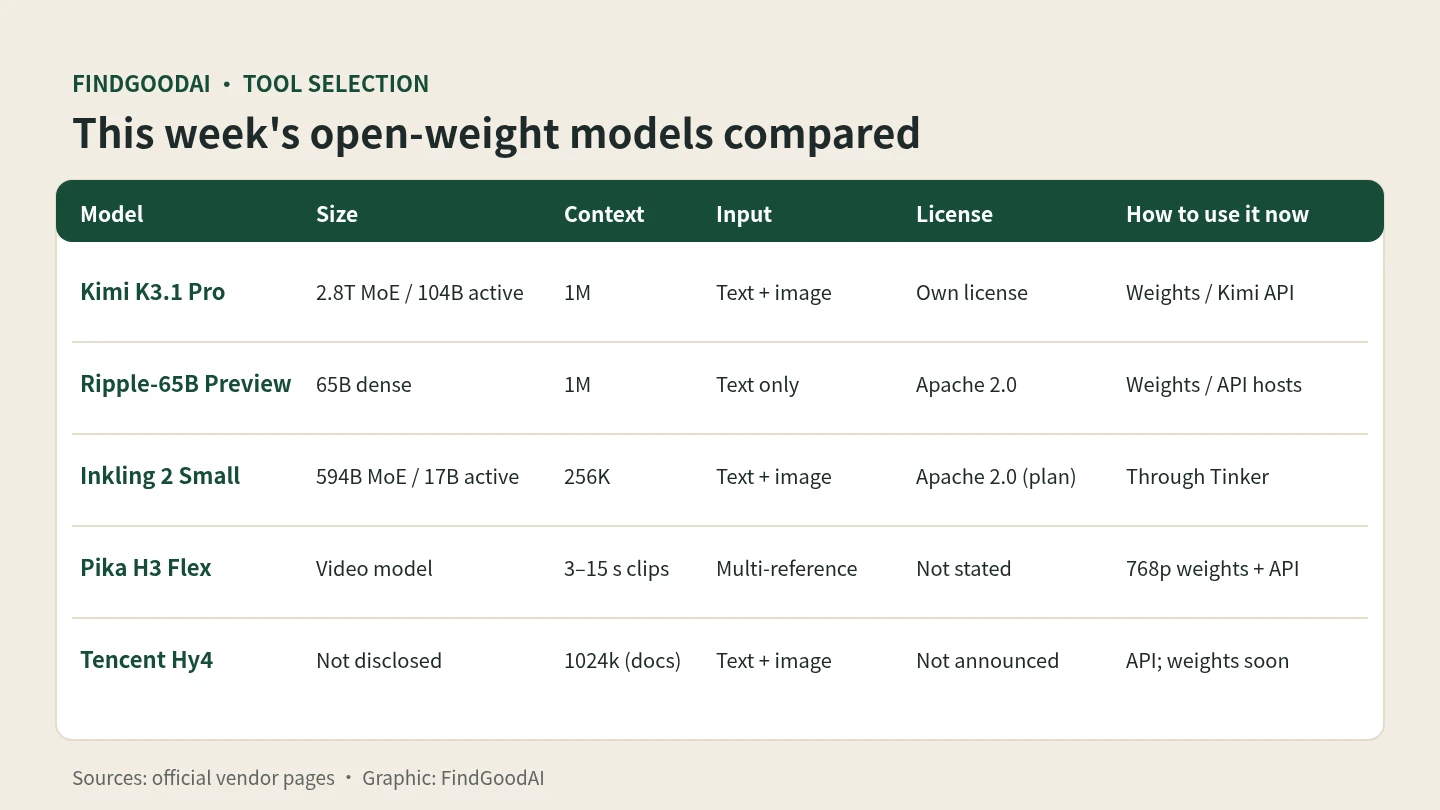
Several models published their weights this week: Moonshot’s Kimi K3.1 Pro, Ricursive’s Ripple-65B and Pika’s video model H3 Flex. Thinking Machines has promised weights for Inkling 2 Small after safety testing, and Tencent says Hy4’s weights are coming “in the coming days”. With so many names it is tempting to pick by leaderboard score alone. This guide is for developers and technical leads who want to run open models at work or on their own hardware: three checks — license, hardware and task — to decide which one to try first.
The short answer
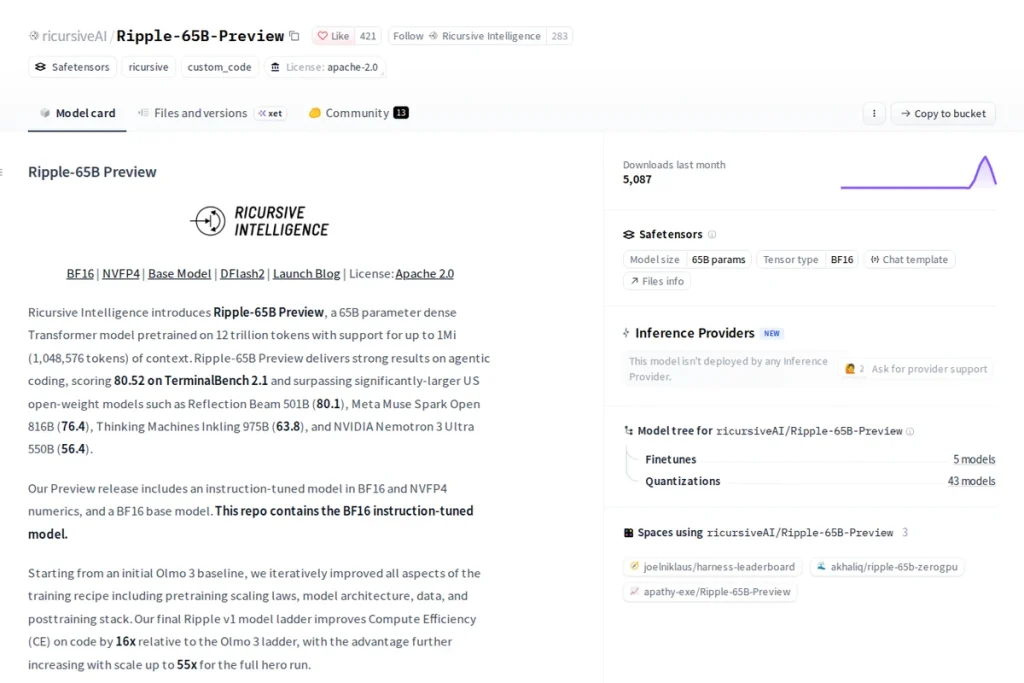
- A coding model you can run locally or on your own servers: start with Ripple-65B Preview. It has 65 billion parameters, an Apache 2.0 license, and the authors say it fits on a DGX Spark-class desktop.
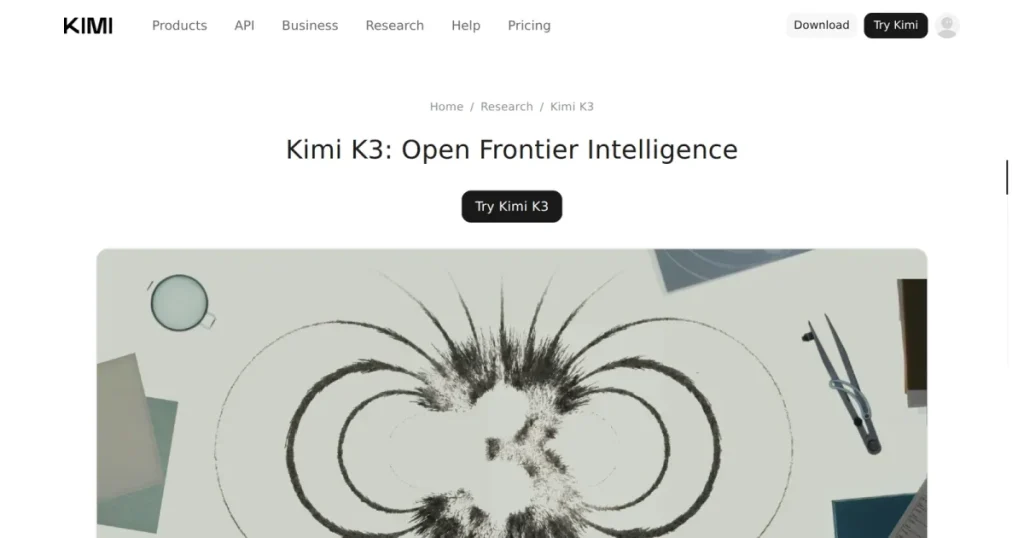
- The strongest open-weight agent, used mostly through an API: choose Kimi K3.1 Pro. The weights are downloadable, but at 2.8 trillion parameters most teams will start with the API.
- Fine-tuning or reinforcement learning on your own data: look at Inkling 2 Small, trained today through Tinker, with Apache 2.0 weights planned.
- Short video drafts: Pika H3 Flex publishes inference code for 480p and 768p; higher resolutions need the hosted service.
- Hy4 and SWE-2 Flash: Hy4’s weights are not out yet, and SWE-2 Flash’s are withheld over cyber risk, so treat both as API options this week.
Step 1: check the license before anything else
“Open weights” does not mean “free for any commercial use”, and this is the step people skip. This week’s models differ a lot:
- Ripple-65B Preview: Apache 2.0 on Hugging Face, the least restrictive of the group.
- Kimi K3.1 Pro: Moonshot’s own Kimi K3.1 Pro License. Read the full terms before commercial use.
- Inkling 2 Small: full weights are planned under Apache 2.0 after external safety testing; for now it is available only through Tinker.
- Pika H3 Flex: the product page does not name a license, so check the Hugging Face or GitHub repository before using it in a commercial project.
- Tencent Hy4: weights and system cards are due soon, and no license has been announced.
Our suggestion: if the model is headed for a company product, put anything with an unclear license on a watch list before you spend time on technical evaluation.
Step 2: check your hardware — self-host or API?
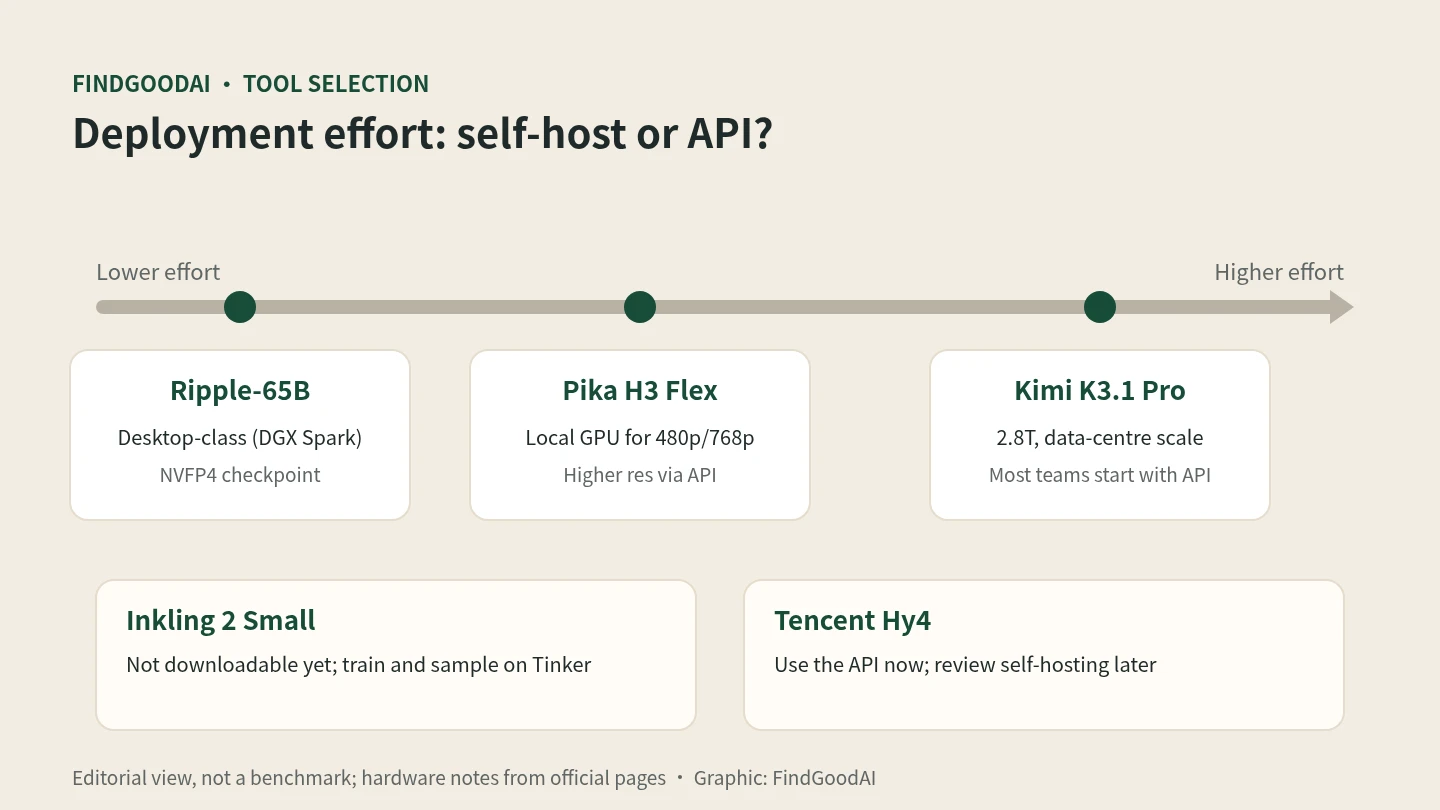
Parameter count drives deployment cost. Kimi K3.1 Pro has 2.8 trillion total parameters with 104 billion active. Moonshot uses MXFP4 weights to cut memory needs, but self-hosting is still data-centre work. Most teams should start with the Kimi API (kimi-k3.1-pro) and consider self-hosting only when data must never leave their own infrastructure.
Ripple-65B is a dense model. The authors provide an NVFP4 checkpoint and a Colab notebook, say it fits on a DGX Spark, and report about 250 tokens per second on two B200 GPUs before quantisation. To try it in Ollama you will need a community quantisation. Inkling 2 Small has 594 billion total and 17 billion active parameters; in practice today you train and sample it on Tinker. Pika H3 Flex’s local speed depends on your GPU and setup, and Pika warns it may not match the hosted API.
Step 3: match the model to the task
Coding agents. Kimi K3.1 Pro and Ripple-65B both target agentic coding. In vendor results, Kimi scores 65.7 on Terminal-Bench 4.0 and Ripple 80.5 on Terminal-Bench 2.1. Those are different versions of the test, so the numbers cannot be compared directly, and Ripple’s model card says scores were generally lower with the official harness.
Long documents and images. Kimi K3.1 Pro takes text and images with about one million tokens of context. Ripple also offers one million tokens but accepts text only. Inkling 2 Small reads images but not audio.
Custom models. If you need to train on your own data, the Inkling family on Tinker is the most ready-made route this week: you write the training loop, the platform manages GPUs, and you pay per token.
Video. Pika H3 Flex makes 3 to 15 second clips from up to 12 references with synchronised audio. The open part stops at 768p; 4K output and separate audio stems need the hosted API.
Cost. Few official prices are published. Tencent Hy4 costs about $0.90 per million input tokens and $2.70 per million output tokens. Pika H3 Flex’s hosted API charges per output second, $0.02 at 480p, with half price during the launch. Tinker charges per token for training and sampling, plus $0.10 per GB per month for checkpoint storage. For Kimi and Ripple, check the API host you use. Self-hosting looks free until you add GPUs, power and the time someone spends keeping it running, so for small teams an API is often cheaper.
Run your own two-hour comparison
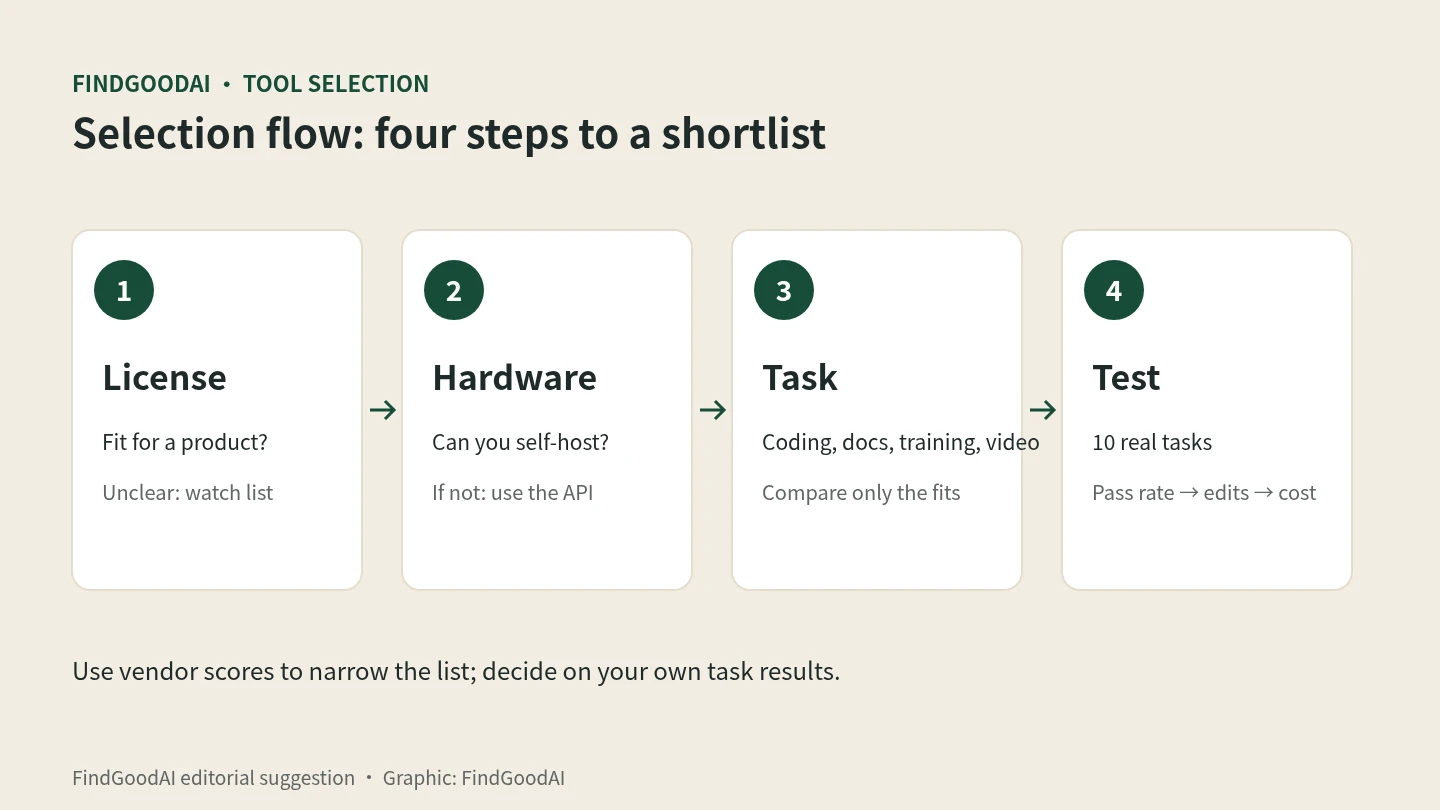
Vendor scores are only good for narrowing the list. This is the method FindGoodAI suggests, not a result we have measured:
- Pick 10 tasks from your real work, such as five bug fixes, three long-document questions and two screenshot extractions, and write down what “done” means for each.
- Give every model the same prompts and tools. Record pass or fail, time, cost and how many manual edits you needed.
- Call API models through one router such as OpenRouter so prices are easy to compare, and run local models on the same machine with the same quantisation.
- Rank by pass rate first, then edits, then cost — not by an average score.
How to choose
If your team needs a coding model it can use commercially and host itself, Ripple-65B is the one to try first this week, with Kimi K3.1 Pro’s API as a reference point. If you care most about capability and do not mind an API, start with Kimi K3.1 Pro. If you want to train your own model, apply for Tinker. Tencent Hy4’s price, about $0.90 per million input tokens, makes it worth an API test now and a self-hosting review once the weights and license are out. Teams that rely on closed models can treat this week’s releases as a rehearsal for a fallback plan.
Frequently asked questions
Can I use any open-weight model commercially?
No. Check each license: Ripple-65B uses Apache 2.0, Kimi K3.1 Pro has its own license, and Pika H3 Flex’s product page does not name one.
Which one runs on an ordinary computer?
None of this week’s releases is lightweight. Ripple-65B is said to fit a DGX Spark; on a typical laptop, use an API or wait for smaller quantisations.
Can I compare the vendors’ scores directly?
No. Kimi and Ripple report different versions of Terminal-Bench with different harnesses and settings, so treat them as rough guides.
Can I download Inkling 2 Small now?
Not yet. Thinking Machines plans to release the weights under Apache 2.0 after external safety testing; until then it is available through Tinker.
Why are SWE-2 Flash’s weights not public?
Cognition is holding them back over cyber risk and plans to share them only with trusted partners and research labs.
Sources
- Hugging Face: Kimi K3.1 Pro
- Ricursive Intelligence: Ripple
- Hugging Face: Ripple-65B-Preview
- Thinking Machines: Inkling 2 Small
- Thinking Machines: Tinker
- Pika: H3 Flex
- Tencent: Hy4
- Cognition: SWE-2 Flash
Copy the link to save or share this article.