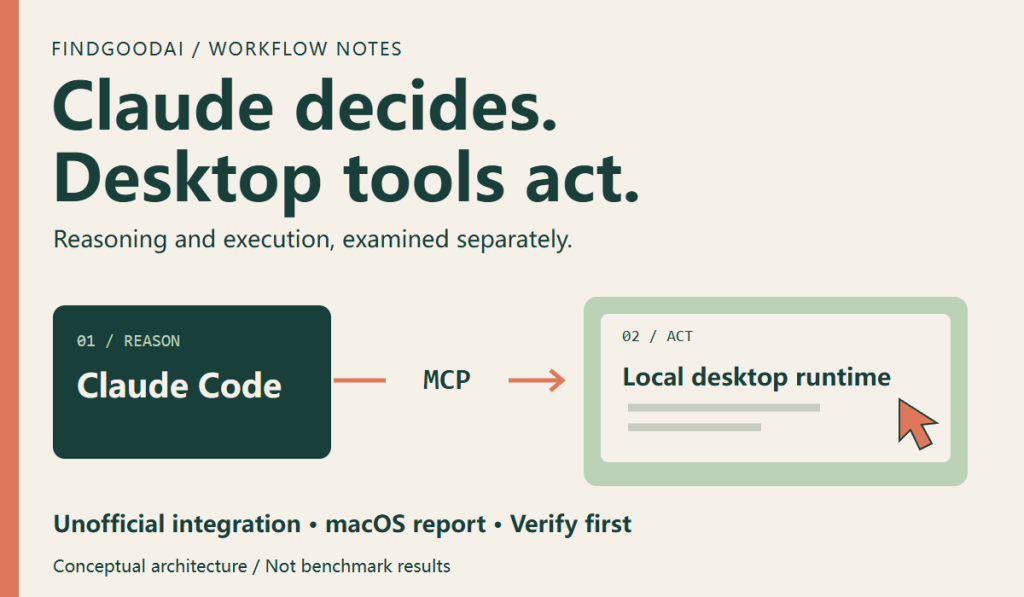
Choosing Claude or Codex is often treated as choosing an entire stack: reasoning, tools, and execution together. A reader-supplied screenshot attributed to @argofowl proposes another arrangement: let Claude Code make decisions while a local computer-use runtime from ChatGPT/Codex operates Mac applications.
Public community implementations support this direction. They do not establish an officially supported OpenAI desktop API for Claude. The interesting idea is that model judgment and desktop execution can be evaluated separately. Understanding that distinction is more useful than treating this as another model leaderboard.
Sources checked October 4, 2026. The supplied screenshot has no complete post URL, timestamp, or task logs. FindGoodAI reviewed documentation and community project descriptions; we did not reproduce its eight-task test on a Mac.
1. What does the screenshot actually claim?
The author reports connecting local Codex computer-use tools to Claude Code over MCP, including non-interactive runs with claude -p. The suggested approach is to locate a cua_repl entry in the local plugin cache and register its launch configuration under the name codex-cu.
There are two distinctions to preserve. Calling a desktop runtime need not mean calling the model associated with its product. And finding an MCP entry on disk does not prove that copying it will make the service work in another client.
The public songkeys/claude-codex-computer-use project describes an experimental, unofficial macOS bridge that relies on a working OpenAI Computer Use installation. This supports the broader integration idea; it does not validate the screenshot’s exact configuration-copy method across versions.
2. Separate reasoning, transport, and execution
A useful conceptual split has three layers. The model interprets the task and chooses the next step. The client and MCP interface convey tool requests. The local runtime observes an application, delivers input, and returns the resulting state.
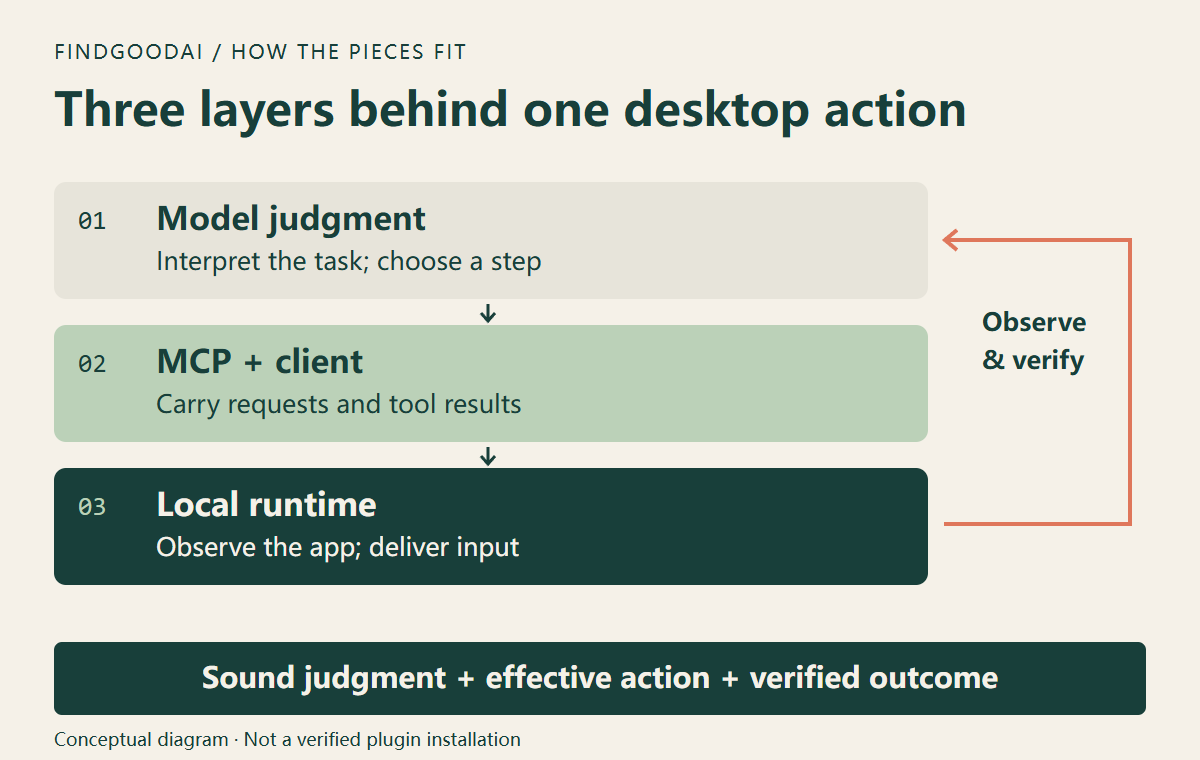
Imagine asking an agent to place an image on a canvas. It may understand the request perfectly but choose the wrong window, use stale coordinates, or send a drag gesture the application does not accept. Equally, a reliable input mechanism cannot rescue a model that chooses the wrong menu.
When a mixed stack performs better, investigate which layer changed the outcome. Was planning better? Did the model receive clearer observations? Did a previously rejected action finally reach the application? An overall completion count does not identify the cause.
3. Separate documentation from reported results
| Claim | Evidence available | Limit |
|---|---|---|
| Claude Code connects to MCP tools | Anthropic documentation | No guarantee for a particular internal service |
| Computer Use supports background Mac tasks | OpenAI documentation | Subject to permissions and application behavior |
| A community bridge reuses the local runtime | Public community project | Unofficial; not independently tested here |
| Opus 5.5 plus that runtime completed 6/8 tasks | The supplied screenshot | No task set, logs, or repeated-run evidence |
| Copying cua_repl remains a stable installation method | Not established in this review | No compatibility promise |
Anthropic documents MCP configuration, including local services and user scope. OpenAI documents Computer Use within its own product. Support for both endpoints does not automatically establish support for every bridge between them.
4. Background, non-interactive, and cursor-independent differ
Non-interactive describes how a task is submitted. Background operation describes whether the target application must occupy the foreground. Leaving the user’s pointer alone describes input delivery. None of these properties proves the other two. A command-line task may still need a graphical session and operating-system permissions.
OpenAI’s current documentation describes background tasks on macOS, while Windows Computer Use works on the active desktop in the foreground. The Mac experience in the screenshot should not be presented as a Windows capability.
The claim about a “CUA driver” also needs version context. If it refers to Cua Driver, its current platform documentation lists multiple macOS interfaces and limits on some background scroll and drag shapes. That does not reproduce the author’s test, but it makes a blanket “accessibility only, so canvas actions never work” conclusion too broad.
The screenshot’s missing-hover observation is similarly environment-specific. Test hover menus, drag-and-drop, continuous drawing, and shortcuts separately. Successful button clicks are not evidence that all gestures work.
5. How much do 6/8 and four times the cost establish?
These are the screenshot author’s reported numbers, not FindGoodAI benchmark results:
| Reported setup | Reported result | Missing context |
|---|---|---|
| Opus 5.5 with the Codex desktop runtime | 6/8 tasks | Settings, versions, per-task evidence |
| Codex itself | 6/8 tasks | Model, budget, matching task outcomes |
| The CUA-driver setup | 3–4/8; reportedly 4× the cost | Exact implementation and accounting basis |
One task changes an eight-task score by 12.5 percentage points. Two systems can both complete six tasks while failing on different operations. One may mishandle dragging; another may misunderstand a save dialog. Failure categories matter more for workflow selection than a tied headline score.
Cost needs its own breakdown: model usage, screenshots, retries, elapsed time, human intervention, and subscription allocation. Without logs and a defined accounting method, the multiplier cannot establish a general price advantage or imply that any setup is free.
For your own comparison, fix the starting state, permitted tools, timeout, and acceptance criteria. Reset the environment between runs and retain failures. Record the final artifact, interventions, time, usage, and action errors rather than reporting only the best attempt.
6. Read the configuration suggestion as a lead
The screenshot points to this local path pattern; the line break below is only for readability:
~/.codex/plugins/cache/openai-bundled/
unified-computer-use/<version>/.mcp.json
The version directory must be resolved on the machine. cua_repl is the reported entry to inspect; codex-cu is a chosen registration name. Naming a server does not install its dependencies or recreate the host environment.
A sensible first check asks whether the executable exists, arguments remain valid, environment fields depend on the original host, and initialization succeeds. The newest-looking cache directory may not be the one the app currently loads.
Begin with a read-only inspection that reports versions, field names, and missing dependencies without printing secrets. Decide on configuration changes only after compatibility is understood. Treat permission or authentication refusals as diagnostic evidence, rather than treating disabled checks as proof of a successful integration.
7. What claude -p does and does not prove
Anthropic’s programmatic-running guide documents -p/--print as non-interactive operation. The flag does not establish that a desktop server is connected or authorized.
This is a proposed verification prompt for an already configured test environment, not an installation command or a record of a test we ran:
claude -p "Use only the configured codex-cu tools to enter 12 times 12 in Calculator. Read the result from the app and report tool evidence. Stop if tools are unavailable or human authorization is required. Do not replace app interaction with arithmetic or code."Run from a trusted directory after normal interactive permission setup, and use the actual registered server name. An answer of “144” alone fails this test: the model already knows the arithmetic.
8. Verify three small tasks before a larger workflow
- Calculator: observe the target window, enter 12×12, and read 144 from a fresh app state. Keep the tool record.
- Temporary text: enter an agreed sentence into a blank test document, save it in a test folder, reopen it, and compare the contents.
- Test canvas: move a disposable object on a blank board and compare its before-and-after position. Test hovering, dragging, and drawing individually.
Define the expected result, scope, stop conditions, and evidence for each. To test non-disruption, add an independent observation of pointer and focus behavior while the user remains in another application. A correct calculation and an undisturbed user session are different acceptance criteria.
9. Inspect approvals and where observations travel
Local MCP describes where a tool runs. It does not make the whole task offline: screenshots and interface text may still enter the chosen model’s context. Blank documents and test data keep early experiments easier to inspect.
Bridge behavior matters too. The songkeys README describes automatically accepting app-access requests. Do not assume a third-party integration preserves the official app’s interactive approval experience. Review how approvals and user stops are handled; this article does not recommend automatic approval as a configuration step.
Keep a version record, configuration backup, and repeatable acceptance tasks. After an app update, rerun them. A server name remaining in a list is not evidence that the execution path still works.
10. Who should investigate this approach?
It is an interesting direction for people who already maintain Claude Code workflows and occasionally need a desktop-only application. It also offers a controlled experiment: keep the task planner constant and investigate whether changing execution tools removes a particular failure.
For file editing, spreadsheet processing, or an existing API, direct structured access should usually be evaluated first. Adding a desktop interface adds window and focus dependencies. For unattended work, budget for maintenance: who checks compatibility after upgrades, handles authorization, and recovers failed tasks?
Ask where the difficulty really lies: interpreting the task, accessing data, observing an interface, or delivering actions. Replacing the component responsible for a recurring failure is more informative than switching products without a diagnosis.
11. Three practical questions
Is this official Claude-to-Codex support? This review found no such compatibility commitment. Keep official product capabilities and unofficial integration claims separate.
Can Windows users copy it? The screenshot and reviewed bridge target macOS. Official Windows Computer Use exists, but has different foreground behavior. A path translation is not a compatibility test.
Does it save Codex charges? A local execution path alone cannot answer that. Model requests, remaining subscription needs, Claude usage, retries, and maintenance all require separate accounting.
Our assessment: the useful development is the ability to evaluate reasoning and desktop execution independently. The durable result to aim for is a repeatable workflow with visible outcomes and understandable failures.
12. Sources and further reading
- A reader-supplied screenshot attributed to @argofowl. The original post URL, date, and eight-task logs were not verified; benchmark numbers remain attributed reports.
- OpenAI: Computer Use — official platform behavior and permissions.
- Anthropic: Claude Code MCP — configuration reference.
- Anthropic: Run Claude Code programmatically — non-interactive execution.
- songkeys: Claude Codex Computer Use — unofficial bridge and documented behavior.
- Cua Driver: Platform support — input-path boundaries.
- On FindGoodAI: Codex, Claude, and our ChatGPT MCP setup guide.
Sources & references
Anthropic: Run Claude Code programmatically ↗
Copy the link to save or share this article.
Related tools
Codex
CodingCodex is OpenAI's coding agent for understanding repositories, writing code, running tools and reviewing changes.
Claude
AssistantsAnthropic’s AI assistant for writing, analysis, coding, and tasks across connected tools.

ChatGPT
AssistantsOpenAI’s AI assistant for everyday questions, learning, creating work deliverables, and coding.