

About Notion AI
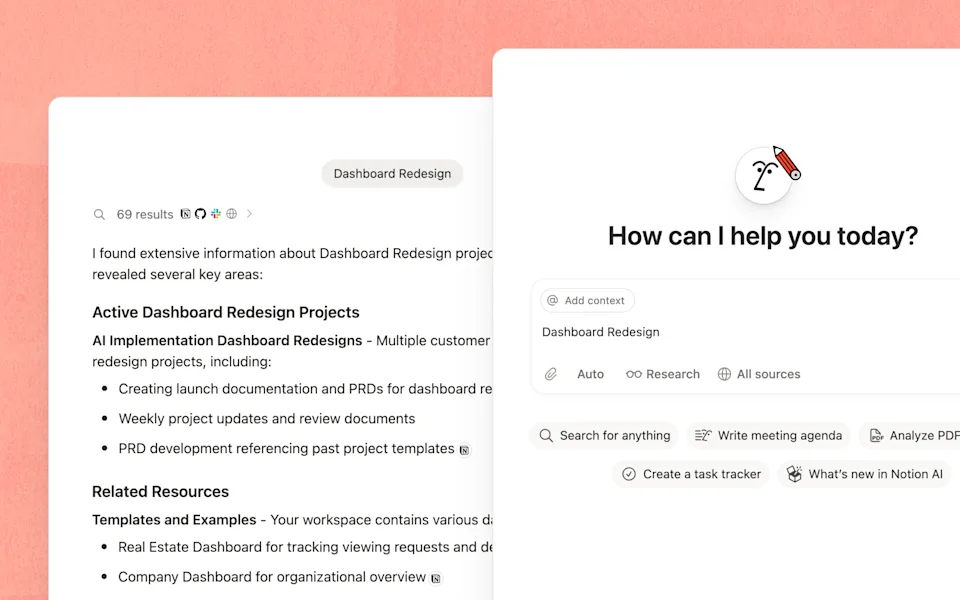
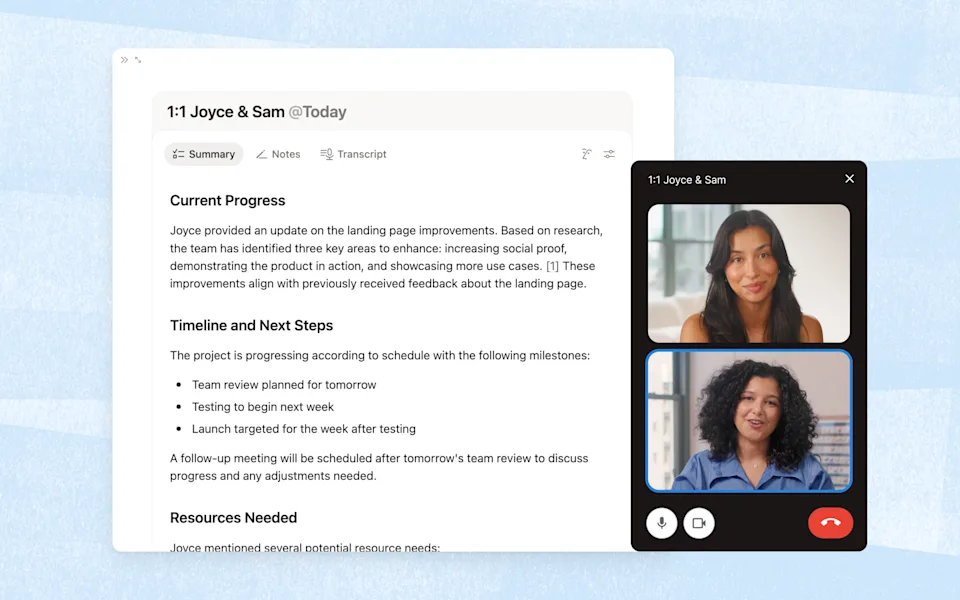
Notion AI works with your pages and connected apps. Its tools include Notion Agent, Enterprise Search, AI Meeting Notes and Research Mode. Custom Agents run recurring work from a schedule or trigger.
Main features
- Create and edit pages and databases with Notion Agent.
- Search Notion and connected apps such as Slack and Google Drive.
- Transcribe meetings and organize summaries and action items.
- Create research reports using workspace material and web information.
- Automate recurring work with Custom Agents.
Inputs, outputs and access
See the product in use
Platforms and access
Available within Notion on web, desktop and mobile; individual features can have platform requirements.
Pricing and plans
Business is priced per member, with monthly or annual billing. Enterprise pricing is negotiated. Custom Agent credits cost USD 10 per 1,000 monthly credits; premium models and eligible additional usage can also consume credits.
Open source and deployment
Notion AI is available as a hosted workspace service.
Data and privacy
By default, Notion and its AI subprocessors do not use Customer Data to train models. Default LLM retention is zero for Enterprise and 30 days or fewer for other plans, with exceptions for admin-enabled data-retaining features and External Agents.
Frequently asked questions
Is Notion AI free?
Free and Plus include limited trial responses. Core AI is included in Business and Enterprise.
Are Custom Agents included in the same allowance?
Custom Agents use Notion credits. Admins purchase and manage those credits separately.
Can it search Slack or Google Drive?
Yes, through supported Notion AI Connectors; workspace access and connected-app permissions apply.
What happens when the AI allowance runs out?
Certain features pause until a rolling or monthly reset. If an admin enables it, Notion credits can cover eligible additional usage.
Does Notion use my work to train models?
By default, Notion and its AI subprocessors do not train models on Customer Data; subprocessors are also contractually prohibited from doing so.
Demos and tutorials
Product updates
- Notion 3.7: Agent skills for your whole team · 2026-09-15
Product and provider
Suitable tasks and users
Turn meeting notes and feedback into a research report. Find an answer across team documents and connected apps. Build a task database or roadmap from project notes. Summarize project updates and share them through a Custom Agent. Teams already managing knowledge and projects in Notion. People who prepare meeting notes, reports and working documents. Workspace admins setting up recurring team workflows.
Availability
Available for use.
Product format
AI capabilities inside Notion pages and workspaces, accessible through web, desktop and mobile clients.
Category
Knowledge and productivity
Related tasks
Knowledge management, writing and automation.
Topics
Notion, workspace search, meeting notes, agents.
Delivery
Hosted workspace service.
AI tasks
Search, writing, transcription and task execution.
Interaction
Chat, page editing and scheduled agents.
Connected ecosystem
Notion with connected Slack and Google Drive knowledge.
Before starting
Use a Notion workspace with access to required pages and available AI allowance.
Value proposition
Notion AI searches workplace knowledge, creates documents and databases, and handles tasks inside Notion.
Access and help
Official website · Pricing url · Documentation url · Changelog url · Api documentation url
| Legal urls | Service terms, privacy and applicable organization agreements. |
Files and results
Editing results
Continue editing AI-generated page content inside the Notion workspace.
From a task to a result
Start with a concrete task
Sign in to Notion and check your workspace's AI plan and allowance. → Open Notion Agent or a page, and describe the task and source material. → Review the result; configure permissions and credits before enabling recurring agents.
Platforms and availability
Platforms and limits
Available within Notion on web, desktop and mobile; individual features can have platform requirements. Free and Plus offer limited AI trial responses; full core access is on Business and Enterprise. Certain AI features have rolling six-hour and monthly allowances. Premium models and Custom Agents can spend additional Notion credits; insufficient credits pause them.
Network requirement
Notion pages can be downloaded for offline editing, but AI features require a network connection.
Platforms
Web, Windows, macOS, iOS and Android; individual AI features vary by client.
Documentation language
English product documentation is available.
Account access
A Notion account and workspace are required.
Subscriptions and billing
Access model
Free access conditions, subscriptions and additional usage are described in the plan row.
| Free | USD 0 · Notion workspace with limited AI trial; not full continuing AI access. Limited AI trial responses. |
| Business | Displayed per-member/month reference; actual annual/monthly settlement unresolved; display reference 20 USD/member/month. Certain AI features have rolling six-hour and monthly allowances. |
| Enterprise | Contract pricing · Custom quote including core Notion AI. |
| Custom Agent credits | USD 10/month · 1,000 monthly Notion credits; add-on usage. 1,000 Notion credits/month. |
Apps, integrations and development
Workspace APIs
The Notion developer platform exposes APIs for workspace content. Connection capabilities determine which objects can be read or changed.
Choose the access boundary
Read, update and insert permissions are separate. A connection added to a page or database can access its children, so choose both capabilities and shared content carefully.
API capacity
Per connection, Business and Enterprise allow 600 requests per minute; other plans allow 180. A separate shared workspace limit can also apply.
Request size and retries
Requests have a 500 KB and 1,000-block ceiling. Wait for Retry-After on throttling; a write returning 503 may already have been saved.
Connect an AI assistant
Notion hosts a remote MCP server. After OAuth authorization, compatible assistants can search, read, create and update accessible Notion content.
Protocols
REST API.
Authentication
Personal access tokens and connections; remote MCP authorizes with OAuth.
API operations
Work with pages, databases, blocks and comments.
Integrations
Search connected Slack and Google Drive knowledge alongside Notion.
MCP connection
Remote, hosted by Notion.
MCP operations
Search, read, create and update pages and databases.
MCP access
Owners can manage MCP clients in Settings → Connections and revoke member connections.
Ownership and deployment
Offline capability
Offline pages are supported; Notion AI remains online.
Privacy and organization controls
AI data retention
Enterprise workspaces default to zero retention at LLM providers; other workspaces default to 30 days or fewer. Admin-enabled data-retaining features and External Agents have separate rules.
Control outside access and spending
Workspace owners can switch AI web search on or off and require confirmation for external web requests. Business and Enterprise owners can control additional credit spending.
Training and assurance scope
Customer Data is not used for model training by default. Notion AI is included in Notion’s SOC 2 Type 2 report and ISO 27001 scope.
Export, migration and alternatives
Reusable output files
Export pages as PDF, HTML or Markdown; export database data as CSV. Business and Enterprise can include subpages in PDF exports.
Exporting a workspace
Workspace exports package pages and assets into files. A database Form view cannot be exported directly; export the questions and responses from its Table view.
Export scope
Pages, database rows and included files can be exported.
Data export process
Workspace content exports are available, subject to workspace permissions.
Sources and further reading
Information checked: 2026-10-02
Notion AI — Meet your AI team
View source · Notion
Notion pricing
View source · Notion
What is Notion AI?
View source · Notion
Notion AI security & privacy practices
View source · Notion
Manage your usage allowance for Notion AI
View source · Notion
Notion credits & pricing for Custom Agents
View source · Notion
Notion on desktop, web, & mobile
View source · Notion
Notion Demo Hub
View source · Notion
Notion 3.7: Agent skills for your whole team
View source · Notion
Custom Agents in Notion
View source · Notion
Skills for Notion Agent
View source · Notion
Connection capabilities
View source · Notion Labs, Inc.
Request limits
View source · Notion Labs, Inc.
Notion MCP
View source · Notion Labs, Inc.
Export your content
View source · Notion Labs, Inc.
Import data into Notion
View source · Notion Labs, Inc.
Use Notion pages offline
View source · Notion Labs, Inc.
Take part in the discussion
Sign in to comment, save tools and rate them. You can edit or withdraw your own records. Saved tools are private. Comments are published after moderation and return to review after editing. Rating totals include only valid, approved ratings.
User experiences