
GPT-6 Astra is OpenAI’s reasoning model for demanding work. Its API model ID is gpt-6-astra. It combines reasoning, coding, research and tool use in workflows that can move from understanding a task to checking the result. The useful question is whether it can deliver the entire job: identify a software fault, make a focused correction and verify it, or gather evidence and turn it into a usable document.

Specifications and practical boundaries
The official model page specifies a 1,050,000-token context window, a maximum input of 922,000 tokens and a maximum output of 128,000 tokens. The knowledge cutoff is April 30, 2026. Astra accepts text and images and directly produces text. Reading a screenshot or chart is different from generating an image; image generation requires the relevant tool.
A long context can hold related requirements, source files, logs and design documents. Organize that material with filenames, dates and clear version labels. State the constraints in an obvious place. Fitting the evidence into the request does not make every detail equally reliable, so verify important figures, citations and final deliverables.
| Item | Verified specification |
|---|---|
| API model ID | gpt-6-astra |
| Input / output | Text and image input / text output |
| Reasoning effort | low, medium, high, xhigh, max |
| Endpoints | Responses, Chat Completions, Batch; use Responses for tools |
| Common features | Streaming, Structured Outputs, function calling, search, prompt caching |
Work that benefits from Astra
One useful category is debugging with scattered evidence. Supply the error, reproduction steps and relevant code. Ask for a diagnosis, a focused repair and evidence that the repair works. For changes across modules, name interfaces that must stay stable, data that must be preserved and the acceptance conditions. “Optimize this code” often produces changes that are difficult to assess.
Another category is research with conflicting documents. A supplier comparison can include pricing units, deployment options, source dates, missing facts and links before recommending an option under your budget and workload. Specific selection criteria produce a more useful result than a generic request for a professional report.
Astra can also participate in work across applications. The model page lists computer use, web search, code execution, hosted shell and MCP support. Actual operations still depend on the tools and permissions supplied by the application. A text API request alone does not grant desktop access or permission to use an account.
A complete tool-call round trip
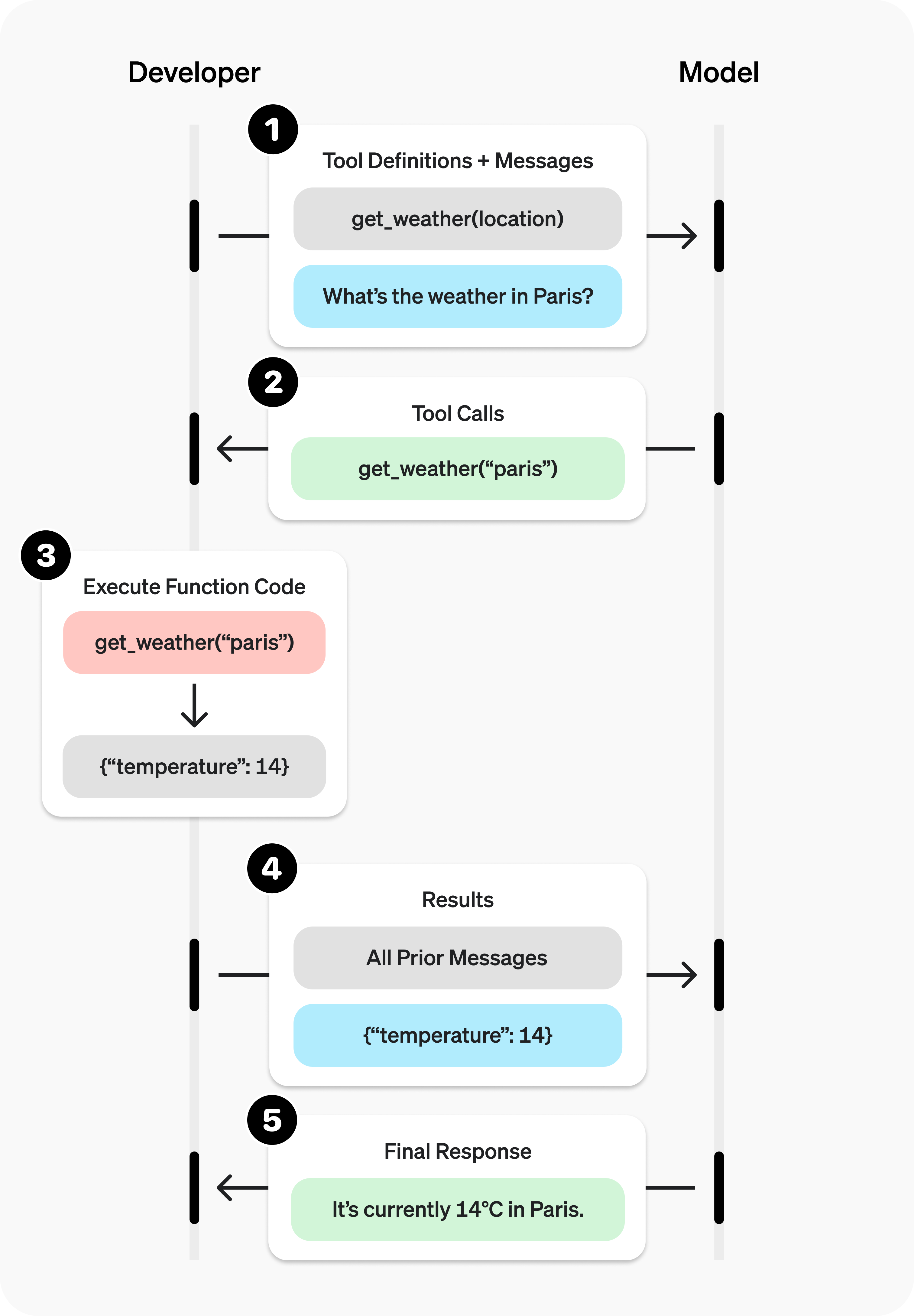
The division of work matters: the model requests an action, the application executes the tool, and the result is sent back to the model. Verify whether execution succeeded, what result was returned and whether the model used it correctly. When connecting your own functions, begin with an action that is easy to check, such as a read-only stock lookup, before expanding the workflow.
Start with a task you can check
In Codex or ChatGPT Work, first check that Astra is available in your account’s model picker. Give it a bounded task, such as identifying why an import misses duplicate records, making a minimal repair and verifying two representative inputs. Review the changed files and actual results as well as the explanation.
The CLI command codex --model gpt-6-astra selects the model. It does not grant access. Eligibility depends on the account, sign-in method and workspace configuration. At launch, Astra is off by default in eligible Enterprise and Edu workspaces until a workspace owner enables it.
API developers should begin with Responses. This example makes a request only if you run it with the SDK installed and OPENAI_API_KEY set in the environment. Start with text before adding tool execution.
from openai import OpenAI

client = OpenAI()
response = client.responses.create(
    model="gpt-6-astra",
    reasoning={"effort": "high"},
    max_output_tokens=4000,
    input="Design an acceptance checklist for CSV imports, covering duplicates, missing values and rollback. Use executable steps."
)
print(response.output_text)
Keep pricing, reasoning and speed separate
The API pricing table charges per million tokens. Standard short-context rates are $10 input, $1 cached input, $12.50 cache writes and $50 output. If the input exceeds 272K tokens, the whole request uses long-context rates: $20 input, $2 cached input, $25 cache writes and $75 output. Tool charges are additional.
Reasoning effort determines the thinking budget; a speed tier changes the serving mode. Start at a suitable effort and increase it when the task warrants deeper work. Astra does not support API efforts none or minimal. Ultra in Codex and Work uses subagents and is not an API reasoning.effort value.
Fast and Ultrafast are also available in the API. Ultrafast short-context input and output cost $60 and $300 per million tokens respectively. Review the Ultrafast configuration and limits first. Subscription products have their own allowances and eligibility; Work and Codex speed rules cannot be used to calculate an API bill.
Evaluate completed work
Our recommendation is to compare a few real tasks by total time, retries, human correction time and complete cost. If Astra substantially reduces difficult rework, its higher token rate may be worthwhile. For a fixed transformation, a smaller model may be more economical. This is an evaluation approach, not a claim that we have run those comparisons here. Preserve sources and verification results so the next person can inspect the output.
Read more: GPT-6 guide · Codex and Work model selection · Enterprise access controls.
Read the detailed guide
GPT-6 Astra explained: long workflows, tools, API usage and task cost
