
GPT-6 Astra focuses on carrying difficult work through to completion. The official GPT-6 guide positions it as OpenAI’s highest-capability model for code, computer use, browsing, science and professional work. It can keep the task goal across steps, adjust to tool feedback and incorporate additional requirements during a run. For people using AI on actual projects, these are practical changes to examine.
This article brings official capabilities, usage and cost together. Release evaluations are OpenAI-reported results. The workflows and acceptance suggestions below are our proposed ways to evaluate the model on your own work. Specifications and pricing were checked on October 4, 2026.

Long tasks need an inspectable deliverable
A software task may require reading the requirements, finding the relevant code, reproducing a fault, making a change, running tests and explaining the result. When one step fails, the next action depends on understanding why. If an assistant loses the original constraints at each step, the user has to keep restoring them. Astra’s direction is stronger sustained work across these steps, especially when sources, tools and constraints are numerous.
Clear acceptance conditions still matter. Real projects contain requirements that cannot be inferred from source code alone: historical compatibility, data retention and customer expectations. “Fix duplicate imports, preserve the field meanings, and provide the changed files and two verification results” gives the model a more usable task than “improve this system.”
I would assess this generation by its deliverable: did it diagnose the right problem, contain the scope, identify missing evidence and produce code or a document that someone can use? Those questions explain value more clearly than a short demonstration conversation.
Put the specifications in context
The model page lists a 1,050,000-token context window, a maximum input of 922,000 tokens and a maximum output of 128,000 tokens. Its knowledge cutoff is April 30, 2026. It accepts text and images and directly outputs text, with streaming, Structured Outputs, function calling and prompt caching. Current facts require current evidence or an appropriately configured search tool.
A large context is useful when related evidence needs to be examined together: logs against a design document, or contract terms against later emails. Label dates, sources and versions. If old and new drafts appear together without guidance on which controls the task, the output may combine incompatible requirements.
Tool support also needs a precise explanation. Computer-use support does not mean a text API request can see your desktop. Image-generation tool support does not mean the model’s direct output modality is images. The application must supply the browser, files, code runner or connected tools and the permissions those operations require.
Three API changes and the problems they address
Async tool calling keeps independent work moving
The guide describes async tool calling. While a tool is pending, the model can keep reasoning, call other tools or answer independent portions of the request. A developer marks an eligible function or custom tool with async: true. The application still executes tools, manages pending work and returns a result using the original call_id.
Consider gathering information from three suppliers. If one site is slow, work on the other two can continue. If the next step depends on confirmation that a payment succeeded, it must wait rather than assume the result. Async work reduces unnecessary waiting; it does not remove dependencies. See the async tool-calling guide.
Mid-turn steering incorporates a correction
Mid-turn steering lets a user add instructions while work is in progress. The documented flow uses Responses over WebSockets to preserve completed work and include the new instruction in a continuation. For example, a user can add a requirement to show all prices in dollars and include source dates while a report is being assembled.
The application must handle events and tool results correctly. A new instruction does not automatically undo an external operation that already happened. A useful interface should make clear what has been completed and how the remaining work will change. The steering guide describes the event flow.
Change the reasoning effort as the task changes
The guide also explains configuration_update items for changing reasoning effort without rewriting the original prompt prefix, helping preserve caching. A difficult diagnosis can receive more reasoning effort, followed by a lower-effort summary. Review the compatibility conditions before adopting it. A client’s interface labels are not necessarily API parameter values.
A complete tool-call round trip
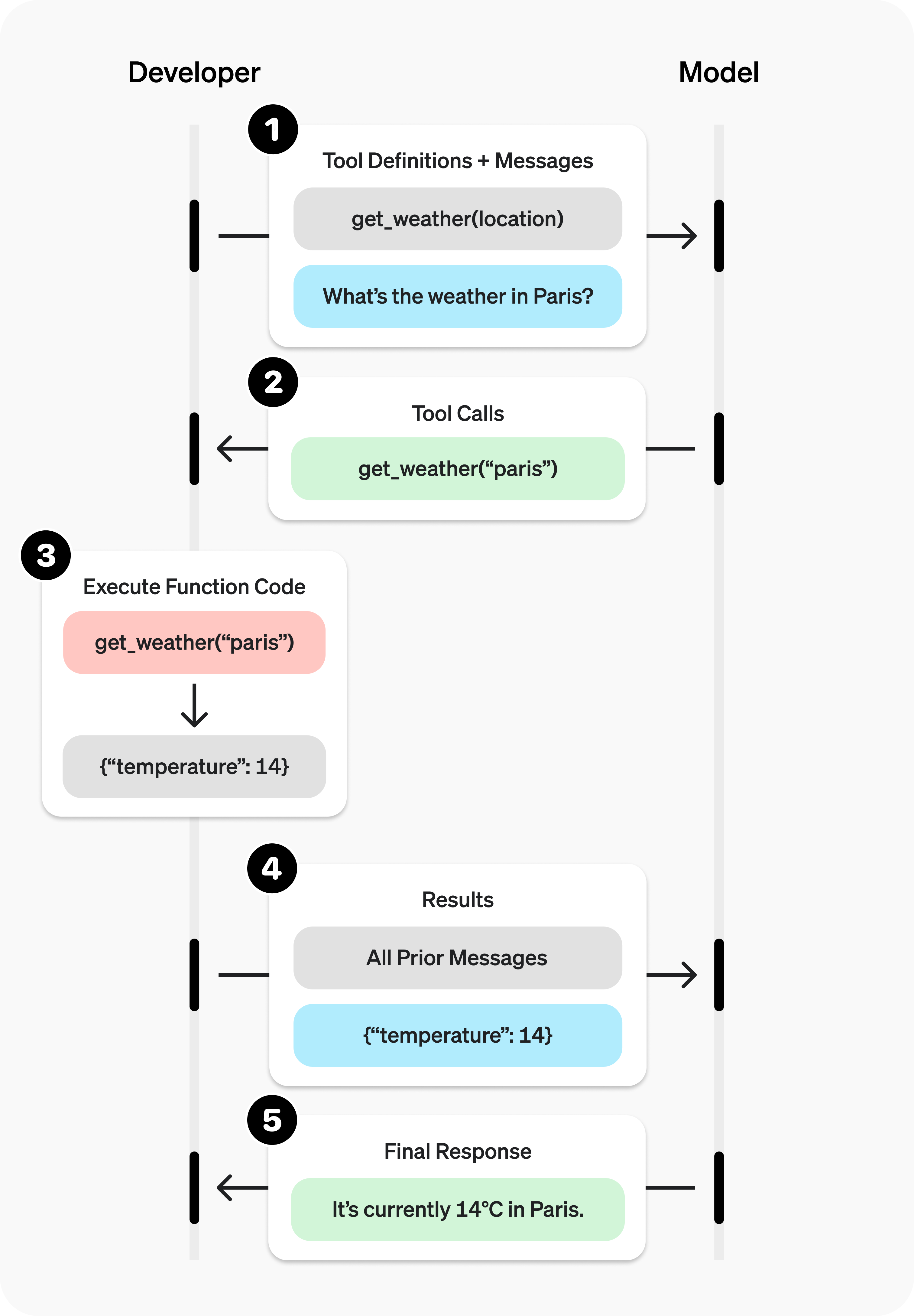
The division of work matters: the model requests an action, the application executes the tool, and the result is sent back to the model. Verify whether execution succeeded, what result was returned and whether the model used it correctly. When connecting your own functions, begin with an action that is easy to check, such as a read-only stock lookup, before expanding the workflow.
A useful first task
Start with work you already understand so you can assess the result. A developer can use a reproducible fault; an operator can use product information that needs organizing; a researcher can use a few sources they have already read. State the input, goal, constraints and acceptance conditions before increasing the task length.
Check this CSV import workflow.
Goal: detect duplicates both within a batch and against existing database records.
Constraints: preserve field meanings and never delete historical records.
Identify the cause, then make the smallest suitable correction.
Verify: new records, within-batch duplicates, existing duplicates and missing fields.
Deliver: changed files, verification results and boundaries that remain unverified.
This request asks for evidence rather than a long answer. You can inspect whether all four cases were checked. If the environment cannot run the tests, you can assess whether the assistant accurately reports that limitation. The same approach works for research: require actual links, source dates and empty fields for unknown information.
Pricing comparisons need especially clear units. First establish whether a supplier charges by user, token, call or completed task. Only then compare the options. A polished table does not help if incompatible units have silently been put in the same column.
Using Astra in Codex, Work and the API
In Codex or ChatGPT Work, confirm that Astra is available in the model picker. The CLI can start with codex --model gpt-6-astra. File, browser, application and account access still depends on the environment and permissions. Eligible Enterprise and Edu workspaces have Astra off by default at launch until a workspace owner enables it; a model name in a configuration file does not grant eligibility.
API applications select gpt-6-astra and use Responses for tool calling. Chat Completions supports requests without tools. The supported reasoning efforts are low, medium, high, xhigh and max; none and minimal are unsupported. Follow the migration guidance for incompatible sampling parameters instead of retaining every field from an old request.
Begin with one text task to check the response shape, consumption and timeout handling before adding tools. This example illustrates the request structure; no API request was executed for this article.
from openai import OpenAI

client = OpenAI()
response = client.responses.create(
    model="gpt-6-astra",
    reasoning={"effort": "medium"},
    max_output_tokens=4000,
    input="Turn these acceptance requirements into individually checkable steps: duplicate detection, missing-value errors, and failure rollback."
)
print(response.output_text)
Cost means the complete task
The official API table gives Standard short-context rates of $10 input, $1 cached input, $12.50 cache writes and $50 output per million tokens. Above 272K input tokens, the whole request uses the long-context rates of $20, $2, $25 and $75 respectively. These are API charges, not included ChatGPT subscription allowances.
A higher token rate does not by itself establish a higher task cost. If a model reduces retries and human corrections, a more capable run may be worthwhile. If it spends extensive reasoning on a simple field conversion, the cost can increase. OpenAI reports that Astra used fewer output tokens and achieved better results in some evaluations, but that does not guarantee lower costs for every workload.
Record input, output, caching, tool charges, retries and human correction time. A testable division of work is to use Astra for difficult analysis and an appropriate lighter model for repeated transformations with settled rules. GPT-6.1 Sol introduces another option; its near-Astra positioning is an official claim, and substitution should be checked against your tasks.
What Ultrafast accelerates
The API configuration is service_tier: "ultrafast". OpenAI recommends persistent WebSockets for applications that make frequent tool calls, reducing connection overhead. Short-context input and output cost $60 and $300 per million tokens. Ultrafast supports US data residency and global processing, not EU or other non-US regional processing endpoints.
The Codex and Work speed documentation states that Astra Ultrafast generates tokens up to eight times faster than Standard in Codex. That measures token generation, not an eightfold improvement in total task time. Network waits, page loads, tool execution and human input still take time. Subscription usage multipliers and API token rates are also separate billing systems.
I would test Ultrafast where waiting has a clear cost, such as a highly interactive tool workflow. Keep the task, tools and acceptance conditions constant, then compare actual completion time and cost. That shows whether a serving tier solves the delay you experience.
Check the deliverable
Inspect the change and tests before shipping code; verify sources and figures before publishing research; check formulas and key cells before handing over a spreadsheet. More capable sustained execution allows an assistant to participate in more steps, so acceptance needs to cover those steps. A completion statement alone does not establish that the result is correct.
Read more: Astra specifications · GPT-6 guide · API Ultrafast · Work / Codex model selection.