Topaz Photo
Image & designDenoise, sharpen, upscale and repair photographs through a desktop application or supported editing plugin. Topaz Photo combines several enhancement tools with local and cloud rendering options.
A free Krita plugin that brings local AI generation, selective inpainting and controlled image refinement into a layered painting workflow.
Krita AI Diffusion integrates generative image tools into a painting application rather than making every change a separate website upload. You can draw normally, select an area and use AI to fill, reinterpret or extend it, then keep working with Krita’s layers. This is useful when control over composition matters more than repeatedly generating whole images from a prompt.
The plugin is free and supports a local backend. It still needs Krita, a compatible ComfyUI setup and downloaded models; installing the plugin alone is not a complete image-generation environment. A hosted option exists for people without suitable local hardware, but it is a separate service with its own pricing.
Explore a prop design
Extend a background
Guide a concept from a sketch
Polish a selected region
Official product image. Click to inspect the details.

Install matching software versions
Choose the backend route
Begin with a small canvas or selection
Compare and integrate
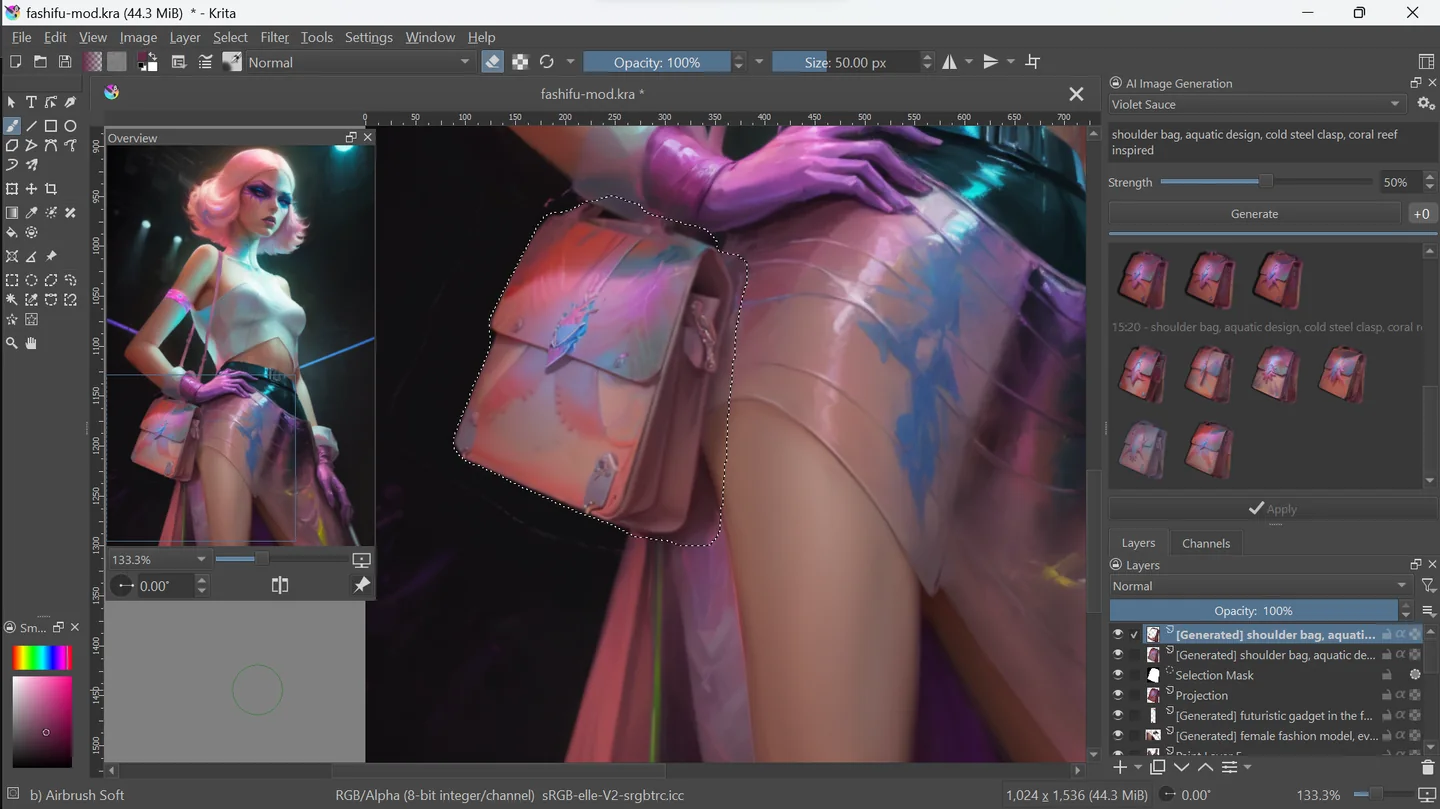
Example prompt or task: Within the selected area, add a small canvas shoulder bag that matches the existing light direction and painted style. Preserve the character pose and the rest of the composition.
This is an editorial example for a bounded image edit. Selection, model and strength matter alongside wording; no specific output or generation speed is guaranteed.
Local use is free under the plugin license. Cloud generation and model terms are separate.
The plugin uses GPLv3 and offers a free local path with open model choices. You supply compatible compute, disk space and electricity. The installation guide notes that model downloads can begin around 10 GB and grow beyond 50 GB depending on selected packages.
Cloud generation is optional and separately priced. A custom remote ComfyUI server can also incur hosting costs. Check the license of each checkpoint or LoRA instead of assuming the plugin license grants unrestricted rights to every model.
Yes, there is a GPLv3 local route. Krita, backend resources and model downloads must still be prepared; optional hosted generation has separate pricing.
Its generation backend is ComfyUI. The plugin can manage local installation or connect to a compatible existing server, while the hosted route handles infrastructure separately.
Compatibility is workload-specific. CPU operation exists but is slow; consult current hardware guidance rather than assuming every device will provide a useful experience.
Selections and refinement strength let you target particular areas. Check the result and preserve the original layers before accepting changes.
Only compatible base models and required resources work. Follow the custom-backend instructions and check the model’s terms.
The plugin requires particular nodes and models. Inspect the connection log and resource list instead of assuming a running server contains every dependency.
Use the plugin project’s documentation and support channels for extension issues. The official Krita team is not the support channel for this separate plugin.
Explore platforms, inputs and outputs, licensing, and access requirements.
The official guide supports Windows, Linux and macOS with hardware-specific backends. A capable GPU is strongly recommended; CPU operation is possible but very slow. The requirements depend on the chosen workload, so a device that handles one smaller model may not handle every supported family.
The plugin connects to ComfyUI and checks for required custom nodes and model resources. An existing ComfyUI installation is not automatically compatible. The backend guide identifies required components and explains how model discovery works; check connection logs when a workload is missing.
A local backend can keep image generation on your machine. A hosted or remote server receives the information needed for its task, including image context, so choose the route appropriate for the work.
Retain source artwork and inspect generated details before commercial publication. Plugin licensing, model licensing and rights to reference images are distinct; a local workflow does not automatically settle all of them.
Reviewed October 3, 2026. Product facts come from the official sources below. Suggested projects, prompts and review methods are FindGoodAI editorial guidance, not measured performance results.
Loading experiences…
Saved tools are private. Approved comments are public; edits return to moderation. Comment counts include approved comments and replies. Each person has one rating. New ratings are automatically approved; withdrawn, unapproved or invalid ratings do not count. Share real experiences and avoid spam, private information or personal attacks.
For moderation appeals or data requests: support@findgoodai.com
Bring a real task and see how it fits the way you work.
User experiences