

Sources & references
Granola pricing and plan comparison ↗
Granola security, privacy and architecture ↗
Capture a meeting without adding a bot to the call, then turn your rough notes and transcript context into a reviewable summary. Granola is strongest when someone still owns the decisions and follow-ups.
Granola behaves more like a meeting notepad than a video recorder. On desktop it captures microphone and system audio after the user starts it, transcribes the conversation and uses the transcript to improve rough notes. It does not enter Zoom, Google Meet or Teams as a visible bot participant. The mobile app supports in-person meetings, with a different temporary-audio processing path. This workflow helps when people prefer writing their own priorities during a discussion but still want searchable detail afterward.
The important work is still human: confirm the meeting purpose, get appropriate consent, write the decision while it is being made, and review the generated note before sharing. A transcript can capture words that were said, but it may not distinguish a proposed option from an approved decision. A compact final note should separate decisions, owners, due dates, open questions and direct quotations that need exact wording. Granola's meeting chat can then answer questions across accessible notes, with the original meeting available for review.
Granola's official security page says it does not store meeting audio after processing; the stored materials are the transcript and your notes. Third-party transcription and AI providers process data to provide the service, while the company says its contracts prohibit those providers from training models on customer data. Granola itself may use anonymized data for improvement unless the user opts out; the Enterprise tier defaults that training off. These are meaningful distinctions when choosing whether a personal account is appropriate for a sensitive internal discussion.
Customer discovery
Project stand-up
Hiring interview
Official product image. Click to inspect the details.
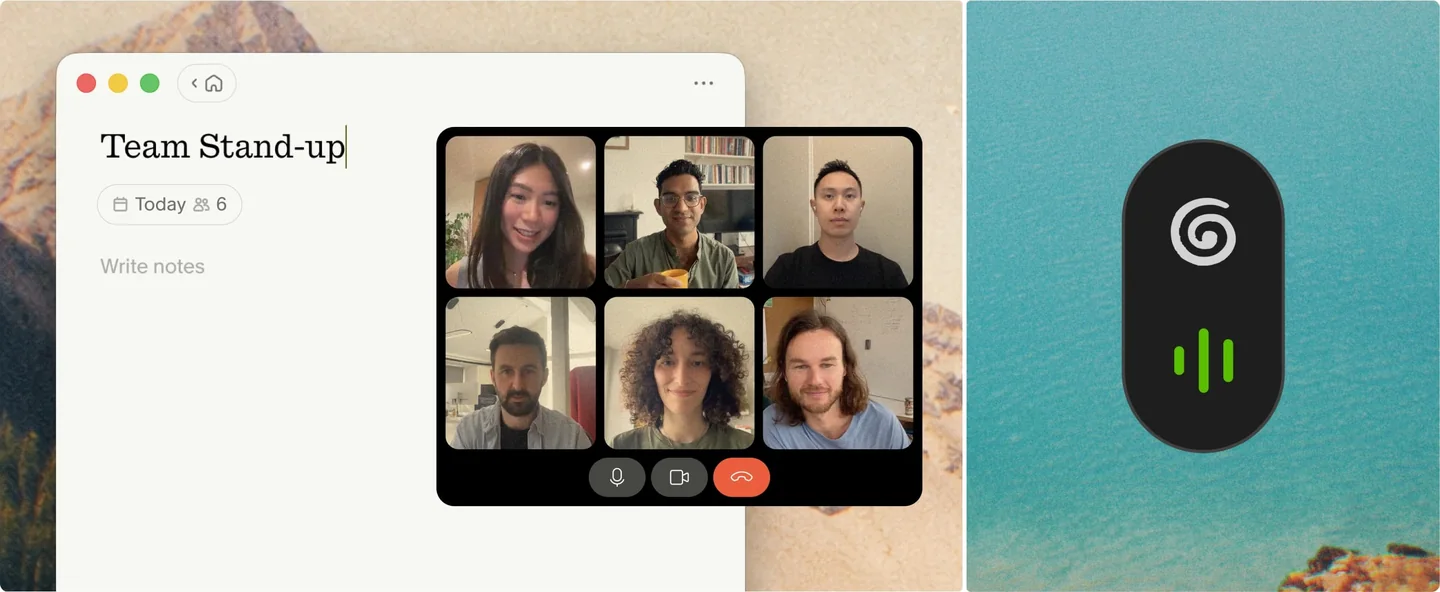
Start Granola manually before a supported online meeting. It reads local meeting audio rather than requesting that a meeting bot join the participant list. This changes the visible meeting experience, but not the need to tell participants about transcription.
Jot rough points during the call, then let Granola use transcript context to produce a clearer note. Review names, numbers and the status of each decision before relying on it.
Ask a question within a meeting or across notes you can access. Follow the answer back to the relevant meeting instead of treating the synthesized response as a standalone record.
Notes are private by default according to the security page. Share individual notes or use folders for a team process, checking whether every recipient should see the transcript and follow-ups.
Use the mobile app for in-person conversations; Business adds advanced integrations and API/MCP access listed on the pricing page. Treat each connected destination as another access path that needs review.
Prepare the meeting
Start and take rough notes
Review the enhanced note
Share deliberately
Check the agenda, local recording rules and workspace permissions. Add a few headings for decisions, owners and questions.
Manually start Granola, tell participants about transcription as appropriate, and write down what you think is important while the discussion happens.
After the meeting, inspect generated structure against the transcript. Distinguish proposed ideas, agreed decisions and tasks with named owners.
Remove sensitive or off-topic material, choose the intended recipients and follow up on action items through the team's normal system.
Pricing checked on October 7, 2026. See plan details below.
The official pricing page lists Basic at $0 per user per month. It includes AI meeting notes, AI chat, shared folders, customizable note templates, multilingual support and a limited meeting history. Business is shown at $14 per user per month, with unlimited notes and history, advanced AI features, several integrations, central billing, API and MCP integration. Enterprise is displayed at $35 per user per month with organization-level security and administration features.
The difference between a limited history and unlimited history is material for a team that expects Granola to become a searchable meeting memory. Check the current billing view and contract terms before purchase, and evaluate the actual retention and access requirements instead of choosing only by the number of meetings. An integrated tool may make a copy or expose another retrieval path; account for that when estimating the real cost of rollout and governance.
No. On desktop it captures local meeting audio after you manually start it.
The official security page says it does not store meeting audio after processing; it keeps transcripts and notes.
Basic has limited meeting history. Evaluate Business if ongoing search across all past meetings is required.
Granola says notes are private by default until you choose to share them.
Do not assume so. Review the transcript and explicitly mark decisions, owners and dates before sharing.
Try a low-sensitivity project stand-up, compare the enhanced note with your own notes and confirm sharing and retention settings.
Explore platforms, inputs and outputs, licensing, and access requirements.
Granola is a proprietary cloud-assisted service, and the desktop app works with the audio from ordinary conferencing platforms without joining as a bot. The mobile app is intended for face-to-face meetings. It is designed for post-meeting notes, not for preserving a replayable source recording. If exact evidence must be retained, determine separately whether an authorized recording and retention workflow is required.
The company says notes are private by default and audio is not stored after processing; transcripts and notes remain. It contracts with third-party speech and AI providers to process content. Review the training opt-out, sharing settings and any organization-wide retention or notification controls before recording sensitive meetings. Bot-free capture should never be presented as permission to transcribe a conversation secretly.
Granola pricing and plan comparison ↗
Granola security, privacy and architecture ↗
Loading experiences…
Saved tools are private. Approved comments are public; edits return to moderation. Comment counts include approved comments and replies. Each person has one rating. New ratings are automatically approved; withdrawn, unapproved or invalid ratings do not count. Share real experiences and avoid spam, private information or personal attacks.
For moderation appeals or data requests: support@findgoodai.com
Turn interviews, recordings, tickets and surveys into traceable customer insights with projects, channels and AI Chat. The current Free plan offers one project and one channel; Enterprise is custom priced.
Create meeting transcripts, summaries and action items, then search accessible conversations and connected work sources. Read AI has a permanent Free tier for five meeting transcripts per month; collaboration and privacy settings matter before inviting it to a call.
Describe a small business tool and build a hosted Taskade Genesis app connected to projects, agents and automations. Its credits pay for AI creation, while existing published apps continue running after the balance is exhausted.
Bring a real task and see how it fits the way you work.


User experiences