
OpenAI released GPT-6.1 Sol on September 29, 2026, positioning it as a lower-cost model for complex work. For people who use AI to write code, repair interfaces, research, and prepare reports, the useful question is whether it can carry a task through revisions to a deliverable. OpenAI provides a launch introduction and an API specification page.

Compare the completed task before comparing the price
Near-Astra performance is the provider’s description, not a guarantee of identical results on every job. I would look at whether a real task finishes within a manageable number of revisions, and whether later changes still honor earlier constraints. An admin page can look convincing quickly; filters, pagination, error states, mobile layout, and existing permissions determine whether the result is usable.
Start with a recent task whose difficult parts you know. Give Sol and Astra the same inputs, expected files, quality checks, and scope. Asking one to suggest a plan while the other actually changes code is not a meaningful cost comparison. Compare the same completion state: a working page, correct data definitions, passing checks, and editable deliverables.
How to read the release evaluations
The software-engineering, professional-work, automation, and computer-use evaluations can help choose an initial workflow to try. Read inference settings, test conditions, and cost axes together. Price per token is only one part of task cost; material read, reasoning, tool calls, and repair attempts also matter. The charts describe particular tests. Your own inputs and acceptance criteria still need to be part of model selection.
Turn a wish into a work brief
A weak result often reflects missing executable requirements. For a project change, state the current situation, what the user should experience, which material is authoritative, and how completion will be checked. For example: “Add a manufacturer filter to the existing product directory. Preserve URLs and bilingual structure. Make search parameters shareable. Show filters on desktop and collapse them on mobile. Demonstrate three real filter combinations during acceptance.”
The skill is to turn an aspiration into observable behavior. You do not need to specify every line of code, but you do need product behavior and acceptance conditions. Feedback should be equally concrete: “At 360 pixels the buttons are crowded and hard to tap; keep the primary action in the first row and move secondary actions below.” This gives the next revision a real defect to fix and reduces the chance of rebuilding parts already approved.
Use the same pattern for reports and presentations. Reconcile facts and citations, agree on a structure, then create editable files. Every chart should answer a question: has the trend changed, what explains growth, or which expense needs investigation? After a fluent paragraph appears, check it against the original spreadsheet. “Do not invent missing values,” “retain source units,” and “state the basis for judgments” are more useful than repeatedly asking for a professional tone.
Codex, Work, and API access are separate questions
The launch covers Plus, Pro, Business, Enterprise, and Edu. Enterprise and Edu need administrator enablement, while Free and Go are outside the Sol launch. Access is offered through Codex desktop, CLI, and ChatGPT Work, subject to the client and workspace. Work and Codex availability should not be read as the ordinary Chat model list. Check official availability.
In the desktop client, begin with the account’s default Power setting. Move toward Smarter when deeper analysis is needed, or Faster when waiting and usage matter. Advanced options depend on the actual account. Light and Ultra are product controls; an API request uses reasoning.effort values low, medium, high, xhigh, or max, with medium as default. None and minimal are unsupported. Do not substitute interface labels directly into API parameters.
The API ID is gpt-6.1-sol. Use Responses for tools such as search, file retrieval, or custom functions. Chat Completions is supported without tool calling. The model accepts text and images and produces text; generating or editing an image needs the separate image tool. A screenshot can therefore be analysis input, while producing an actual image requires the right enabled environment. Model selection and configuring tools, files, and permissions are different layers.
codex -m gpt-6.1-solThis command is for an installed and signed-in Codex CLI. A first task could be: “Read the project instructions, find the product-list filtering logic, then implement the manufacturer filter. Reuse existing styles. Provide changed files, three filter examples, and verification results.” The command selects a model; account access, project availability, and tools still depend on your environment.
A large context still needs organized material
The context window is 1,050,000 tokens, with a maximum 922,000 input and 128,000 output. That leaves room for long code and document sets, but “include everything” is a poor habit. Separate current specifications, historical background, and unresolved information. Identify the authoritative file, and ask the model to flag conflicts rather than blend them. For large material sets, request a map of the documents and constraints before editing or analysis.
Require important conclusions to point to their file or section. A contract summary should return to a clause; a code recommendation should return to an interface; a data conclusion should return to columns and filters. Without checking those references, it is hard to tell whether a conclusion came from the supplied material or a familiar-sounding guess. Traceability matters more than length when working with long sources.
Multi-agent for work that can be separated
Sol supports Multi-agent beta in Responses. A root agent can assign independent work to subagents and reconcile results. A website change can split backend investigation, page structure, and existing tests; a research task can split sources and compare disagreements. The documented default is three concurrent subagents. Delegation also increases token usage and is not a benefit for every task. Read the Multi-agent guide.
HTTP continues after collecting tool results
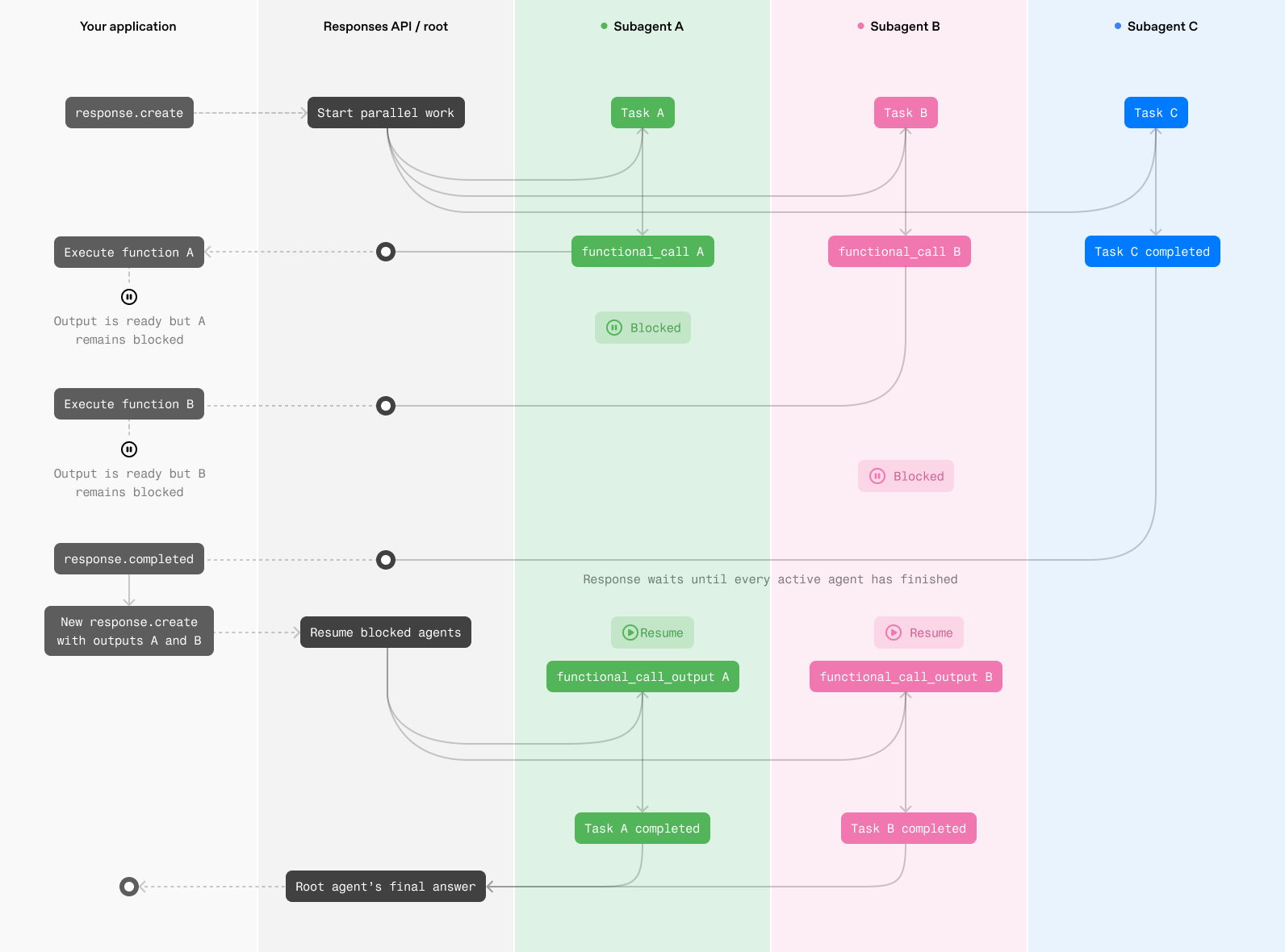
The diagram shows a subagent pausing after requesting a function. The application executes functions, gathers results, and sends a continuation request so paused work can resume. This can be enough for simpler workflows with few tools. The implementation needs to process calls from every agent and return each result against its own call identifier. A partial root answer does not establish that every branch is complete.
WebSocket can resume a branch when its result is ready
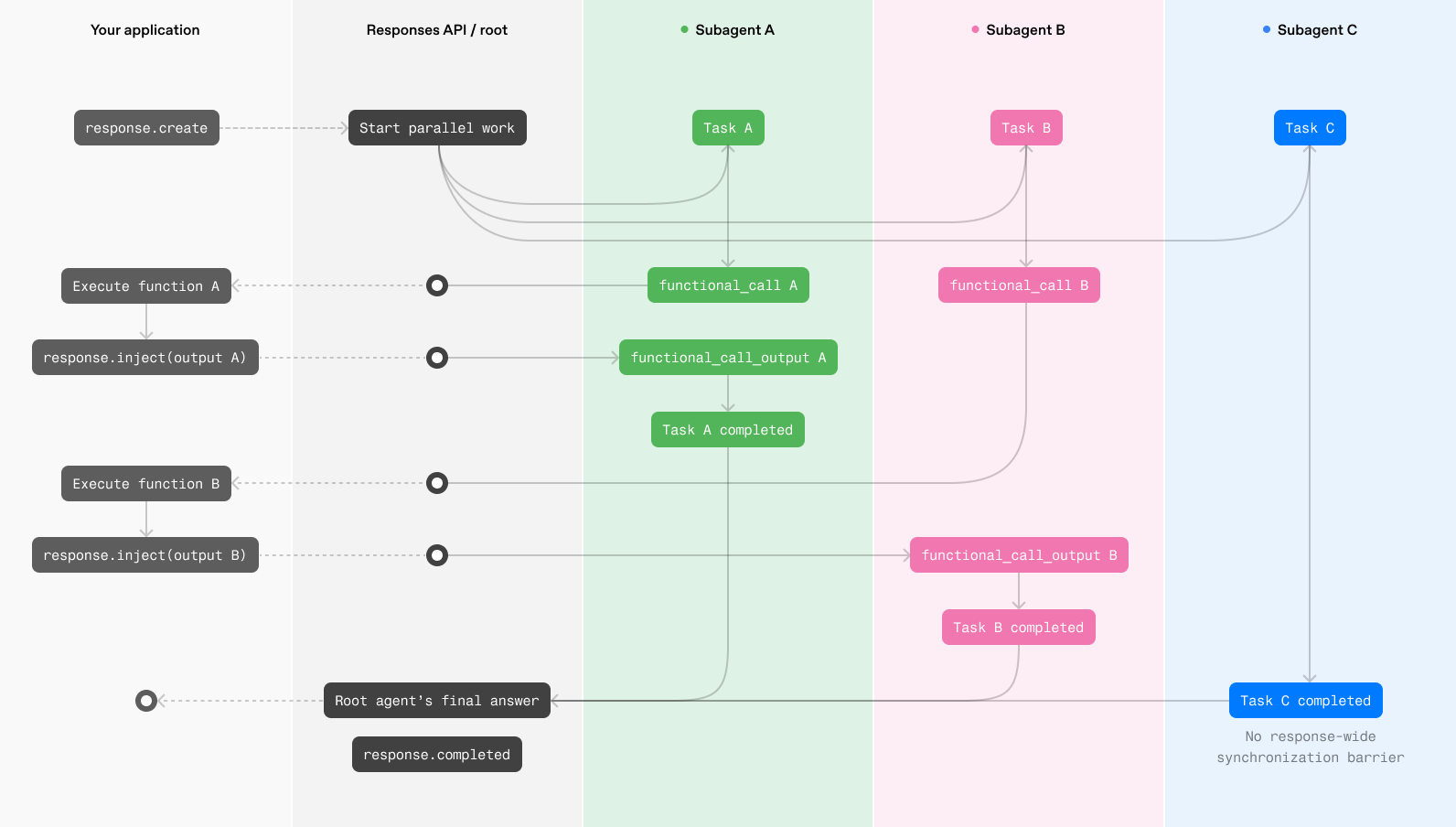
With the persistent connection, a completed tool result can be injected into the active response so the corresponding subagent continues without waiting for the other branches to reach the same barrier. This is useful for long, tool-heavy work. Measure end-to-end waiting, rather than the number of agents started. Multiple branches modifying the same file, or steps with strict dependencies, can add coordination instead.
Price with a calculation you can check
| Standard charge | Input ≤272K tokens | Input >272K tokens |
|---|---|---|
| Input / million tokens | $2 | $4 |
| Cached reads / million tokens | $0.10 | $0.20 |
| Cache writes / million tokens | $2.50 | $5 |
| Output / million tokens | $10 | $15 |
Long-context pricing applies to the full request. Fast is twice Standard, while Batch and Flex are half. Regional processing adds 10% where applicable, and tools need their own cost check. These are API dollar rates; client subscriptions and credits have their own product rules. See prices and processing tiers.
As an illustration, 100,000 uncached input tokens and 10,000 billed output tokens at short-context Standard text rates cost $0.20 plus $0.10, or $0.30. This is a calculation example excluding other charges, not a quote for a real job. Across a multi-step workflow, material may be read repeatedly, tools called, and checks rerun. Compare the entire task’s usage instead of treating the input rate as a fixed total saving.
How I would choose a regular setting
I would keep a representative task set: one cross-file feature, a report based on real numbers, a screenshot-based interface repair, and a long-material summary. Record first-attempt acceptance, revisions, factual omissions, total duration, and total cost. For repeating work, these observations are more informative than one polished demonstration.
If Sol reliably finishes most tasks, it can handle regular complex work while Astra remains a candidate for the difficult cases you have actually identified. Small formatting edits and bulk extraction can also be tested on a lighter model. This is a suggested evaluation method, not a benchmark we have run. The official model-selection guide likewise recommends trying the same inputs and retaining the lightest setting that meets your quality bar.