

About Codex
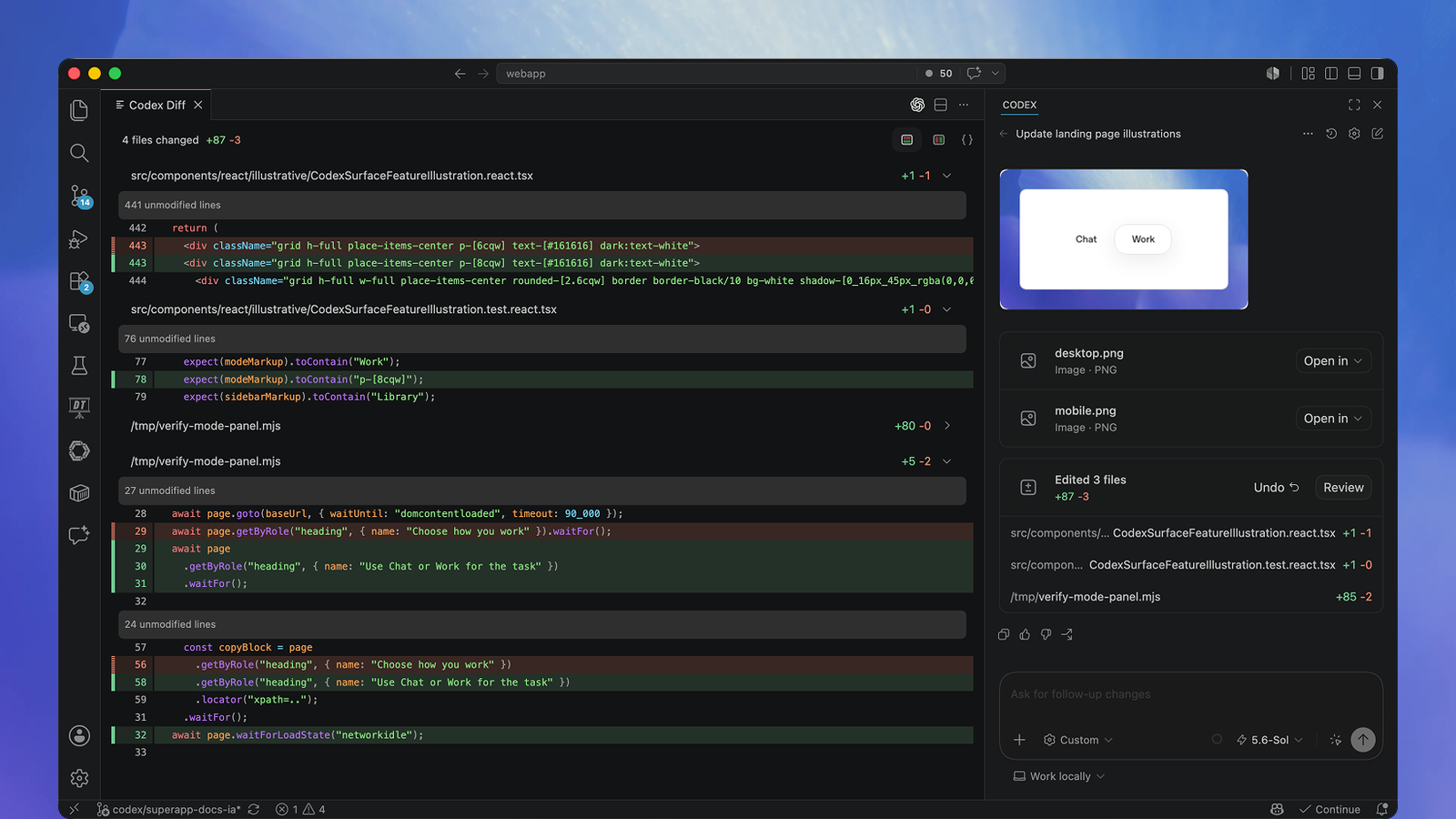
Codex works with project files and development tools in local clients or cloud environments. It can investigate a bug, implement a feature, run checks and prepare code for review. Cloud tasks use their own project workspace and can continue while your computer is asleep.
Main features
- Inspect a repository and plan a code change.
- Edit files and run project commands or tests.
- Review uncommitted changes, commits or pull requests.
- Run tasks in a configured cloud environment.
- Use skills, plugins and MCP integrations.
- Automate repeatable workflows through CLI or SDK.
Inputs, outputs and access
See the product in use
Platforms and access
ChatGPT desktop app, web, Codex CLI, IDE extension and eligible cloud/mobile workflows; CLI installers cover Windows, macOS and Linux.
Pricing and plans
Monthly prices are Free USD 0, Go USD 8, Plus USD 20, and Pro USD 100/200/500. Free/Go Codex desktop access is subject to rollout. Business is USD 25/user/month when paid monthly, or USD 240/user/year, equivalent to USD 20/month, with at least 2 users. Enterprise/Edu require a quote. Usage is shared with ChatGPT Work and varies by model and task; eligible plans can buy credits. API-key work follows separate API billing.
Open source and deployment
The CLI, SDK and app-server components are open source. The Codex repository uses Apache-2.0; that code license does not cover hosted cloud services or model weights. The IDE extension and Codex Cloud are not open source.
Data and privacy
Data handling follows the login method: ChatGPT workspace policies for subscription access, and API organization retention/sharing settings for API keys. Business data is not used for training by default.
Frequently asked questions
Do I need an API key?
No. Sign in with ChatGPT for subscription access. An API key is an alternative for supported local workflows.
Does Codex have its own unlimited task allowance?
No. Usage depends on model and task. Codex and ChatGPT Work share usage, and local/cloud work draws on the same plan allowance.
Can I leave a cloud task running?
Yes. A task in a published Codex Cloud environment has its own workspace and can keep working while your computer is asleep.
Can I use an API key for Codex Cloud?
No. Codex Cloud requires ChatGPT sign-in; API-key access is for supported local clients and is billed separately.
Is the whole Codex product open source?
The CLI, SDK and app-server components are open source. The IDE extension and Codex Cloud are not open source.
Demos and tutorials
Product updates
- Codex CLI 0.160.0 · 2026-10-01
Product and provider
Suitable tasks and users
Fix a bug in an existing project. Implement and test a requested feature. Review changes before a commit or pull request. Run repeatable coding work in scripts or CI. Developers maintaining software repositories. Engineering teams reviewing and coordinating changes. Builders prototyping and testing software.
Availability
Available for use.
Ways to use Codex
Codex works through terminal, IDE and cloud workflows; local code and tool execution stay attached to a selected project.
Related tasks
Software development and code review.
Topics
Coding agent, repositories and code review.
Delivery
Local agent runtime and hosted cloud tasks.
AI tasks
Code editing, review and command execution.
Interaction
CLI, IDE conversations and cloud tasks.
Before starting
Provide the project repository and its development tools, with the required file and execution permissions.
Value proposition
Codex is OpenAI's coding agent for understanding repositories, writing code, running tools and reviewing changes.
Access and help
Official website · Pricing url · Documentation url · Changelog url · Api documentation url
Files and results
Input formats
Project source files and text instructions.
Editing results
Review file differences and edit the generated project source in your development environment.
From a task to a result
Start with a concrete task
Choose a Codex client and sign in with ChatGPT, or use an API key for supported local workflows. → Open a repository or select a published cloud environment; describe the task and acceptance criteria. → Inspect the diff and test results, then commit or open a pull request.
Platforms and availability
Platforms and limits
ChatGPT desktop app, web, Codex CLI, IDE extension and eligible cloud/mobile workflows; CLI installers cover Windows, macOS and Linux. Plan, model, task complexity and local/cloud execution affect usage. ChatGPT Work and Codex share usage; local messages and cloud tasks draw on the same plan allowance. API-key usage is billed at API rates and does not enable Codex Cloud. Workspace policies and configured permissions control what Codex can access and execute.
Documentation language
English product documentation is available.
Account access
Sign in with a supported ChatGPT account or API credentials for the chosen workflow.
Subscriptions and billing
Access model
Free access conditions, subscriptions and additional usage are described in the plan row.
| Free | USD 0 · Limited desktop access subject to rollout. Quick coding tasks. |
| Go | USD 8/month · Lightweight desktop coding subject to rollout. |
| Plus | USD 20/month · Individual subscription; Codex access and shared Work usage. Depends on model/task; local and cloud share allowance; weekly limits may apply. |
| Pro 100 | USD 100/month · Individual subscription. |
| Pro 200 | USD 200/month · Individual subscription. |
| Pro 500 | USD 500/month · Individual subscription. |
| Business monthly | USD 25/month · Per user; minimum 2 users. |
| Business annual | USD 240/year · Per user; minimum 2 users; equivalent USD 20/month. |
| Enterprise & Edu | Contract pricing · Custom agreement. |
| API key | Separate API model rates; no Cloud access. |
Apps, integrations and development
Automate with the SDK
The TypeScript package @openai/codex-sdk runs server-side on Node.js 18 or later. It starts, continues and resumes local Codex threads for internal tools and CI jobs.
MCP client and integration boundary
Codex still connects to external MCP tools. Hosting Codex itself through codex mcp-server has been removed; app-server integrations use a separate JSON-RPC protocol.
Reusable workflows and connections
Plugins can combine reusable skills, MCP services and hooks. Connected services keep their own account permissions, and hooks must exist in the execution environment.
Api availability
The SDK provides programmatic control of local Codex agents.
Protocols
SDK automation and experimental app-server JSON-RPC.
API operations
Start, continue and resume local coding threads.
API versions
Existing server integrations must migrate protocols; app-server is experimental.
Ownership and deployment
CLI source and licence
The Codex CLI is open source under Apache-2.0. This licence covers the CLI code, while hosted services and model weights remain separate products.
Source visible
Codex CLI source is public.
Source repository
openai/codex repository.
License identifiers
Apache-2.0 for the CLI.
Licence scope
CLI code only; no inference that hosted services or weights share this licence.
Local deployment
The CLI runtime runs locally; hosted inference and cloud services are separate.
Deployment choices
Local CLI, IDE extension and hosted cloud.
Generated code export
Edits are ordinary project files and Git changes.
Export scope
Project source files and Git changes.
Privacy and organization controls
Control local execution
The sandbox controls file and network access; approval policy controls review. Ask for approval allows routine work inside the workspace and asks before crossing its boundary. Full access permits broader commands without per-action approval.
Project context and external data
Coding context includes prompts, selected project files and tool output. When a plugin sends content through MCP, the connected service handles that data under its own permissions and policies.
Model training
Business and API data are not used for training by default; API organization settings and the selected account policy apply.
Export, migration and alternatives
Keep the code in your repository
Review and keep changes in the project repository. The output can be opened with other editors and handled through normal Git workflows.
Sources and further reading
Information checked: 2026-10-02
Codex CLI
View source · OpenAI
Codex Cloud
View source · OpenAI
Codex and ChatGPT Work pricing
View source · OpenAI
Authentication
View source · OpenAI
Open Source
View source · OpenAI
ChatGPT & Codex changelog
View source · OpenAI
Official ChatGPT Learn video directory
View source · OpenAI
Official Codex repository LICENSE
View source · OpenAI
Codex SDK
View source · OpenAI
Codex MCP server removal
View source · OpenAI
Plugins
View source · OpenAI
Permissions
View source · OpenAI
Codex IDE extension
View source · OpenAI
Take part in the discussion
Sign in to comment, save tools and rate them. You can edit or withdraw your own records. Saved tools are private. Comments are published after moderation and return to review after editing. Rating totals include only valid, approved ratings.
Further reading: Responses API Multi-agent in practice
OpenAI Multi-agent in Practice: Responses API, Tools and Parallel Workflows — Start with a GPT-6.1 Sol review example and learn task delegation, application tools, and HTTP versus WebSocket.
Setup guide: ChatGPT MCP plugins
How to Add MCP Plugins to ChatGPT: A Pro Setup Guide with Screenshots — Follow connection, installation and first-call checks, with screenshots and troubleshooting.
User experiences