
GPT-6.1 Sol is an OpenAI reasoning model released on September 29, 2026 for complex coding, computer use, and professional work. Its practical role is to offer a lower-cost option than Astra when a task goes beyond a short answer and requires reading materials, editing files, and checking results over several steps. OpenAI describes its performance as close to Astra; whether it meets your delivery standard still needs a comparison using your own task. Read the launch introduction.

Specifications and the difference between a model and its tools
| Item | Verified specification |
|---|---|
| Model ID | gpt-6.1-sol |
| Modalities | Text and image input; text output |
| Context window | 1,050,000 tokens |
| Maximum input / output | 922,000 / 128,000 tokens |
| Knowledge cutoff | April 30, 2026 |
| API reasoning effort | low, medium (default), high, xhigh, max |
| Tool calling | Responses API; Chat Completions without tool calling |
| Standard short-context pricing | Input $2; cached reads $0.10; cache writes $2.50; output $10 per million tokens |
These specifications come from the GPT-6.1 Sol API model page. Image input does not mean the model natively outputs images. A poster, character, or image edit needs an enabled image-generation tool. Browser operation, file search, and code execution likewise depend on the tools, permissions, and client actually available. Selecting the model does not connect company data or give it access to every file on a computer.
The large context window can hold the relevant materials for a project: existing interfaces, a database structure, error logs, and a new feature brief. Capacity alone does not prove that every item will be used correctly. Mixing current specifications, obsolete documents, and example data makes decisions harder to assess. Label material by date and purpose, identify the authoritative file, and ask the output to point back to its supporting file or passage.
How to start
In Codex or ChatGPT Work, check whether GPT-6.1 Sol appears in the model picker. The launch covers Plus, Pro, Business, Enterprise, and Edu; Enterprise and Edu administrators must enable it, and Free and Go are outside the launch. Availability in Work and Codex does not imply availability in ordinary Chat. Client controls can range from Light to Ultra depending on the account and workspace. Those labels should not be copied directly into API parameters: the API supports low through max, without none or minimal. Check client availability.
With Codex CLI installed and signed in, codex -m gpt-6.1-sol starts a session with this model. For a first task, choose an outcome you can inspect: a reproducible bug fix, a page that follows an existing brand, or an editable report from sourced meeting materials. Supply inputs, the files you expect to receive, and acceptance conditions. This is easier to evaluate than “build me a great website.”
Three practical workflows
Code and interfaces. Ask it to trace the request path, make a scoped change, and show a working page or tests. For example: “Keep the existing login and navigation, add a date filter to the report page, make it work on desktop and mobile, and provide changed files and verification results.” This uses cross-file work while making completion visible. A closing message is not the deliverable; the patch, running interface, repeatable checks, and unresolved issues are.
Business materials. Supply data, meeting notes, and historical proposals separately. Ask it to reconcile definitions before writing and charting. A useful request is: “Calculate amounts from the source sheet, leave missing values blank, distinguish facts from judgments, and deliver an editable presentation.” Review citations, totals, and chart axes as well as writing. When the work needs revisions, observe whether later edits preserve facts already agreed upon.
Work across applications. Start with a narrow workflow, such as extracting milestones from approved project documents and preparing a task list for review. Expand it after that flow is stable. Specify the trigger, input location, and completion state. Ask the agent to distinguish finding material, preparing a draft, and writing into the destination system. That makes a useful repeatable routine easier to establish.
Cost and longer tasks
“Per million tokens” is a billing unit, not a task price. At up to 272K input tokens, Standard is $2 input and $10 output. Above the threshold, long-context pricing applies to the full request, at $4 input and $15 output. Fast costs twice Standard; Batch and Flex are 50% lower. Tools and regional processing can add charges. See the complete pricing table.
My suggestion is to treat Sol as a candidate for complex work with a budget, then compare it with Astra on a genuinely difficult task. Record acceptance on the first attempt, follow-up instructions, total duration, and final cost. An inexpensive run that needs repeated repair may not save money. If Sol reliably passes your checks, a stronger model name alone is not a reason to raise the setting for routine work.
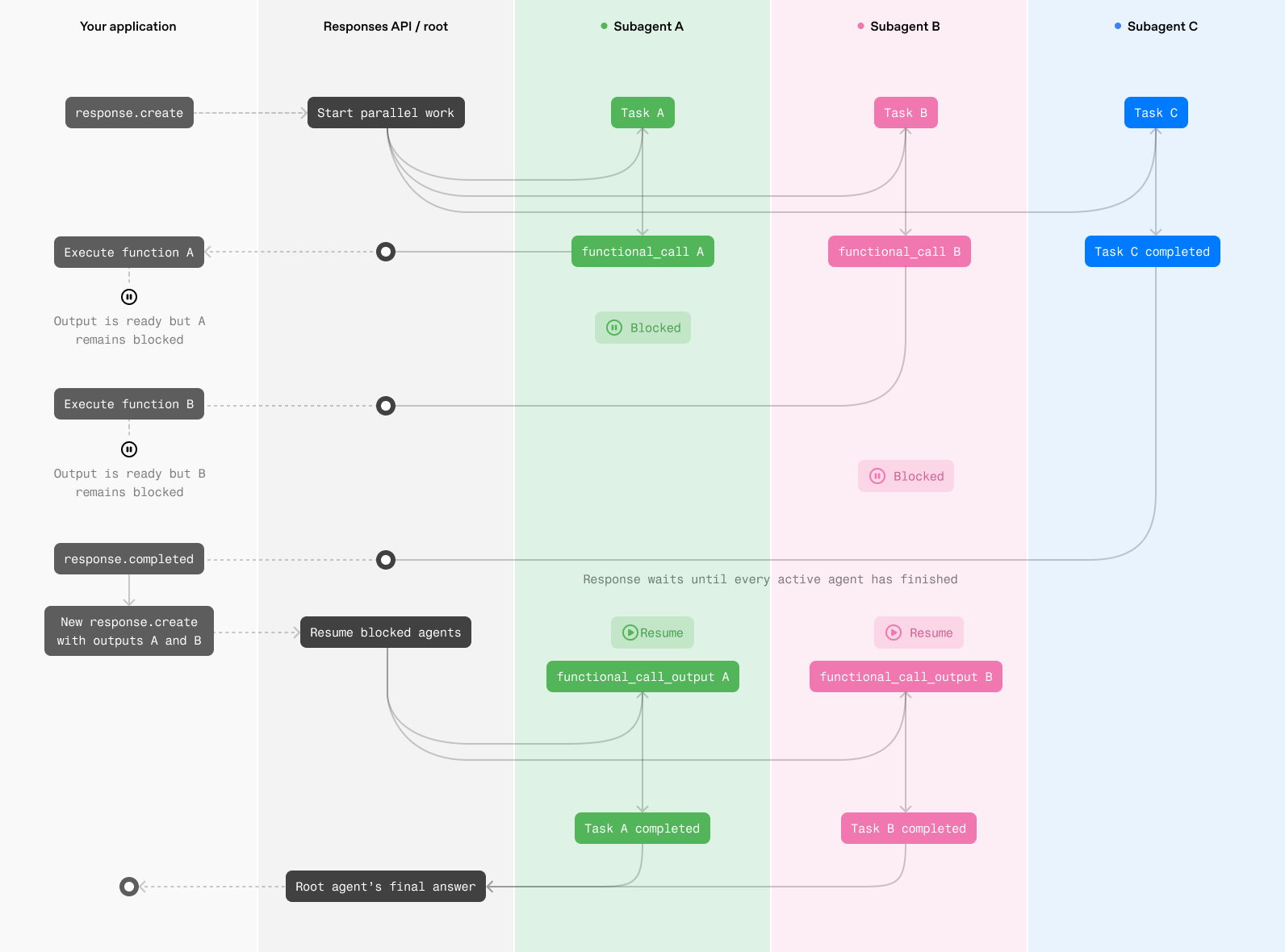
Sol also supports Multi-agent beta in the Responses API. Independent checks of code, documentation, and tests can be delegated and synthesized by a root agent. Shared-file writes and strictly sequential work can make coordination less useful. Read the Multi-agent guide. A smaller scope and explicit checkpoints can be more practical than turning every setting to its maximum.
How multiple agents coordinate
Read the detailed guide
GPT-6.1 Sol: Access, Workflow Diagrams, and a Guide to Complex Work
GPT-6 Astra · GPT model family
Further reading: Responses API Multi-agent in practice
OpenAI Multi-agent in Practice: Responses API, Tools and Parallel Workflows — Start with a GPT-6.1 Sol review example and learn task delegation, application tools, and HTTP versus WebSocket.
