

Sources & references
Plans and hosted-token explanation ↗
Edit code in Zed, use its native agent or connect an external agent, and review changes in the editor. The editor is free; hosted models and unlimited predictions are part of Pro, while personal API keys are a separate billing route.
Zed is a code editor that adds AI without making the subscription mandatory for basic editing. Its native Zed Agent can read and search a project, edit files, run permitted terminal commands and use configured MCP tools. Alternatively, Zed can display external agents through its agent interface, or organize a CLI in terminal-backed threads. These are distinct paths: the native agent follows Zed's provider, tool-profile and permission configuration, while an external agent can keep its own authentication and rules. A developer choosing between them should test the agent that already fits the team's workflow.
Begin with a small, reviewable change in a clean repository. Ask the agent to explain the relevant files, then request a narrow edit and open the diff. Check every modified file and run the project's normal validation. If the agent needs terminal access, configure tool permissions rather than granting broad write capability by habit. Edit Predictions are another feature: they suggest in-line code while typing and have different plan limits from agent inference. Do not confuse an editor subscription with model token costs.
Zed's current pricing lists Personal at $0 and Pro at $10 per month. Pro includes unlimited accepted Edit Predictions and $5 monthly hosted-model credit; further Zed-hosted usage is billed by token. Personal users can use their own API keys or external agents; charges then come from the relevant provider. Business adds administrative controls and unified visibility, with AI costs still separately considered. Before adoption, decide which path owns the model bill and where source code leaves the machine.
Small feature implementation
Codebase orientation
Multi-agent editor workflow
Official product image. Click to inspect the details.
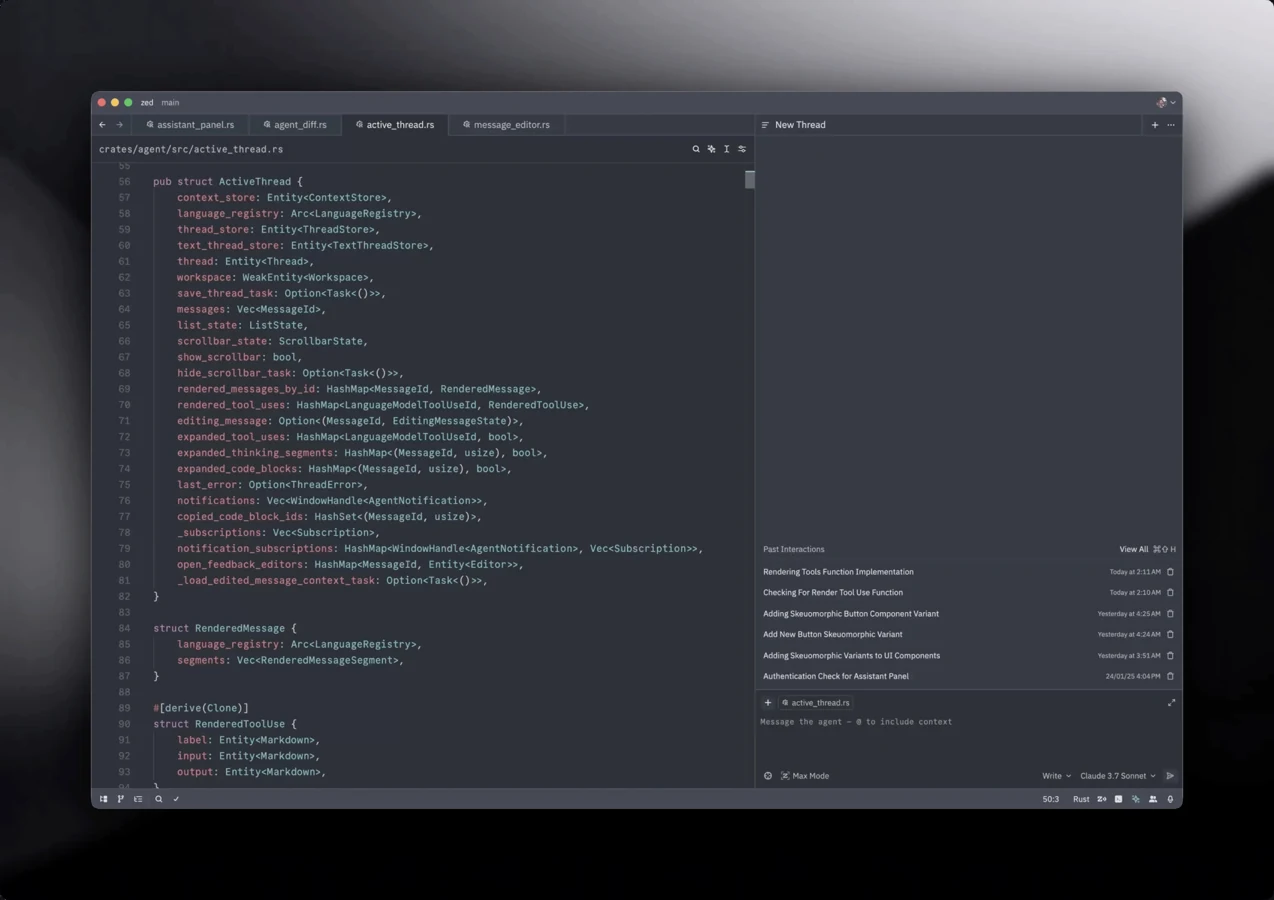
Read, search and edit a project using Zed-managed models, tools and review surfaces.
Run supported agents through the interface or terminal threads, keeping each agent's own authentication and configuration in mind.
Allow, deny or confirm sensitive actions; choose an Agent Profile that matches the job rather than exposing every tool.
Receive inline coding suggestions while typing; accepted-prediction allowances differ by plan.
Inspect agent changes alongside normal diffs and tests, using the editor as the place to validate the result.
Install and choose AI path
Set permissions on a sample repo
Request and inspect one change
Review usage and team policy
Use free editing first, then decide between Zed-hosted models, your own key and an external agent.
Define allowed file and terminal operations, and avoid attaching secrets to unnecessary context.
Ask for a narrow change, examine the diff, run relevant tests and correct mistakes before committing.
Check the hosted-token meter or external provider bill, and set organization controls where team adoption needs them.
See plan details below.
The Personal editor is free and does not require an account for basic use. It allows external agents and personal API keys, while hosted Zed models are reserved for Pro and other eligible plans. The pricing page currently lists Pro at $10 per month, with unlimited Edit Predictions and $5 of hosted-model tokens included each month. Further hosted use follows the model rate plus Zed's stated surcharge; a trial may have separate terms.
Business is currently listed at $30 per seat per month for organization-wide AI policy, governance and billing visibility. Its seat charge is not a bundle of fixed LLM credits. If using BYOK or an external agent, account for that provider's own plan separately. Compare total cost across editor seat, hosted tokens and any external-agent subscription rather than counting one subscription twice.
Yes. The basic editor is free and does not require an AI subscription.
Yes. Personal users can configure their own API keys, with provider charges billed separately.
The current plan includes unlimited accepted Edit Predictions and $5 of monthly hosted-model token credit.
No. They can have their own authentication, model and tool rules; Zed Agent follows Zed's configuration.
Yes. Agent Profiles and Tool Permissions control available tools and whether sensitive actions need confirmation.
The pricing page says it does not bundle a fixed LLM-credit amount; usage is separate.
Explore platforms, inputs and outputs, licensing, and access requirements.
Zed documentation distinguishes native Zed Agent, external agents and terminal threads. Agent Profiles choose available tools; Tool Permissions decide allow, deny or confirmation. Personal API keys are stored in the system keychain according to official docs. These controls help a team preserve deliberate boundaries around repository and terminal access.
Repository contents and terminal output can leave the device when sent to a hosted model or external agent. Pick the provider and data policy deliberately, exclude secrets from context, and use tool permissions for operations that write or delete files. Business controls govern Zed-hosted features, not necessarily every external agent.
Plans and hosted-token explanation ↗
Loading experiences…
Bring a real task and see how it fits the way you work.
User experiences