InVideo
Video creationCreate and revise videos with AI agents while retaining an editable multitrack timeline. InVideo’s current editor combines footage search, storyboard planning, generated assets and real-time collaboration.
An AI video editor built around transcripts, captions and spoken content. A continuing free plan includes 200 shared monthly credits, making it a useful starting point for short explainers and captioned clips.
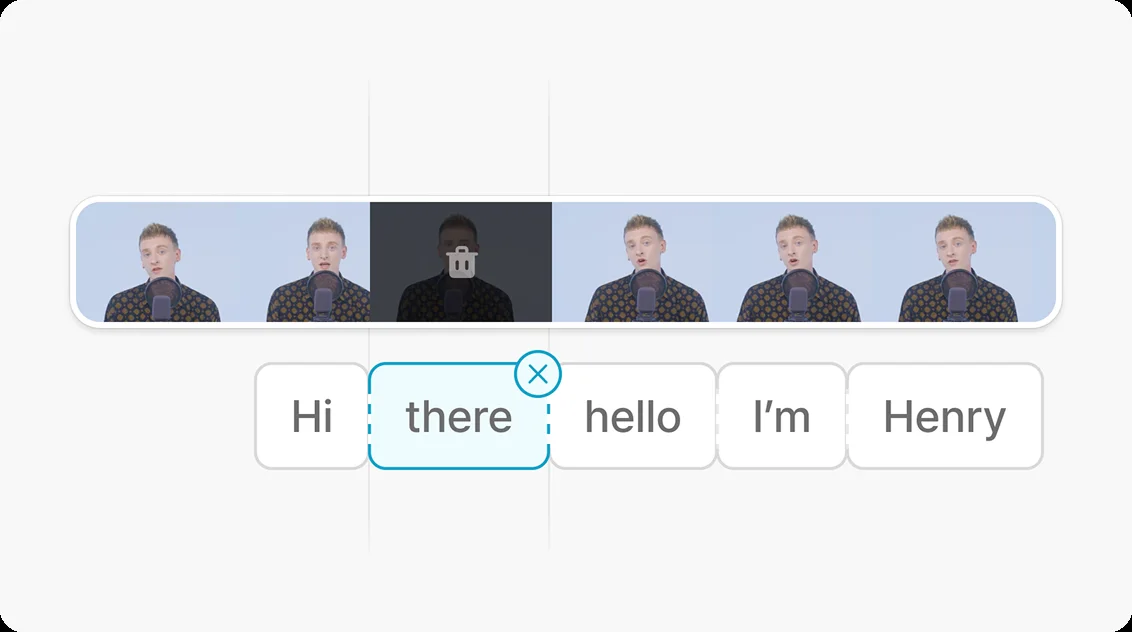
Vrew is designed for people who think about a video in sentences before they think about a timeline. It transcribes spoken content so editing can begin with words, then adds captions, visual material and other production elements. This is particularly useful for an explanation, a lesson or a talking-head clip whose structure depends on what is being said.
Its broader feature list includes generated voices, images, scripts and speech correction, but the free plan does not grant every capability without limits. The practical distinction is between ordinary editing, shared AI credits and features reserved for higher plans. Understanding those boundaries helps you plan a small complete video instead of discovering a restriction at the final export.
Caption a short explanation
Make a lesson segment
Repurpose a presentation
Prototype a narrated clip
Official product image. Click to inspect the details.

Choose a short source
Correct the transcript
Build the visual sequence
Preview the actual output
Example prompt or task: Create a two-minute captioned explainer from this recording. Preserve the main example, keep useful pauses and check every number and proper name before export.
This is a suggested editing brief. It does not imply that all generative tools or advanced speech controls are free.
The listed transcription, voice and image quantities are alternatives for the same credit pool, not separate free allowances.
The current Free Forever plan provides 200 credits per month. Its comparison gives examples such as up to 200 transcription minutes, 20,000 voice characters or 200 images when the pool is spent on that activity. These are alternative uses of the same 200 credits, not benefits that can all be consumed in full together.
The pricing page lists watermark-free videos in Light and AI Edit Speech in Standard. Unused credits do not carry forward. Paid subscriptions also renew their included credits monthly even when billed annually, so a yearly payment does not deliver the full year’s credits at once.
Yes. The current pricing page labels it Free Forever.
The current allowance is 200 per month, shared across eligible features.
No. They illustrate different ways to spend the same credit pool.
The pricing comparison lists watermark-free videos in Light, not Free.
The current plan table places it in Standard.
No. The pricing notes say unused credits do not roll forward.
Check names, numbers, line breaks and timing against the actual recording.
Explore platforms, inputs and outputs, licensing, and access requirements.
The official website offers desktop downloads for Windows, macOS and Linux, alongside a browser trial entry. Availability of a particular function can differ by surface, so use the supported current application for the workflow you intend to complete.
Automatic transcription and translation need language-specific checking. A technically successful export can still contain an incorrect name, a caption that covers the speaker or text too small to read. Review one representative full clip before copying its format to many more videos.
Vrew’s data-protection page states that creative content is not used to train AI models. Review the current policy and processing arrangements for your chosen feature, especially when working with internal recordings or identifiable voices.
Use consented voices and licensed source material. A generated or corrected sentence should not falsely suggest that someone said something they never approved, and a stock asset’s availability inside an editor does not replace checking the relevant usage terms.
Reviewed October 3, 2026. Product facts come from the official sources below. Suggested projects, prompts and review methods are FindGoodAI editorial guidance, not measured performance results.
Loading experiences…
Saved tools are private. Approved comments are public; edits return to moderation. Comment counts include approved comments and replies. Each person has one rating. New ratings are automatically approved; withdrawn, unapproved or invalid ratings do not count. Share real experiences and avoid spam, private information or personal attacks.
For moderation appeals or data requests: support@findgoodai.com
Bring a real task and see how it fits the way you work.
User experiences