

Sources & references
Napkin AI product and workflow ↗
Napkin AI pricing and export limits ↗
Turn a paragraph or rough idea into editable diagrams, visual explanations and slides. Napkin is most useful when the structure of an argument matters more than making a decorative image.
Napkin AI starts with text rather than a blank artboard. Paste a short explanation, select the passage that should become a visual, and compare the diagram suggestions. This makes it a practical bridge between a written brief and a slide, process map or social graphic. Its output is not a substitute for deciding what the idea actually means: the user still has to choose the right relationship, labels and level of detail.
The product now covers both Napkin Visuals and Napkin Slides. A single subscription covers the two experiences, but their generation units should be distinguished: the official help center describes a slide generation as 100 credits, while visual generation credits are associated with selected words. Start with a compact sentence that expresses one relationship, not an entire report, so the candidate diagram remains editable and the credit spend is predictable.
A useful trial is a three-stage process such as request, review and release. Ask Napkin for a process visual, inspect the direction of arrows, and deliberately change one step. If it is easier to correct the generated layout than to draw from scratch, the tool is doing useful work. If the diagram introduces a false dependency or hides an exception, revise the source text and regenerate before export.
Explain a workflow
Support a presentation
Summarize a comparison
Official product image. Click to inspect the details.
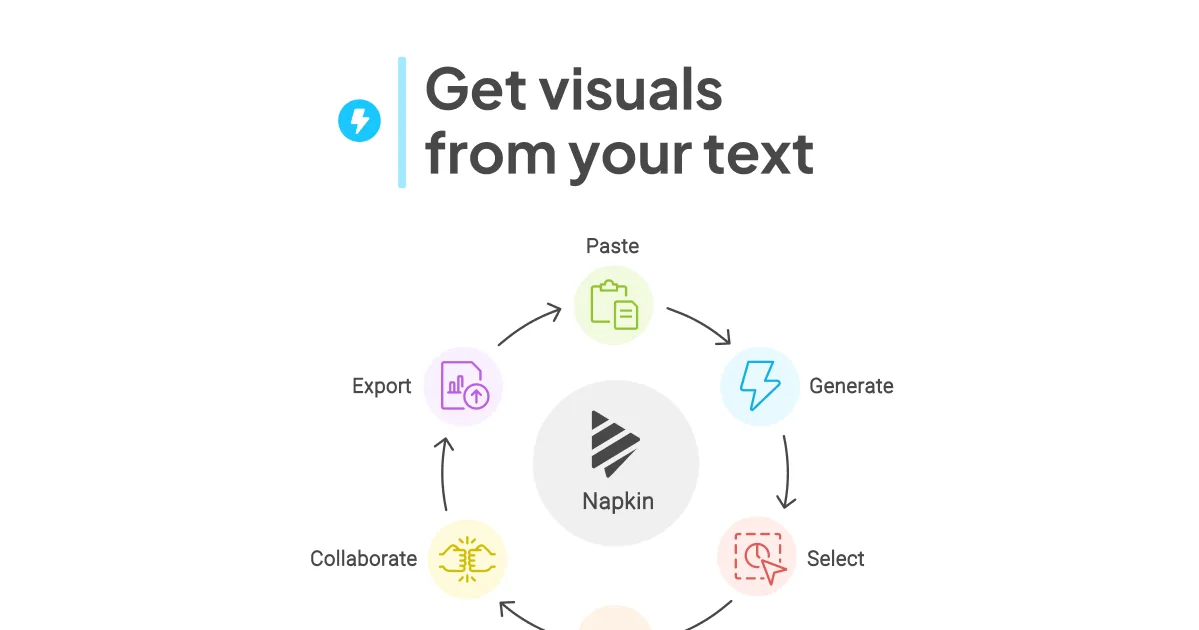
Select the passage containing the key relationship and generate several visual interpretations. A short, explicit input often yields cleaner options than a long paragraph with several topics.
After generation, revise labels, layout, colors and icons. Treat the first output as a draft: confirm whether the visual grammar is a sequence, comparison, hierarchy or cycle.
Napkin Slides turns an outline into a deck that remains editable. Review one slide at a time for excessive text and whether a visual actually supports the spoken message.
The official pricing page lists PPT, DOC, PDF, HTML and Markdown import. PNG and PDF export are available on Free, while PPT and SVG exports have a Free-plan limit. Verify dimensions and line wrapping in the target document.
Apply built-in styles and fonts, then create a consistent look across related diagrams. The Free tier retains Napkin branding; paid tiers remove it and offer additional brand controls.
Write the relationship first
Generate and compare alternatives
Edit labels and hierarchy
Export in the intended context
Draft two or three sentences stating the audience, the entities and how they connect. Remove background details that do not belong in the visual.
Select only the relevant text and compare the suggested structures. Prefer the diagram that conveys the relationship with the fewest unexplained elements.
Check spelling, arrow direction, ordering and exception paths. Adjust the layout or regenerate from clearer text when the structure is wrong.
Choose PNG or PDF for a quick share, or a supported editable format where the plan allows it. Open the exported file in the final slide or document before publishing.
Pricing checked on October 7, 2026. See plan details below.
The official October 2026 pricing page lists a permanent Free plan at $0 with 500 AI credits per week for visuals, unlimited editing, unlimited PNG/PDF export and Napkin branding. Free also permits PPT/SVG export with limits. The same page shows Plus at $9 per person per month in the yearly-billed view, with 10,000 monthly credits, unlimited PPT/SVG export and removal of branding. Pro is displayed at $22 per person per month in that view.
Napkin's help center says a generated slide costs 100 credits; editing existing content does not consume credits. Subscription credits do not roll over, whereas separately purchased top-up credits do. These details matter more than the headline plan price if you expect to iterate through many slide drafts. Check the current checkout view before purchasing because billing cadence and offers can change.
Yes. Free includes weekly visual credits, editing and PNG/PDF exports, with branding and some export limits.
It creates candidates. You should verify relationships, labels and omissions before using one in a public document.
The help center says ordinary editing does not; generating a new slide or visual uses credits.
The current help article states 100 credits per generated slide.
Yes, with limits; Plus removes that export limit according to the pricing page.
Take one three-step process, compare generated layouts and ask a colleague to explain the result without reading your original paragraph.
Explore platforms, inputs and outputs, licensing, and access requirements.
Napkin is a proprietary cloud product, not an image generator for photorealistic scenes. Its best fit is an explanation whose relationships can be reviewed. A visually polished process diagram can still be factually wrong; validate entities, order and exceptions against the source material. For presentation delivery, also inspect readability at the projector size rather than judging solely in the editor.
Do not paste confidential briefs or unpublished strategy into a personal workspace without permission. Check workspace sharing before inviting collaborators and review the export for hidden notes or unintended source text. The official privacy and terms pages govern data handling; a public marketing page does not itself establish a guarantee that every submitted document remains private.
Napkin AI product and workflow ↗
Napkin AI pricing and export limits ↗
Loading experiences…
Saved tools are private. Approved comments are public; edits return to moderation. Comment counts include approved comments and replies. Each person has one rating. New ratings are automatically approved; withdrawn, unapproved or invalid ratings do not count. Share real experiences and avoid spam, private information or personal attacks.
For moderation appeals or data requests: support@findgoodai.com
Convert bitmap logos, sketches and artwork into editable SVG, PDF, EPS or DXF paths. Web previews can be inspected free; production downloads need a web subscription, while API calls use a separate credit plan.
Start a poster, social image, logo concept or product graphic from a template or prompt, then edit pieces through Smart Layers. Playground now resolves to playgroundai.com; plan limits combine rolling generation caps and monthly model credits.
Freepik adopted the Magnific name in April 2026. The current suite spans image, video, audio, design and stock assets; AI credits and stock-download rights are separate, and the free tier is for personal use.
Bring a real task and see how it fits the way you work.


User experiences