

Sources & references
Krisp Meeting AI pricing and trial ↗
Krisp product-line help article ↗
Clean up both sides of a call and, when enabled, transcribe and summarize meetings. Krisp separates locally processed noise cancellation from cloud-based meeting transcription and recording, a distinction worth checking before rollout.
Krisp combines live audio cleanup with an AI Meeting Assistant. Its noise cancellation is intended to reduce the background noise you send and the noise you hear, while the assistant can produce transcripts, notes and action items. It works alongside common call software rather than requiring a team to migrate all meetings to one platform. The product family also includes separate Call Center AI and developer offerings; this profile focuses on the professional meeting assistant.
A useful comparison is to run the same short call twice: once with Krisp off and once with it on. Include a keyboard, room noise and a quieter speaker. Listen for clipped consonants and unnatural silence as well as for reduced noise. Then test a meeting with notes enabled and review whether the transcript attributes statements to the right speaker and whether the summary preserves the difference between a proposal and a decision. Clearer audio does not automatically produce a trustworthy record.
The two core functions handle data differently. Krisp's help center says in-call noise cancellation runs locally and the audio for that function is not sent to the cloud. Its AI Meeting Assistant transcribes in the cloud and deletes the audio used for transcription after processing. If the user chooses to record the meeting, recordings are kept in encrypted cloud storage. These distinctions matter when an organization permits local noise cleanup but has stricter rules for transcription or retaining recordings.
Remote team meetings
Customer calls
Online teaching
Official product image. Click to inspect the details.
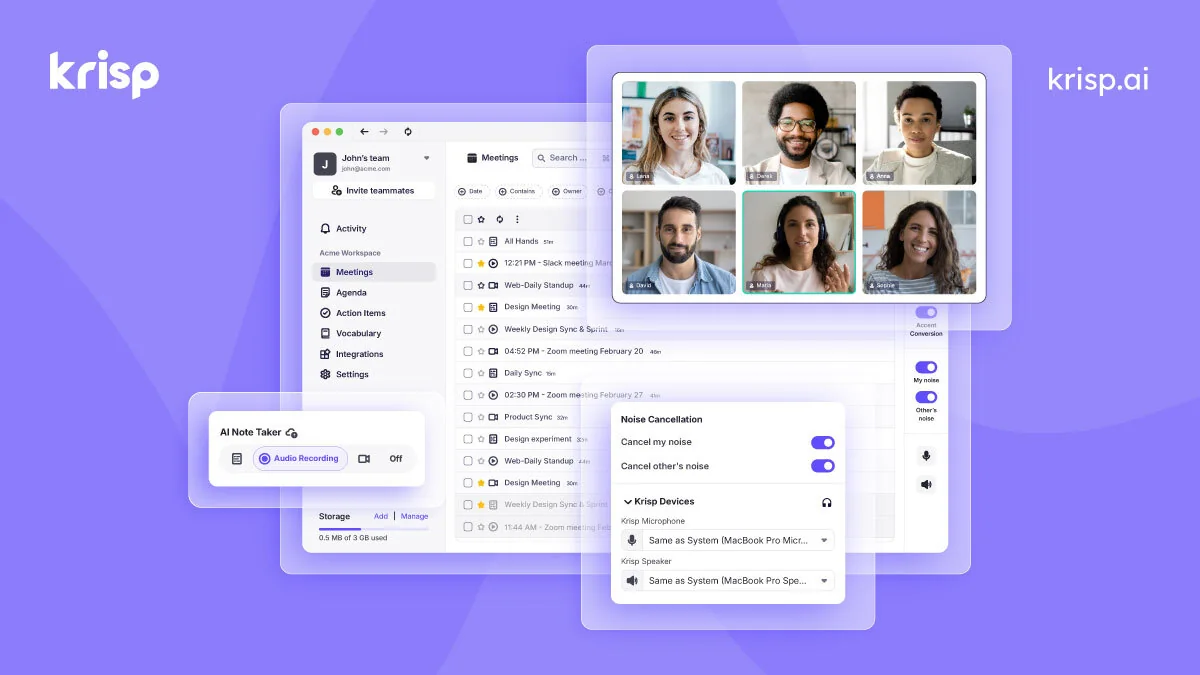
Reduce your own background noise and noise from the remote side. Test the setting with actual headsets and environments because aggressive cleanup can affect speech detail.
Capture speaker-aware text and revisit key passages. Review names, numbers and unfamiliar vocabulary before using the transcript as a record.
Summarize the discussion and draft follow-ups. Require a human to confirm owners, deadlines and whether an item was actually approved.
Audio or video recording can be enabled under the relevant plan. Decide retention, access and consent before turning on storage, since this is different from ephemeral transcription processing.
Paid plans list accent conversion, multilingual transcripts and connections to workplace tools. Test intelligibility and the exact plan allowance rather than assuming every feature is unlimited.
Test audio alone
Choose meeting capture
Review one report
Roll out with controls
Install Krisp and compare a sample call with noise cancellation enabled and disabled. Check both microphone and speaker processing.
Decide whether the session needs notes, transcription or retained recording. These are distinct privacy and storage choices.
Check speakers, action items, dates and exact claims against what participants remember or the authorized recording.
Set team permissions, storage and integration rules, and have users test their own headsets and speaking conditions.
See plan details below.
Krisp's current Meeting AI pricing page offers a seven-day $0 free trial without a credit card. It is labeled a trial, not a permanent free plan. The annual view lists Core at $8 per user per month, while the monthly view lists $16; Advanced is shown at $15 annually or $30 monthly. Core includes unlimited noise cancellation and AI note taking plus storage and integration allowances.
The same page describes time-based limits for accent conversion and larger allowances on Advanced. Enterprise requires a sales conversation. Krisp has separate product lines for call centers and developers, so Meeting AI prices should not be applied to those offerings. During the trial, test the actual audio improvement, transcription quality and permission model before deciding whether a paid seat is worthwhile.
The current Meeting AI pricing page presents a seven-day free trial, not an ongoing free tier.
Krisp says in-call noise cancellation runs locally and its audio is not sent to the cloud for that feature.
No. The AI Meeting Assistant uses cloud transcription according to the help center.
Krisp says recordings are retained in encrypted cloud storage, unlike transient transcription audio.
No. Bot-free notes are available, and an optional bot feature exists on eligible plans.
Compare real call audio with and without cleanup, review one transcript, and check permissions before sharing.
Explore platforms, inputs and outputs, licensing, and access requirements.
Krisp is a proprietary audio and meeting platform. Noise cancellation and transcription should be evaluated separately because they have different data handling and failure modes. The product can work without a meeting bot for note taking, while its separate bot feature can be invited when needed on eligible plans. Check which capture mode is active instead of describing every Krisp meeting as either always bot-free or always recorded.
Local noise processing does not imply that every Krisp feature is local. The help center explicitly separates local cancellation, cloud transcription and cloud-stored recordings. Obtain the appropriate agreement before transcribing a meeting, restrict access to stored notes and recordings, and verify deletion and retention settings. Krisp states on its pricing page that meeting data is not used to train its AI models; check applicable enterprise terms for a formal rollout.
Krisp Meeting AI pricing and trial ↗
Krisp product-line help article ↗
Loading experiences…
Deepgram offers APIs for real-time and recorded speech-to-text, text-to-speech and voice agents. New accounts get $200 of free credit with no card.
Separate vocals and instruments from existing recordings, with additional voice-cleaning and audio tools.
Generate and adjust original background tracks, or develop beats for a distributed song. SOUNDRAW separates its Creator background-music license from Artist plans that permit modified songs on streaming services.
Bring a real task and see how it fits the way you work.


User experiences