Topaz Photo
Image & designDenoise, sharpen, upscale and repair photographs through a desktop application or supported editing plugin. Topaz Photo combines several enhancement tools with local and cloud rendering options.
A free local AI image-creation workspace combining a visual canvas, regional editing, galleries and reusable node workflows, with model management and optional external integrations.
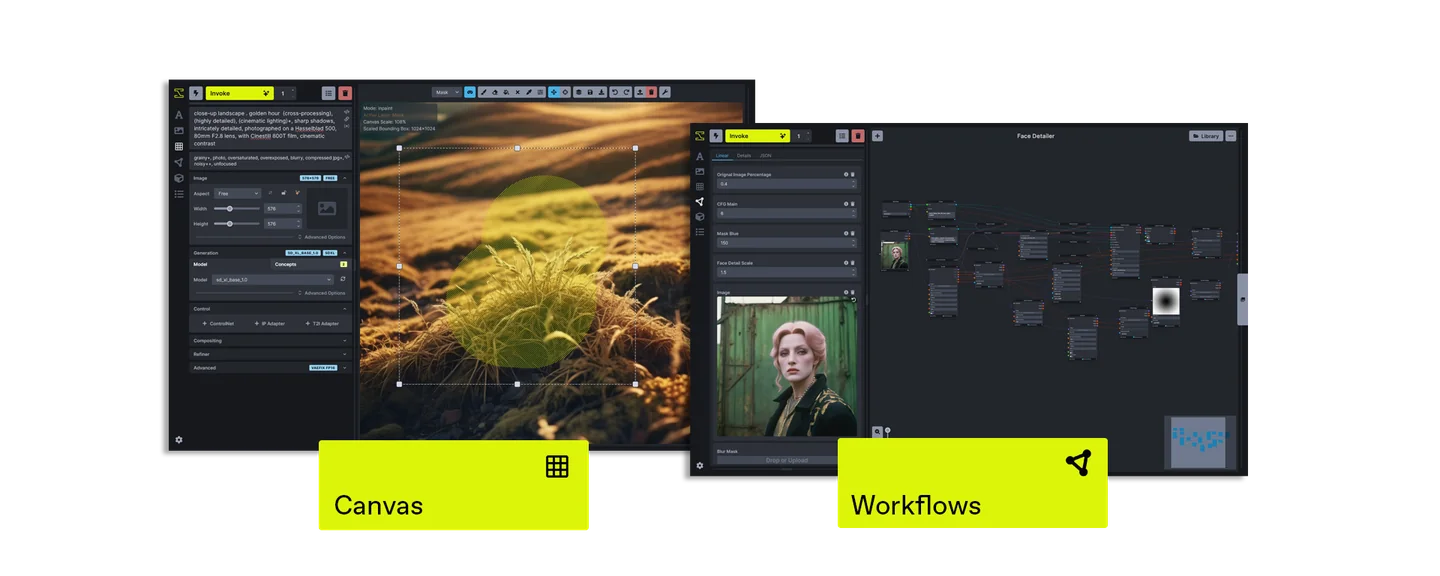
InvokeAI is a creative workspace for generating and refining visual media with AI models. Its canvas supports an iterative approach: start with an image or sketch, edit a region, compare the result and keep developing the composition. Galleries, boards and saved settings help turn a series of experiments into a project you can revisit.
The local community software is free, but a complete setup also needs compatible hardware and suitable model files. The supported-model list includes both local and API-only routes, so read the specific model entry before assuming a feature will run entirely on your machine or without an external service.
Refine a concept illustration
Explore a scene from a sketch
Organize a visual asset study
Build a repeatable production step
Official product image. Click to inspect the details.

Install with the official launcher
Add a compatible model
Create a small first image
Refine and organize
Example prompt or task: Create a concept image of a quiet reading corner with a wooden chair and soft window light. Keep the overall layout, then revise only the small table area to leave space for a book.
This is an editorial exercise, not a measured example of output quality. Use the model and canvas controls appropriate to the installed release, and compare each revision with the preserved starting image.
Local software is free. Optional hosted infrastructure and API-only model calls have separate costs.
InvokeAI community software is available for free local use under Apache-2.0. That covers the application, not unlimited rented hardware, storage or every model license. A local generation setup uses your own compute resources and downloaded files.
Some supported model routes are API-only, and optional remote infrastructure can charge separately. Before sharing a workflow, note external service requirements and check the relevant provider terms. The fact that a workflow is visible in the local interface does not establish that every processing step is free or local.
The local community software is free under Apache-2.0. Hardware, model terms, API usage and optional hosted infrastructure remain separate.
The local software route is separate from paid external integrations. Use an available compatible local model and follow its setup and license requirements.
The canvas includes supported regional editing, inpainting and outpainting tools. Review the transition between edited and untouched areas.
They make a sequence of operations reusable. They are most useful when the same process will be applied repeatedly or integrated into a larger production routine.
No. The file format, model architecture and installed version must be supported. Use the model manager and matching documentation.
The official FAQ notes that the complete settings and processing chain matter. Prompt text alone is insufficient to reproduce another image.
Check model requirements and the documented low-memory guidance. Start with smaller output settings and a suitable model instead of assuming every architecture fits the same device.
Explore platforms, inputs and outputs, licensing, and access requirements.
The official launcher has platform-specific Windows, macOS and Linux downloads and manages installation and updates. Check the system requirements for the desired model before installing a large collection; generation size and model architecture can change memory demand substantially.
The application uses a local web server and browser interface. Common issues can arise from invalid configuration, missing or incompatible models and insufficient memory. The official FAQ explains that reproducing an online example requires matching more than its prompt, including model, seed, sampler, dimensions and additional processing.
A local model workflow can process project images on your own computer. API-based integrations and remote hosting introduce other operators, so check the chosen route before using material that should stay within a particular environment.
Generated image metadata can include prompts or settings useful for reproducibility. Review it before sharing project files. Keep source-image rights, software licensing and model licensing distinct, and preserve original artwork so a generated revision remains reversible.
Reviewed October 3, 2026. Product facts come from the official sources below. Suggested projects, prompts and review methods are FindGoodAI editorial guidance, not measured performance results.
Loading experiences…
Saved tools are private. Approved comments are public; edits return to moderation. Comment counts include approved comments and replies. Each person has one rating. New ratings are automatically approved; withdrawn, unapproved or invalid ratings do not count. Share real experiences and avoid spam, private information or personal attacks.
For moderation appeals or data requests: support@findgoodai.com
Bring a real task and see how it fits the way you work.
User experiences