

Sources & references
Dzine official product overview ↗
Dzine image editor and official example ↗
Current plans and Credits rules ↗
Generate visual concepts, revise selected areas and carry a design through export in a single browser workspace. The free account has credits, but commercial-use rights are reserved for paid plans.
Dzine combines image generation, image-to-image styling, localized editing, visual asset management and video tools. The important distinction is between creating a new candidate and repairing a good existing image. Its editor can select a part of a picture for an insertion, erasure or expansion, making it useful when a campaign image works except for one background object or missing space for text. Multiple underlying models and tools appear in one interface, but each operation can have a different credit cost and availability.
For a practical test, start with a product photo you own and a short brief that specifies the product's unchanged features. Generate two compositions, then use a local edit to replace only the background. Inspect the product label, shape, edges and shadows at full size. AI edits can make a visually pleasant picture that quietly changes a package or printed word. Export a working version and compare it with the original in the layout where it will actually appear.
The current pricing page unifies image, video and other AI functions under one Credits balance. The FAQ says a new free account receives 100 signup Credits valid for 12 months; its commercial-use answer excludes the free tier. Beginner starts at $8.99 per month with 1,000 monthly Credits, Creator at $24.99 with 6,000, Master at $59.99 with 9,000 and Master Pro at $149.99 with 30,000 before any annual billing or temporary first-month offer. Credit rollover differs by tier, so evaluate the recurring price and the actual actions you plan to use, not a promotional banner.
Product campaign visuals
Social design variants
Concept and storyboard exploration
Official product image. Click to inspect the details.
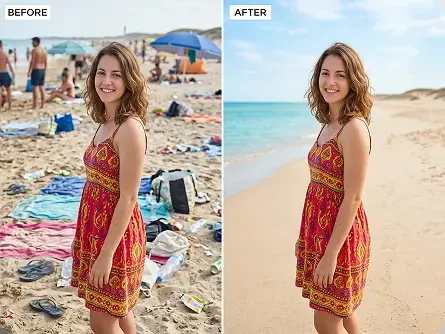
Select a subject or region to add, remove or replace an element while retaining the rest of the composition; check boundaries and shadows after each edit.
Create initial images from a written brief or an owned reference, then compare candidates against the same requirements rather than changing prompts without a baseline.
Add canvas around a usable picture to make space for a title or new aspect ratio; verify that repeated textures and perspective remain believable.
Use the same credit wallet for different media tasks, while checking each model's available controls, resolution and per-action cost before a large batch.
Paid tiers list storage and private generation features. Keep version names and approved exports organized so a later edit does not replace the production master.
Set the rights and brief
Make a small comparison set
Repair the selected area
Export and verify permission
Use source images and likenesses you can submit; record product details, aspect ratio and the intended commercial use.
Generate two or three alternatives with a fixed brief, log their credit costs and choose the one worth repairing.
Use local edit or expansion, then zoom in on labels, hands, edges, lighting and any duplicated texture.
Test the image in its target layout and check the plan's commercial-use terms before delivery.
See plan details below.
A new free account receives 100 signup Credits with a 12-month validity according to Dzine's current FAQ. The pricing page also discusses free daily Credits, which are distinct from paid subscription Credits. Free-tier output is described as personal-use only in the FAQ; a commercial project should use an eligible paid plan and respect rights in uploaded material.
The listed regular monthly prices are Beginner $8.99, Creator $24.99, Master $59.99 and Master Pro $149.99. Included monthly Credits are 1,000, 6,000, 9,000 and 30,000 respectively. Beginner subscription Credits do not roll over; the three higher tiers may roll them over for up to three months. The page offers temporary and annual discounts, so verify the renewal amount at checkout.
Yes. The current FAQ says new accounts receive 100 signup Credits valid for 12 months.
The current FAQ reserves commercial use for paid plans; do not apply free-tier output to client work.
No. The FAQ and pricing page list feature-specific credit costs that can depend on model and settings.
Yes. The image editor offers a localized selection workflow; inspect the repaired region against the rest of the image.
Beginner subscription Credits do not; Creator, Master and Master Pro list up to three months of rollover.
Compare the output with the original for packaging, printed text, product geometry and permitted use.
Explore platforms, inputs and outputs, licensing, and access requirements.
Dzine is a hosted proprietary service. Its unified Credits balance does not make every model or edit equally priced. The pricing table differentiates storage, concurrent jobs, private generation and image/video features by plan. Treat the official before-and-after example as an illustration of editing, not evidence that all source details are preserved automatically.
Uploaded photos and customer assets can contain people, logos or unreleased products. Check private-generation settings, sharing permissions and the current privacy policy before uploading sensitive work. Save the original separately and document which output a client approved.
Dzine official product overview ↗
Dzine image editor and official example ↗
Current plans and Credits rules ↗
Loading experiences…
Explore Kittl for AI graphics, editable vectors and merchandise design, with practical first-project steps, free-plan limits and licensing considerations.
A browser-based collection of image generation, photo editing, chat and other creative AI tools.
AI-assisted brand content and website creation for small and medium-sized businesses
Bring a real task and see how it fits the way you work.

User experiences