Topaz Photo
Image & designDenoise, sharpen, upscale and repair photographs through a desktop application or supported editing plugin. Topaz Photo combines several enhancement tools with local and cloud rendering options.
A free local node-based AI creation engine for building reusable image, video, audio and other supported model workflows, with optional paid cloud and API services.
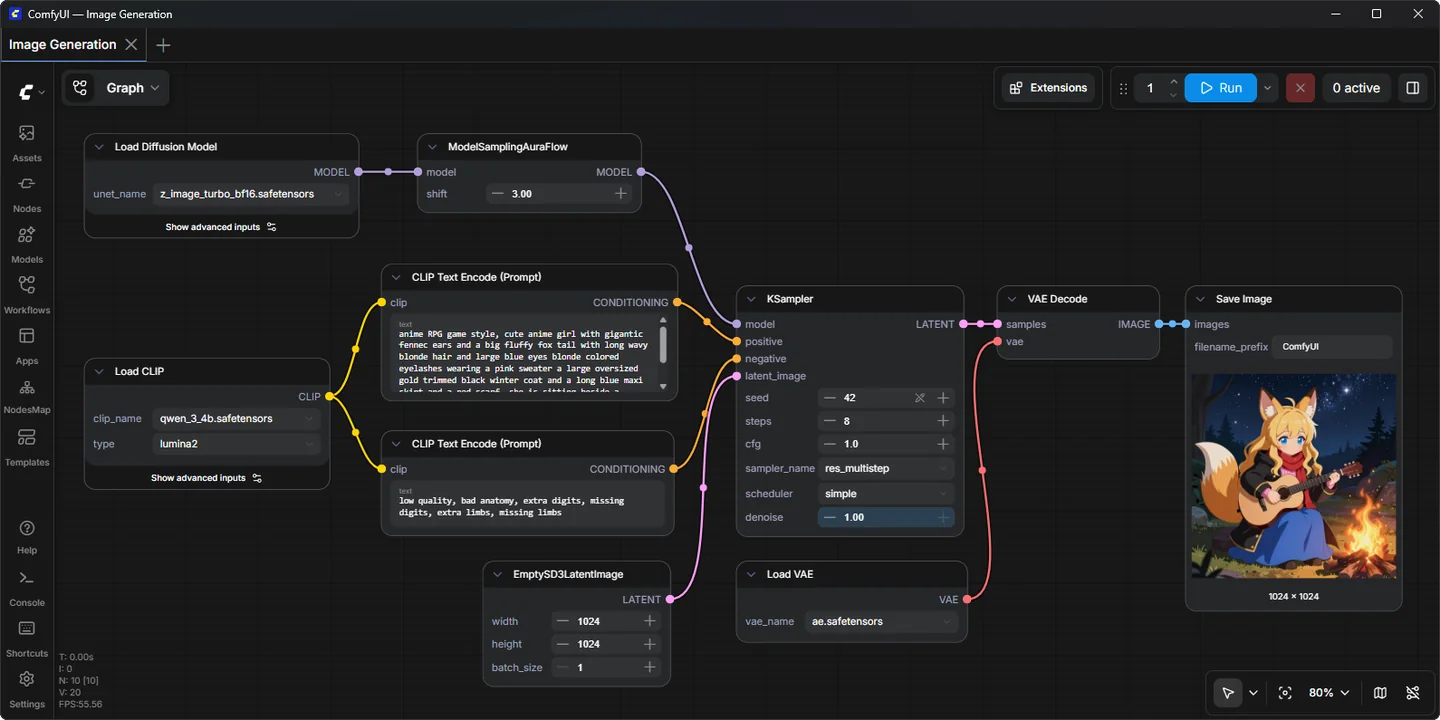
ComfyUI represents an AI creation process as connected nodes. Instead of hiding every step behind a single Generate button, it shows which model loads, how prompts are encoded and how results pass through processing stages. This makes it useful when a creator wants to understand, modify and reuse a production recipe rather than repeatedly improvise settings.
The same flexibility creates a learning curve. A workflow is only ready when its required models, nodes and dependencies are available. Begin with a maintained example that fits your machine, then change one part at a time. A large graph copied from the internet is not automatically a complete, compatible or free-to-run setup.
Repeat a visual production recipe
Compare one model setting
Prepare controlled image editing
Integrate generation into an application
Official product image. Click to inspect the details.

Choose the installation route
Load an official example
Generate a baseline result
Refine and document
Example prompt or task: Create a small product-background concept workflow: generate a neutral studio surface, save the original output, then add a separate upscaling stage and compare whether it preserves the intended texture.
This is an editorial project idea. The exact nodes depend on the chosen model. A workflow file stores a recipe; it is not a bundle containing every required checkpoint or extension.
Local use is free under the software license. Cloud subscriptions, Partner Node credits and hardware are separate.
ComfyUI provides free local software under GPL-3.0. Local workflows use your computer and locally available model files, so there is no mandatory Partner Node credit purchase just to run the engine. Memory, storage, electricity and time remain real resource requirements.
Official Comfy Cloud is a paid route, and Partner Nodes require credits for external model calls. A graph can mix local and paid operations, so inspect its nodes before assuming the whole run is free. Model licenses and optional custom-node terms also need separate consideration.
The local engine is free under its software license. Cloud hosting and paid Partner Nodes are optional separate products.
Many workflows can be connected visually, but understanding inputs, model files and dependencies is still useful. API integration and custom development are more technical.
No. It describes the graph and settings; required model weights and custom nodes generally must exist in the receiving environment.
It may depend on extensions or versions that are not installed. Identify the required components before adding unrelated packages.
Local workflows can. Official offline options disable built-in external functionality, but independently installed extensions still deserve their own review.
No. Official documentation describes credit-based paid external model calls. They are optional and separate from local inference.
Not by itself. Model, seed, workflow, dimensions and processing settings all matter, and environment changes can affect reproducibility.
Explore platforms, inputs and outputs, licensing, and access requirements.
Desktop downloads serve supported Windows and macOS configurations, while manual installation covers additional platforms and hardware paths, including Linux. Hardware demand varies widely between a small image workflow and long video generation; there is no single memory figure that guarantees every model will be comfortable.
A typical local workflow may need a diffusion model, text encoder, VAE and task-specific additions in the correct locations. The core supports configurable model paths, useful when sharing an existing model library. Missing files or incompatible versions can stop a graph even when the browser interface itself loads normally.
Local model processing can keep inputs on your machine. Partner Nodes and other remote integrations send relevant prompts or media to external providers, so classify the workflow by its actual nodes rather than by the fact that its interface opens locally.
Treat workflow metadata and generated files as project data: they may retain prompts and settings. Check what you share with collaborators, and keep a stable copy of working configurations so updates do not erase the recipe behind an accepted asset.
Reviewed October 3, 2026. Product facts come from the official sources below. Suggested projects, prompts and review methods are FindGoodAI editorial guidance, not measured performance results.
Loading experiences…
Saved tools are private. Approved comments are public; edits return to moderation. Comment counts include approved comments and replies. Each person has one rating. New ratings are automatically approved; withdrawn, unapproved or invalid ratings do not count. Share real experiences and avoid spam, private information or personal attacks.
For moderation appeals or data requests: support@findgoodai.com
Bring a real task and see how it fits the way you work.
User experiences