
Sources & references
Official project and features ↗
Official installation guidance ↗
A free desktop transcription app for turning audio and video into editable, timestamped text or subtitle files using local speech models.
Buzz provides a desktop interface for speech transcription, including audio files, video files and microphone input. It supports local speech-model backends so a recording can become text without sending the entire task to a paid transcription API. The result is a draft that can be reviewed, searched and exported for writing or subtitles.
Its most useful role is removing the first round of manual typing. It does not turn uncertain audio into certain facts: accents, overlapping speakers, names and background music can still produce errors. Keep the original recording and use the transcript viewer to inspect important sections. A short checked sample is a better starting point than immediately processing an entire archive.
Interview preparation
Video subtitles
Lecture notes
Recurring audio intake
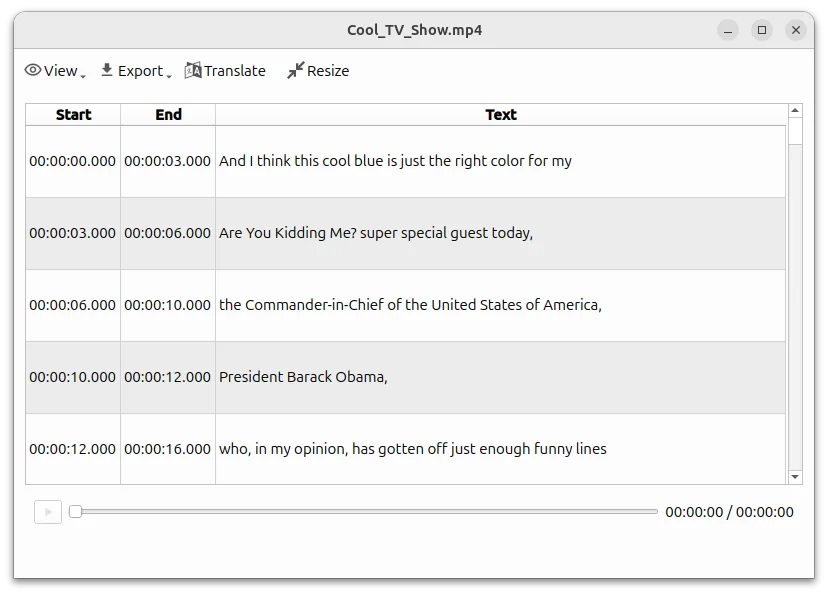
Official product image. Click to inspect the details.
Install a compatible release
Choose a local model and short recording
Review the transcript
Export for the destination
Example prompt or task: Transcribe a two-minute recording in its original language. Check every name and number against the audio, mark uncertain words and export both a readable text copy and a subtitle file if needed.
Buzz is primarily a transcription interface. This is an editorial task checklist rather than a chat prompt, and the suggested review is not a measured accuracy claim.
No cloud minute allowance is required for local transcription. Optional services and plugins can have separate costs.
The project uses the MIT license and offers local transcription without a recurring software fee or required cloud minute package. Your computer supplies storage, memory, processing time and electricity. Large speech models can need more resources than small ones.
Optional API backends, summary plugins or other connected services may introduce separate charges and data transfers. The free classification applies to the local application path. Do not infer that a plugin which uses a paid language model is included at no cost.
The MIT-licensed app provides a free local route. Hardware resources and any optional external services remain your responsibility.
The project supports video transcription and SRT or VTT export. Review timing and formatting in your video editor before publishing captions.
After installing the required application and models, a local backend can process recordings offline. Downloads, links and remote services still need connectivity.
Not automatically. Whisper’s built-in speech translation targets English and depends on the chosen model. Other translation tools or plugins are separate.
No. Automatic identification can help organize material, but attribution should be checked against the recording.
Model size, backend, device and audio length all matter. Try a smaller supported model on a short sample before processing a long file.
No. A plugin or API backend may contact another service. Check its configuration and data path separately from local transcription.
Explore platforms, inputs and outputs, licensing, and access requirements.
Official installation routes cover Windows, Linux and macOS. Current repository guidance says recent Mac builds require Apple Silicon and identifies 1.4.5 as the last Intel Mac version. Consult release-specific instructions rather than assuming every download supports every Mac.
Transcription preserves the source language; Whisper’s built-in speech-translation task targets English with suitable multilingual models. Its turbo model is not trained for that translation task. Other plugin-based translation routes are separate and should not be described as the same built-in capability.
Local processing can keep the audio task on your device when a local backend is selected. Remote APIs and optional plugins can change that boundary, so inspect the chosen route before using private recordings.
Keep transcripts and recordings under the appropriate access permissions. The application license does not grant rights to distribute someone else’s recording, and an automated transcript should be checked before presenting it as a verbatim quote.
Reviewed October 3, 2026. Product facts come from the official sources below. Suggested projects, prompts and review methods are FindGoodAI editorial guidance, not measured performance results.
Official project and features ↗
Official installation guidance ↗
Loading experiences…
Saved tools are private. Approved comments are public; edits return to moderation. Comment counts include approved comments and replies. Each person has one rating. New ratings are automatically approved; withdrawn, unapproved or invalid ratings do not count. Share real experiences and avoid spam, private information or personal attacks.
For moderation appeals or data requests: support@findgoodai.com
Bring a real task and see how it fits the way you work.
User experiences