Murf
Audio & musicCreate voiceovers from scripts and refine delivery with voice, pronunciation and pacing controls. Murf Studio serves content production, while Murf’s API, dubbing and conversational-agent offerings address different workflows.
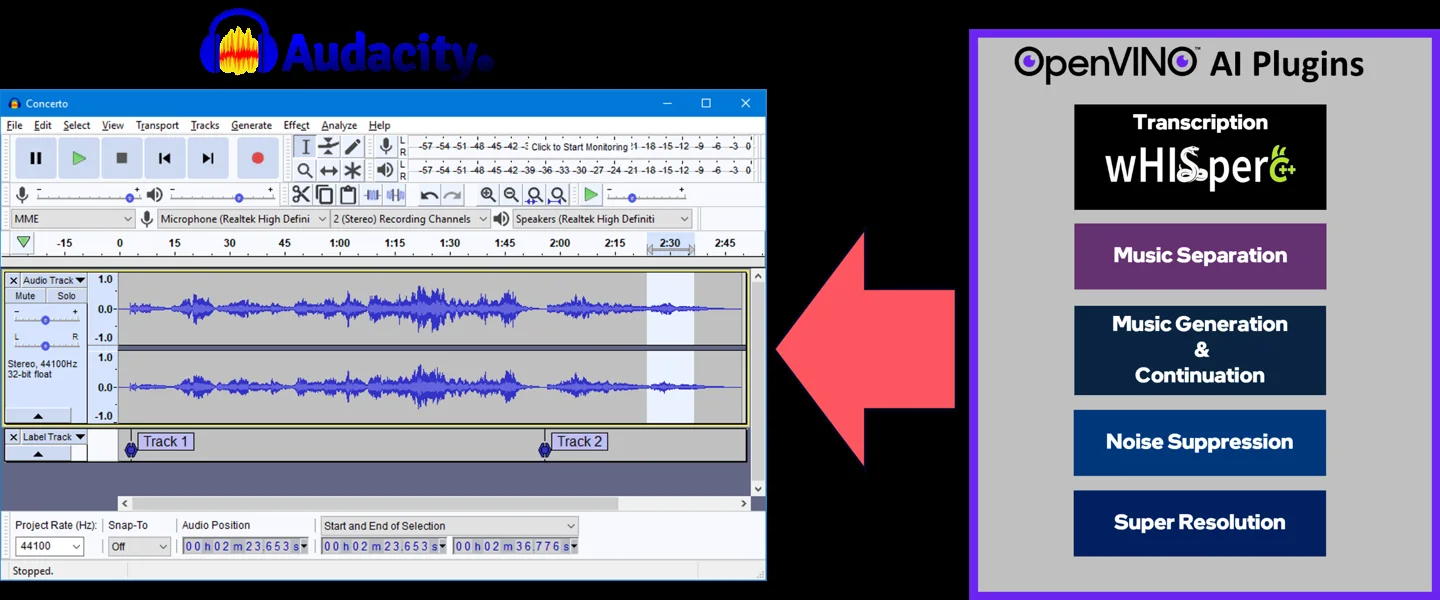
Free local AI plugins that add noise suppression, stem separation, speech transcription, music generation and audio enhancement to a compatible Audacity installation.
Intel’s OpenVINO plugins bring several AI audio functions into Audacity. Instead of uploading each file to a separate service, you can work on a selected portion of a track and continue editing in the same project. The functions include cleanup, separation, transcription, generation and enhancement, each with a different purpose.
The plugins run models locally on supported devices through OpenVINO. You still need a compatible Audacity build, plugin package and model files. This makes the project attractive for repeated local work, but setup and processing speed depend on your computer. This listing describes documented features and does not claim a measured improvement on your recordings.
Clean a spoken-word draft
Prepare a transcript for editing
Study an authorized music recording
Explore noncommercial music ideas
Official product image. Click to inspect the details.

Check the compatible release
Install required models
Process a short selection
Review and export
Example prompt or task: Select a short spoken passage with steady background noise, apply the documented noise-suppression effect to a copy, and compare intelligibility and voice texture with the original.
This is an editorial listening workflow. The plugins do not guarantee perfect isolation, error-free transcripts or restoration of missing information.
Local processing has no per-minute cloud fee. MusicGen weights have noncommercial terms; do not assume every module has the same commercial permissions.
The plugin project offers a free local route and identifies its code with GPLv3 licensing. You supply the computer, storage and any time needed for installation and processing; there is no requirement here to buy a cloud transcription subscription.
Individual model and source-audio rights remain separate. In particular, the MusicGen model card identifies CC BY-NC 4.0 model-weight terms. Do not extend that module’s permissions to every feature, or assume the plugin’s code license clears commercial use of generated music. Review the specific component you intend to use.
No. Install a compatible plugin package and model files.
The AI processing is local after the required software and models are available.
OpenVINO can use supported devices including CPU; availability depends on the feature and system.
No. Stems may contain leakage and artifacts.
The documented Whisper translation mode produces English.
No. MusicGen weights have noncommercial terms.
No. Inspect and listen to the output rather than assuming missing information was recovered.
Explore platforms, inputs and outputs, licensing, and access requirements.
The repository provides Windows installation releases and Windows/Linux build guidance. Use those instructions to establish compatibility; this page does not promise an official ready-made package for every operating system or Audacity release.
Transcription output appears as labels in the project rather than automatically becoming a finished subtitle deliverable. Model loading and device-specific preparation can take extra time on the first run, and cached models use disk space. Plan the workflow around actual local resources.
Local processing reduces the need to upload recordings to a cloud service. Still check where projects, model caches and backups are stored, especially when they are inside synchronized folders or shared machines.
Keep original recordings and appropriate speaker or music permissions. Generated transcripts can contain errors, and source separation or cleanup does not change ownership of the underlying audio.
Reviewed October 3, 2026. Product facts come from the official sources below. Suggested projects, prompts and review methods are FindGoodAI editorial guidance, not measured performance results.
Loading experiences…
Saved tools are private. Approved comments are public; edits return to moderation. Comment counts include approved comments and replies. Each person has one rating. New ratings are automatically approved; withdrawn, unapproved or invalid ratings do not count. Share real experiences and avoid spam, private information or personal attacks.
For moderation appeals or data requests: support@findgoodai.com
Bring a real task and see how it fits the way you work.
User experiences