
Jev is TypeSafe AI’s System One decision model. It takes a state plus predefined questions and returns choices, scores and probabilities that software can consume. It fits ticket triage, document ranking and tool routing. Writing an article or generating code still calls for a generative model. Start at TypeSafe AI.

Where it belongs in an application
A tool directory already knows how to fetch a URL, find empty fields and sort dates using ordinary code. The awkward part is judging whether a description concerns image editing or image generation, or whether a user needs a tool search or a clarifying question. Jev can supply that judgment, while the application performs the lookup, displays the results or asks for missing context.
A useful design is: read data, ask a bounded question, receive a typed judgment, execute the next step in code. Saving the state, question definitions, returned version and decision makes mistakes easier to inspect. It also makes replacement easier: the execution rules do not disappear inside a long conversational prompt.
Choosing among the three question types
| Choice | Pick one category or destination from a fixed set. Read the selected option and per-option probabilities. |
|---|---|
| Score | Rate against descriptive, ordered levels. Read the score, level probabilities and confidence. |
| Noul | Evaluate a yes/no proposition. Its number is the probability of yes, rather than a quality or severity rating. |
Make category boundaries concrete. For a directory, “image generation” can mean creating a new picture from a description; “image editing” can mean changing an existing uploaded picture. Add an other option for requests the list does not cover. A small judgment that is easy to inspect is a better starting point than combining request interpretation, tool selection, response writing and execution. The Primitives reference covers the request shapes.
Getting started
Open the official Playground, sign in and put a real, de-identified message into state. Add a Choice with three to five clearly separated options. Test a straightforward request, one that crosses two categories and one that belongs to none. Look for forced classifications before using the answer in your application.
Then follow the quickstart for HTTP or an SDK. Keep the API key on the server and let the browser call your own backend. Initially print decisions without triggering business actions. Compare them with your labels before connecting the routing result to production behavior.
Version, price and input limits
| Checked | October 4, 2026 |
|---|---|
| Version | jev-1.13.0; both current aliases resolved to it when checked |
| Endpoint | POST https://api.typesafe.ai/v1/systemone |
| Input | Text: string, JSON object or text array; no direct image, audio or video input |
| Context | 64k tokens per request; 32k for state plus the longest question |
| Price | US$0.042 per million input tokens; output is free |
| Published rate limits | 100k tokens and 80 requests per second; early-access limits may change |
These are the service parameters in the model reference when checked. Log the returned version, particularly after tuning thresholds. Model input is only part of the application bill: retrieval, response generation, OCR, storage and hosting remain separate. An illustrative 100,000 calls at 2,000 input tokens each would total 200 million tokens, or about US$8.40 at the listed rate. Include question and option text in the actual token count.
Turning probabilities into useful behavior
Choice and Score confidence summarize concentration in the returned probability distribution; they do not certify correctness. Group your own results by confidence, inspect confident mistakes and see whether ambiguous cases cluster around a particular category. The confidence reference explains the statistic.
Suppose a request is classified as coding while image also has substantial probability. A directory could display both categories or ask whether the visitor is building page code or generating illustrations for the page. That may be more helpful than guessing and displaying a long irrelevant list. Existing permissions and business rules still govern actions that change external state.
Reading the official comparison
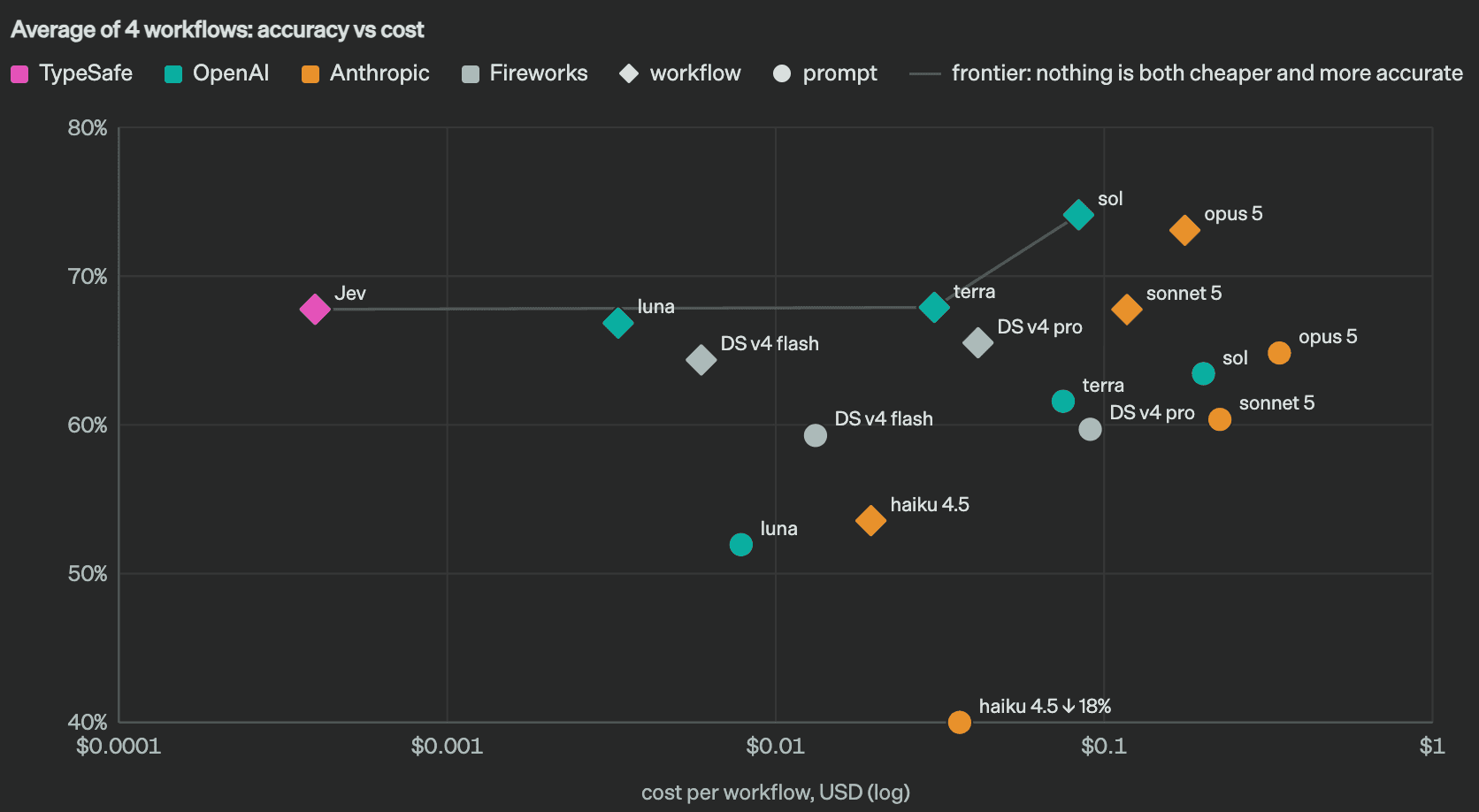
This plot compares cost and performance over four workflows. Left means lower cost, up means better performance in this evaluation. Diamonds represent structured workflows; circles represent single-prompt approaches. Compare like-for-like task and execution settings before extrapolating from a cheap point to a new workload. The workflow evaluations expose individual cases and conditions.
Good first uses and important boundaries
Start with tool routing, document categorization, triage, candidate re-ranking or a structured check alongside another model. These have bounded outputs and can be compared with human labels. First decide one category; later add independent questions about urgency or required information.
The Jev 1.13 limitations include counting, exact quantities, date comparisons, indirect reasoning and adversarial text. Keep arithmetic and permissions in code, and writing in a generative model. For Chinese workloads, build a local evaluation set with specialist terminology, colloquial messages and ambiguity before relying on English demos.
SDKs, skills and further reading
Python SDK · JavaScript / TypeScript SDK · Official agent skill · ToolAI Jev topic. Jev is the model; the SDKs and skill help software call it. They are not downloadable model weights.
Read the detailed guide
Jev turns AI judgment into a function: charts, Playground and Python integration