

Gemini 4 Carbon earns a place in a team’s evaluation queue. Choosing it for a real workflow requires a more specific question: does it finish your work accurately, within an acceptable wait and at an acceptable total cost?
The current evidence is most encouraging for demanding reasoning and checkable coding or background work. An overall ranking does not establish that Carbon is better for instant support or every desktop task.
This analysis uses Google’s launch information and independent evaluation results checked on October 29, 2026. It is not a claim of our own hands-on benchmark. Carbon’s rollout initially targets selected cyber defenders and trusted partners through Fairwind, so access is the first practical gate. Prepare the trial before committing a production workflow to an unavailable account or endpoint.
Start with the job, then select the relevant evidence
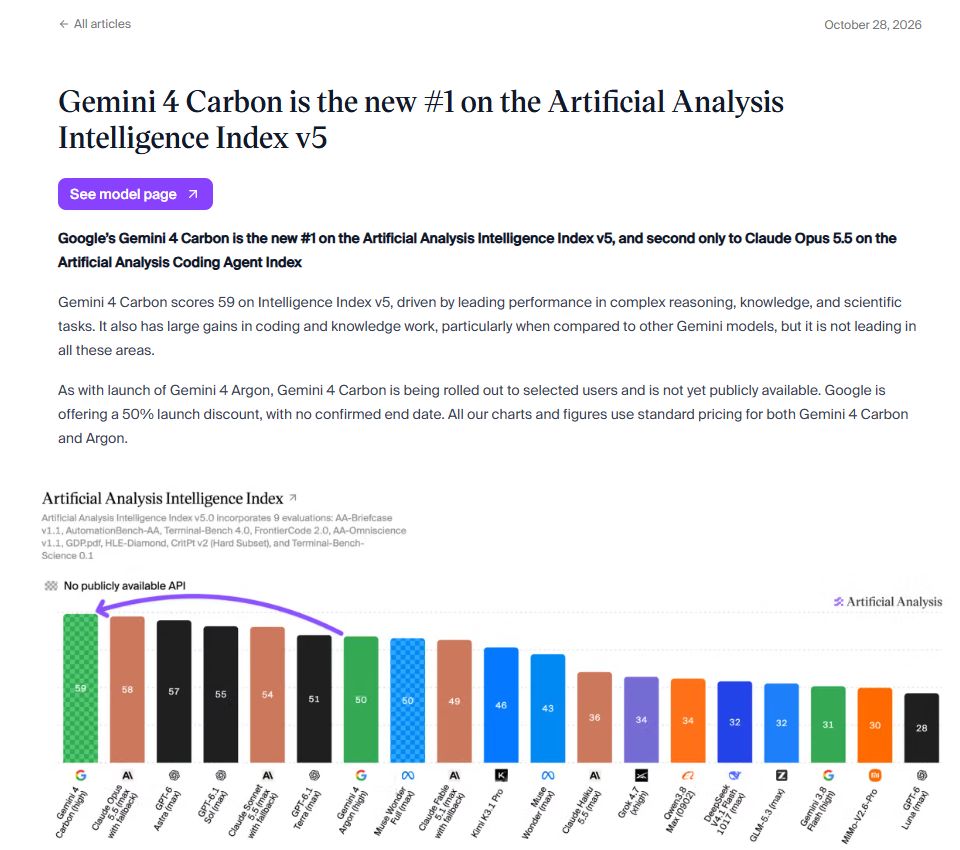
Artificial Analysis ranks Carbon first in its Intelligence Index at 59. That is useful for discovering a candidate; it does not settle whether Carbon is best for a support queue, a repository or a computer-control workflow. The narrower measurements make the decision more concrete.
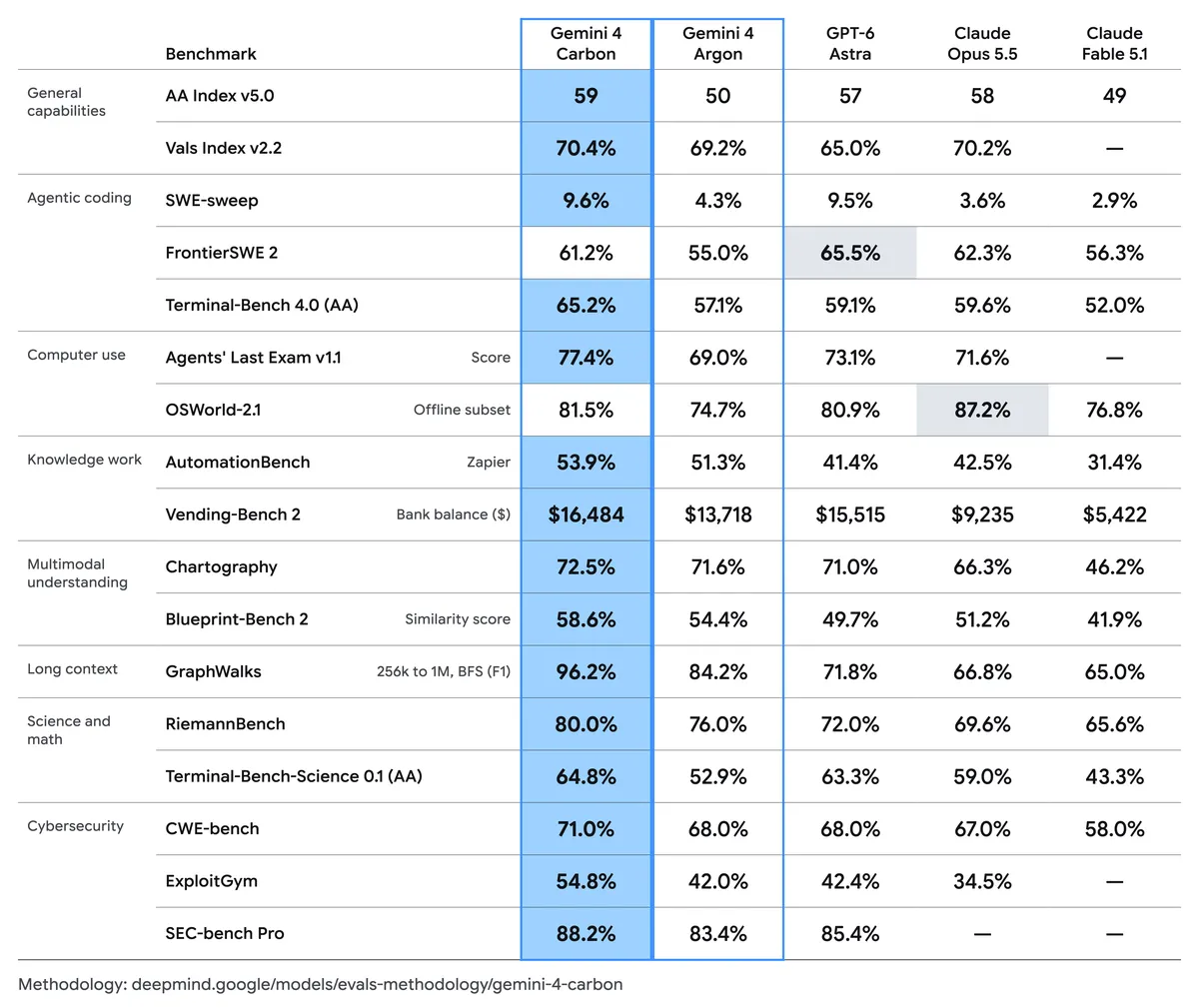
The comparisons below refer to Gemini 4 Carbon (High), Gemini 4 Argon (High), GPT-6 Astra, Claude Opus 5.5 and Kimi K3.1 Pro. The AA coding-agent comparison uses Opus 5.5 (Max).
| Evaluation | Carbon | Comparison |
|---|---|---|
| FrontierSWE 2, Google’s table | 61.2% | Argon 55.0%; Astra 65.5%; Opus 62.3% |
| OSWorld-2.1, partial score on 82-task offline subset | 81.5% | Opus 87.2% |
| AA Coding Agent Index | 59, Antigravity CLI | Opus 62, Claude Code |
| AA-Briefcase | 1609 Elo | Argon 1483 Elo; Kimi K3.1 Pro 1678 Elo |
Comparison sources: Google DeepMind / Artificial Analysis
Carbon improves on its predecessor in these reported comparisons, yet several specialized results leave other candidates ahead. The coding-agent result also includes the surrounding agent software: Antigravity CLI and Claude Code are different environments. Treat those numbers as results for evaluated systems, not a controlled experiment changing only the underlying model.
The business-work benchmark is a meaningful clue for document-heavy analysis, research and structured deliverables: Carbon’s AA-Briefcase result advances beyond Argon, although Kimi remains ahead in that comparison. That makes Carbon a candidate for work where the final artifact matters more than immediate conversation. It does not establish that every spreadsheet, memo or research answer will improve.
For software teams, the higher FrontierSWE score supports trying Carbon on repository tasks with checkable outputs. The lower result than Astra, and the OSWorld gap to Opus, argue against replacing every coding or desktop agent on the strength of the overall index. The strongest case is selective adoption where the relevant task improves, rather than a universal replacement.
Fast generation is different from a short wait
The Artificial Analysis model page showed roughly 100 output tokens per second and roughly 100 seconds to the first token in its current test snapshot. Both can be true. A model may spend a long time before starting its response and then produce the answer quickly. Neither number guarantees what every request will experience.
For interactive support, a long initial wait can matter more than rapid generation afterward. For a background research job, a longer wait may be acceptable if the result saves human work. Record time to first useful output and time to an accepted result separately. Provide an honest progress state and cancellation for longer tasks; do not describe a fast token stream as an instant answer.
Measure factual errors and useful uncertainty
In AA-Omniscience, the launch analysis reports 58% correct for Carbon versus 48% for Argon. It also reports hallucination metrics of 11% and 4%. The second measure has a particular denominator: incorrect answers divided by incorrect, partial and unattempted answers combined. It is not the fraction of all answers that are wrong, and 11% does not imply 89% accuracy.
The practical tension is that answering more questions can be valuable while confident unsupported answers can be expensive. Give a trial set questions with known answers, questions requiring a cited document and questions that the supplied information cannot resolve. Score correctness, source support and appropriate abstention separately. A fluent response should not pass merely because it sounds decisive.
Compare the complete cost of accepted work
Google’s introductory token prices are $2 per million input tokens and $10 per million output tokens. The announced post-introductory prices are $4 and $20; no end date for the introductory period is specified. A simple planning example assuming 200,000 uncached input tokens and 20,000 total billable output tokens costs $0.60 at the introductory rates or $1.20 at the later rates. This hypothetical calculation excludes any separately billed tools or other charges.
Real agent work is more involved. Artificial Analysis reports $7.76 per task for Carbon in its evaluated setup at regular prices, using $4/$20 per million input/output tokens for Carbon, versus $10.04 for Opus and $6.25 for Astra. Arena uses a different task population, lists Carbon at its introductory $2/$10 rates and reports a median. These figures cannot be combined into one universal savings claim or substituted for your application’s bill.
For your own trial, divide total model and tool spend, including retries, by the number of results that pass acceptance. Keep human review time visible alongside that dollar figure. Ten cheap attempts that produce two usable results may be less attractive than fewer, more expensive attempts with reliable completion. Report both the median and expensive cases rather than hiding the tail in an average.
A short trial can resolve the remaining questions
Choose one representative workflow, such as drafting a support answer from fixed product documents. Include ordinary, ambiguous and unanswerable cases. Keep instructions and tools consistent, then score source support, required fields, appropriate uncertainty, retries and human corrections. Repeat a subset to check stability. A spending ceiling and reversible outputs keep this a practical comparison while access and behavior are still being evaluated.
Use a decision rule instead of a launch-day impression
Choose Carbon when its measured completion quality, wait and total cost meet your workflow’s requirements better than the alternatives you tested. Keep the current system when Carbon’s access is uncertain, errors need too much supervision or the delay breaks the user experience. A mixed setup can also make sense: assign demanding background tasks to one model and faster interactive work to another, after testing the routing itself.
The useful outcome of an evaluation is a recorded decision and the conditions that would change it. Pricing, available access and model behavior can move. Save the test inputs, model settings and date so a later comparison is reproducible. Our Carbon launch news brief collects the announcement and updated Arena figures; this analysis focuses on what those results mean for everyday work.
Original evaluation and benchmark images
Sources and methodology
- Google: launch and initial rollout
- Google DeepMind: model comparison
- Artificial Analysis: Carbon launch evaluation
- Artificial Analysis: model speed and latency
- AA-Omniscience: metric definitions
- Arena: task and cost methodology
Copy the link to save or share this article.
