

Sources & references
Read AI current plans and limits ↗
Read AI privacy and participant controls ↗
Create meeting transcripts, summaries and action items, then search accessible conversations and connected work sources. Read AI has a permanent Free tier for five meeting transcripts per month; collaboration and privacy settings matter before inviting it to a call.
Read AI records and analyzes meetings so a user can revisit what was discussed, search for a decision and follow up on actions. The product also brings search across connected workplace information into the same experience. Its value is strongest when a team often loses context between meetings, emails and messages. A generated summary can orient a reader quickly, but the owner still needs to verify whether an item was an actual commitment, a tentative suggestion or a question left open.
The standard meeting assistant can join Zoom, Microsoft Teams or Google Meet and provide transcripts, summaries, metrics and coaching. Read's privacy page says the assistant announces itself and needs host approval before joining. In 2026 Read also introduced a botless Google Meet integration through its Chrome extension; that path is separate from the ordinary assistant joining as a participant. Whichever method is used, meeting participants should understand when measurement or transcription begins.
A sound pilot uses one low-sensitivity recurring meeting. Enable the assistant only for that meeting, compare its output with a short human note, and ask whether names, responsibilities, dates and disagreements were preserved. Then try searching for a specific decision a week later. Search usefulness depends on access controls and retrieval scope, not just on the polish of a single report.
Project handoff
Customer follow-up
Research interviews
Official product image. Click to inspect the details.
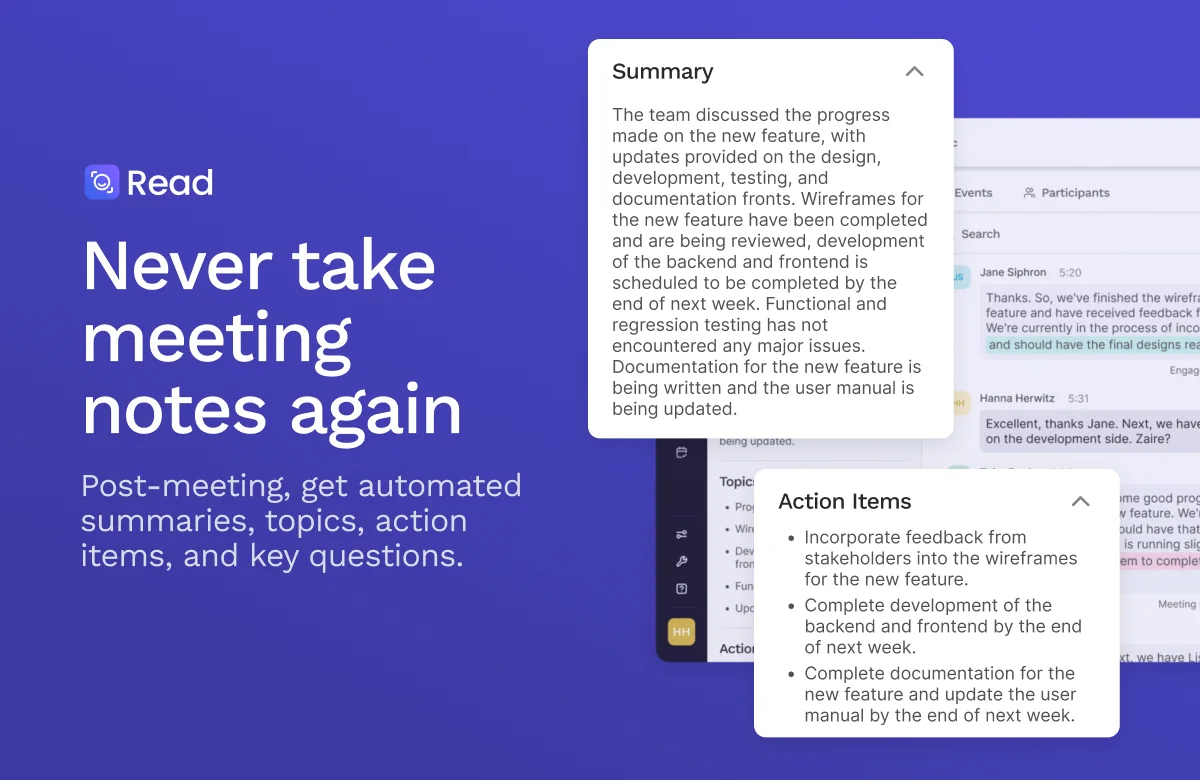
Turn a conversation into a report with topics and follow-ups. Confirm owners and deadlines before copying tasks into a project tracker.
Find the relevant meeting and inspect the underlying transcript when a conclusion matters. Search can also span connected information sources according to the account's permissions.
Review participation and engagement signals as prompts for discussion. They should not be treated as a precise measure of contribution or employee performance.
Use the assistant with supported conferencing services; Google Meet also has a newer botless extension path. Test the actual mode your team will adopt.
Paid tiers add premium integrations and broader workflows. Define which system is authoritative before a generated answer combines meeting notes with external records.
Select one meeting
Configure the join mode
Review the report
Test retrieval and sharing
Choose a low-sensitivity meeting and check host, participant and organization policies for transcription.
Connect the calendar or supported Google Meet extension, and confirm exactly when Read will enter or begin measuring.
Compare the summary and action items with your own notes and the transcript. Separate proposals from approved decisions.
Search for a real decision later, verify the source meeting, and share only with the intended recipients.
Pricing checked on October 7, 2026. See plan details below.
Read AI's current pricing page lists a permanent Free tier at $0 without a credit card, including five meeting transcripts per month, meeting summaries, search, a personalized coach and basic integrations. The comparison lists a one-hour maximum meeting length on Free. That is a real ongoing allowance, but not unlimited meeting capture.
Pro adds unlimited meeting transcripts, priority processing, file-upload credits and premium integrations. Higher enterprise tiers add controls and capabilities such as recording playback or security policies. The published page offers different monthly and annual billing views, and the paid prices have changed compared with older help articles; check the live checkout instead of relying on an old figure. For a small team, the key decision is whether five monthly meetings and the Free duration limit cover the actual workload.
The current plan lists five meeting transcripts each month.
No. The ordinary assistant may join a meeting, while a newer Google Meet extension has a botless option.
Read's privacy page says participants can opt out and meeting data is deleted.
No. Confirm decisions, promises and sensitive details against the transcript before sharing.
No. Treat it as a signal for reflection, not an objective evaluation of contribution.
Use one recurring meeting, compare the report with human notes, and search for a decision afterward.
Explore platforms, inputs and outputs, licensing, and access requirements.
Read AI is a proprietary service. Its ordinary assistant can join meetings as a participant, while a Google Meet extension offers a distinct botless path. Availability depends on platform and setup. Its metrics and coaching are derived signals, not an objective score of meeting contribution. Evaluate accuracy and access control with the exact meeting type you expect to use.
Read says it announces itself, requires host approval and offers participant opt-out. Its privacy page says AI model training is opt-in and report access is role controlled. Before connecting email or messaging sources, review the scope of each permission and the workspace sharing policy. A generated report can contain sensitive personal details even when the original meeting was informal; inspect it before forwarding.
Read AI current plans and limits ↗
Read AI privacy and participant controls ↗
Loading experiences…
Saved tools are private. Approved comments are public; edits return to moderation. Comment counts include approved comments and replies. Each person has one rating. New ratings are automatically approved; withdrawn, unapproved or invalid ratings do not count. Share real experiences and avoid spam, private information or personal attacks.
For moderation appeals or data requests: support@findgoodai.com
Turn interviews, recordings, tickets and surveys into traceable customer insights with projects, channels and AI Chat. The current Free plan offers one project and one channel; Enterprise is custom priced.
Describe a small business tool and build a hosted Taskade Genesis app connected to projects, agents and automations. Its credits pay for AI creation, while existing published apps continue running after the balance is exhausted.
Generate, organize and refine diagrams, documents, slides and other work directly on a shared Miro canvas. Miro AI is useful when a team needs to turn messy material into a reviewable decision, with credit costs that vary by action.
Bring a real task and see how it fits the way you work.


User experiences