
TypeSafe AI introduced Jev in early access on September 15, 2026. Its distinctive interface is a set of bounded decisions: supply a state, define questions and receive typed answers. The launch post introduces the System One direction. Here is a closer look at the figures, a first integration and the product decisions this interface makes possible.

Why judgment can be a separate model interface
Many software steps need one bounded answer. A support system chooses a category; a search system ranks a passage; a tool directory distinguishes video creation from image editing. Asking a chatbot for an explanation and then extracting JSON adds parsing and checking around that answer. A decision interface lets the application read a field directly and ask several independent questions about the same state.
The product implication is particularly interesting. Making a filter smarter need not turn it into a conversational interface. A targeted classification followed by one clarification can be sufficient on a page with a specific purpose. The existing search and filters can stay familiar, while the model changes one small decision. Those changes are easier to evaluate through user completion and irrelevant clicks.
The cost chart: useful evidence, bounded scope
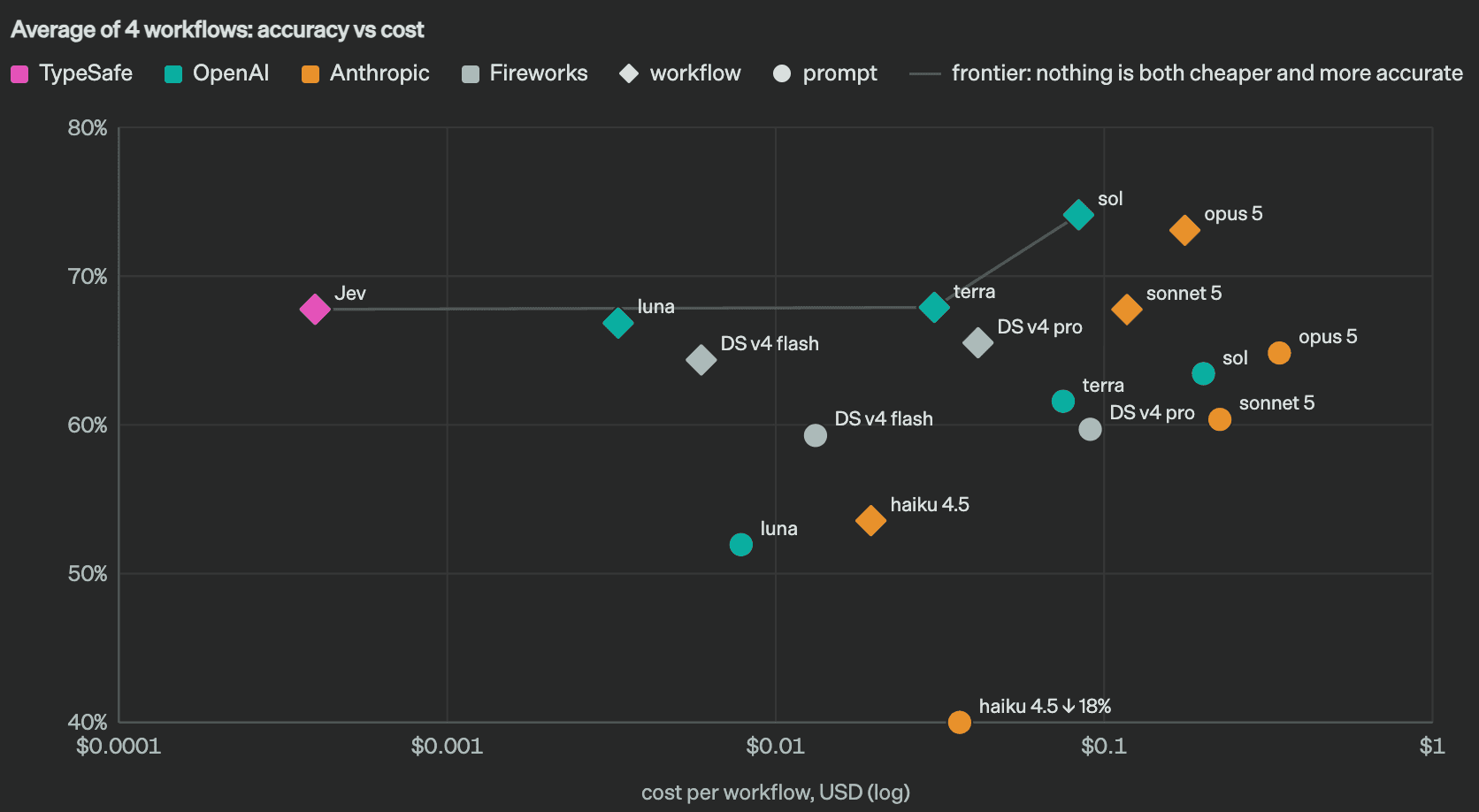
The horizontal axis is dollar cost per workflow on a logarithmic scale. The vertical axis averages performance over four workflows. Compare diamonds with diamonds for decomposed workflows, and circles with circles for single prompts. Left and up are favorable, but horizontal distance is not a linear dollar difference. The evaluation methodology uses stronger models’ consensus as reference labels on four fixed workflows. These scores are not universal ground-truth accuracy.
Translate the chart into questions about your application: daily volume, text length, rework after an error and whether a slow result interrupts the user. If manual rework is expensive, better classification may matter more than further token savings. Read-only recommendations can tolerate more uncertainty if the visitor chooses the final result. Include review and failed-request retries when comparing actual workflow costs.
The workflow chart: questions and actions have different jobs
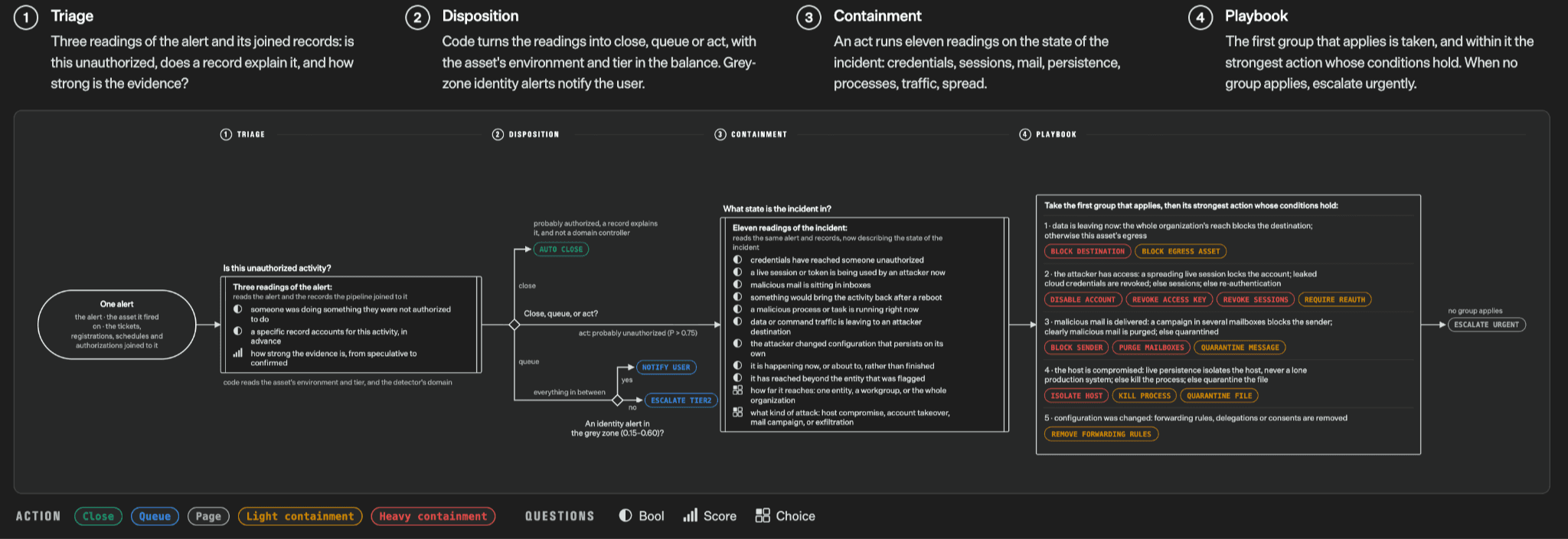
The security-alert example separates triage, disposition, containment and playbook execution. Question boxes judge the current state; action boxes apply rules. The evaluation cases also cover agent-run observation, invoice processing and customer service. The decomposition is as useful as the model comparison.
A directory could validate URLs and required fields in code, classify content by use case, then judge candidate relevance after retrieval. Ordinary ranking and UI components present the result. Separating these stages distinguishes invalid data from a wrong semantic judgment or an unsuitable ranking policy. That distinction makes debugging more productive than repeatedly replacing the model with a larger one.
Zero format errors do not mean zero judgment errors

This figure concerns structured-output and tool-call formatting. The launch post explains that Jev’s zero comes from constrained output structure, rather than proving every decision correct. A Choice can always produce a valid category and still choose the wrong one. Read the launch explanation alongside the known limitations.
Valid-looking mistakes can be harder to notice. An image request assigned to video may have every required field and produce no backend error, while giving the visitor irrelevant results. Track schema validity separately from semantic correctness using labels or product feedback. Separate metrics show precisely what the interface solved and what still needs better criteria or application rules.
Try a decision in the Playground first
Open the TypeSafe Playground, sign in and provide a request such as “I have a product photo and need its background removed for my shop.” Add a Choice asking whether image, video, coding or manual fits the work. Describe the options instead of relying only on short labels. Inspect both the selected option and the probability distribution.
Then try an underspecified message such as “I want product showcase content.” Follow it with a mixed request: “Write a script to process my product photos.” If classification should follow the deliverable rather than isolated keywords, state that in the instruction. Include requests outside the list and inspect whether manual catches them. The aim is to validate question definitions, rather than to maximize the confidence display.
Python: three small questions in one request
Follow the Python SDK guide, install typesafe-sdk and set TYPESAFE_API_KEY on the server. The example below uses the documented SDK interface with an original directory scenario. It asks for a handler, description completeness and whether an existing image is needed. It contains no claimed live model answers, and publishing this example did not involve a paid API call.
python -m pip install typesafe-sdkfrom typesafe_sdk import Choice, Noul, Score, TypeSafeClient
state = {
"message": "I need an AI tool to remove a photo background for a shop listing.",
"available_handlers": ["image", "video", "coding", "manual"],
}
with TypeSafeClient() as client:
response = client.system_one(
model="jev-1.13.0",
state=state,
questions={
"handler": Choice(
instructions="Which handler fits the requested work?",
criteria={
"image": "Create or edit a still image, including removing a background",
"video": "Create, edit, or understand a moving video",
"coding": "Write or debug software",
"manual": "The request is unclear or none of these handlers fits",
},
),
"detail": Score(
instructions="How clearly is the desired outcome described?",
criteria=[
"No concrete task is stated",
"A task is stated but the desired result is unclear",
"The task and intended use are explicitly stated",
],
),
"needs_existing_image": Noul(
instructions="Does this request require editing an existing image?"
),
},
)
handler = response.answers["handler"]
print(response.model)
print(handler.choice, handler.probabilities, handler.confidence)
print(response.answers["detail"].score)
print(response.answers["needs_existing_image"].noul)
# Illustrative starting policy, to be tuned against labeled examples.
if handler.choice == "manual" or handler.confidence < 0.8:
print("Ask the user to clarify")
else:
print("Show tools in category:", handler.choice)First inspect response.model. Then inspect handler.choice, probabilities and confidence. The detail score is a position on the descriptive levels; the Noul is the probability that its proposition is true. The Score and Noul references explain their meanings. A Noul of 0.8 is not an “80-point image-processing difficulty” rating.
The 0.8 branch in this example is an illustrative policy, not a universal threshold. A directory can ask for clarification on uncertain requests; an internal queue may send them for review. Track avoided steps, wrong routes and reversals instead of lowering the threshold simply to increase the reported automation share.
Batch questions that affect the product
When several judgments use the same input, place them in one questions map; the fan-out pattern covers this design. For a tool directory, category, existing-material requirements and coding requirements can be separate questions. Extra questions still add input tokens.
Start from the UI behavior you need and work backward to the fields. Whether a visitor has source material changes the recommended entry point; willingness to code changes candidate tools. A question about commercial plans is unnecessary at this stage if it changes nothing in the current results. Giving each question a specific purpose keeps the request focused and makes later debugging understandable.
Re-ranking: move a relevant answer forward
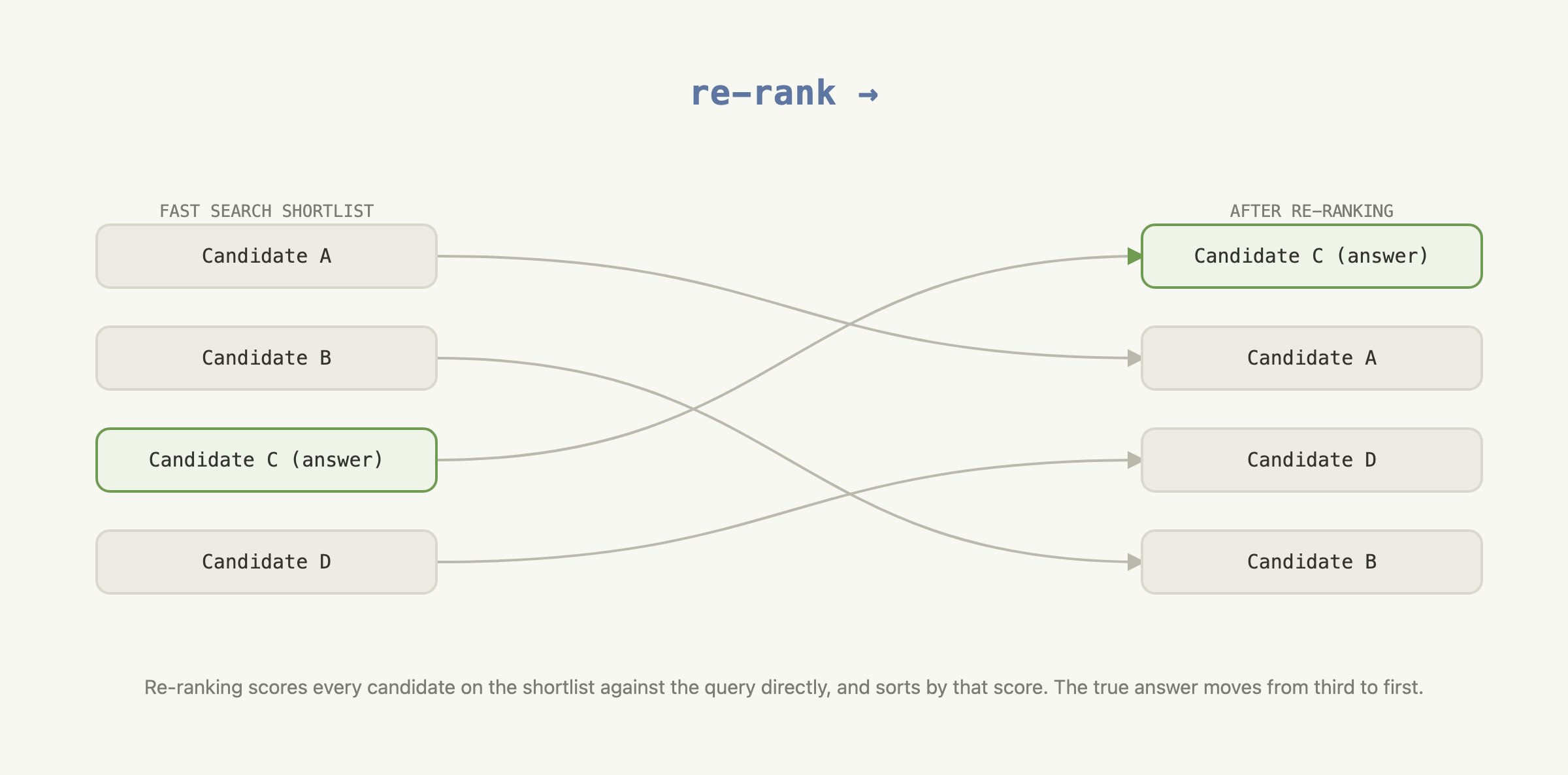
Re-ranking takes already retrieved candidates and changes their order. The relevant passage in this diagram rises from the middle of the shortlist. A directory can still retrieve candidates through keywords, categories and embeddings, then judge whether each actually solves the visitor’s request. The official re-ranking cookbook walks through this two-stage structure.
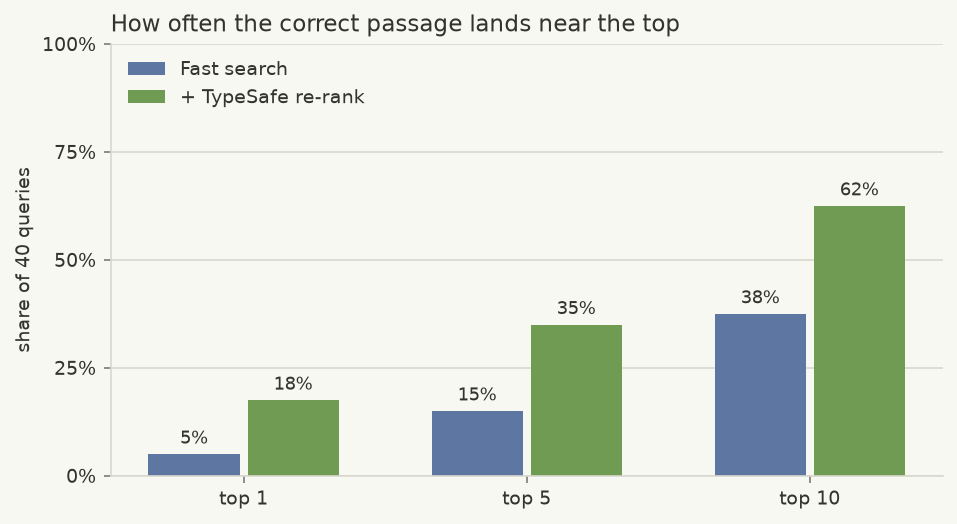
The example uses 40 CLERC queries: top-1 accuracy rises from 5% to 18%, and top-10 from 38% to 62%. These are the cookbook’s recorded Jev 1.12 results, not our independent test of the current 1.13 model. A small example cannot guarantee the same improvement elsewhere. Check that retrieval includes the correct answer first: re-ranking cannot recover a document omitted from the candidate set.
For a request about batch background removal, a generic “AI images” entry offering only text-to-image generation should not lead the results. A directory could judge whether candidate fields support existing images, background removal and batch processing. It would still display the original product links and evidence; the model changes their order. Visitors and maintainers can then examine why a particular tool ranked well.
Citation checks and coding-agent skills
The citation-checking cookbook first locates a quote with ordinary string matching, then judges whether its context supports the claim. This is useful for editorial software: a nonexistent quote needs no model, and a real quote may still be used to support the wrong conclusion. Pair claims with source passages and review ambiguous relationships.
The official TypeSafe skill supplies API context to an agent writing an integration. The coding-agent guide explains that Jev cannot replace the generative model powering a coding agent. The relationship is practical: a coding agent writes your application; that application calls Jev for bounded judgments. Installing an SDK or skill does not install model weights locally.
What I would validate before expanding use
Prepare real requests with expected categories, and hold back a subset while revising questions. Save the text, returned model version, question version, probabilities and eventual action. Compare changes on held-out cases rather than only fixing examples you have already inspected. Include empty requests, mixed intentions, typos, specialist Chinese terms and text deliberately asking for a wrong classification.
Keep an understandable fallback: clarify an ambiguous category, report a lack of reliable candidates, or use existing search after an API timeout. Expand only when the layer helps visitors reach a useful result. If it increases interruptions or misroutes common needs, revise the question and supplied fields first. Its value belongs in relevance, completion and latency measurements.
Continue with the FindGoodAI Jev model entry and the ToolAI Jev topic.