InVideo
Video creationCreate and revise videos with AI agents while retaining an editable multitrack timeline. InVideo’s current editor combines footage search, storyboard planning, generated assets and real-time collaboration.
A free, open-source subtitle editor combining precise timing tools with optional AI transcription and proofreading. The current cross-platform project supports local model routes, making it useful for creators who want editable subtitles rather than only burned-in captions.
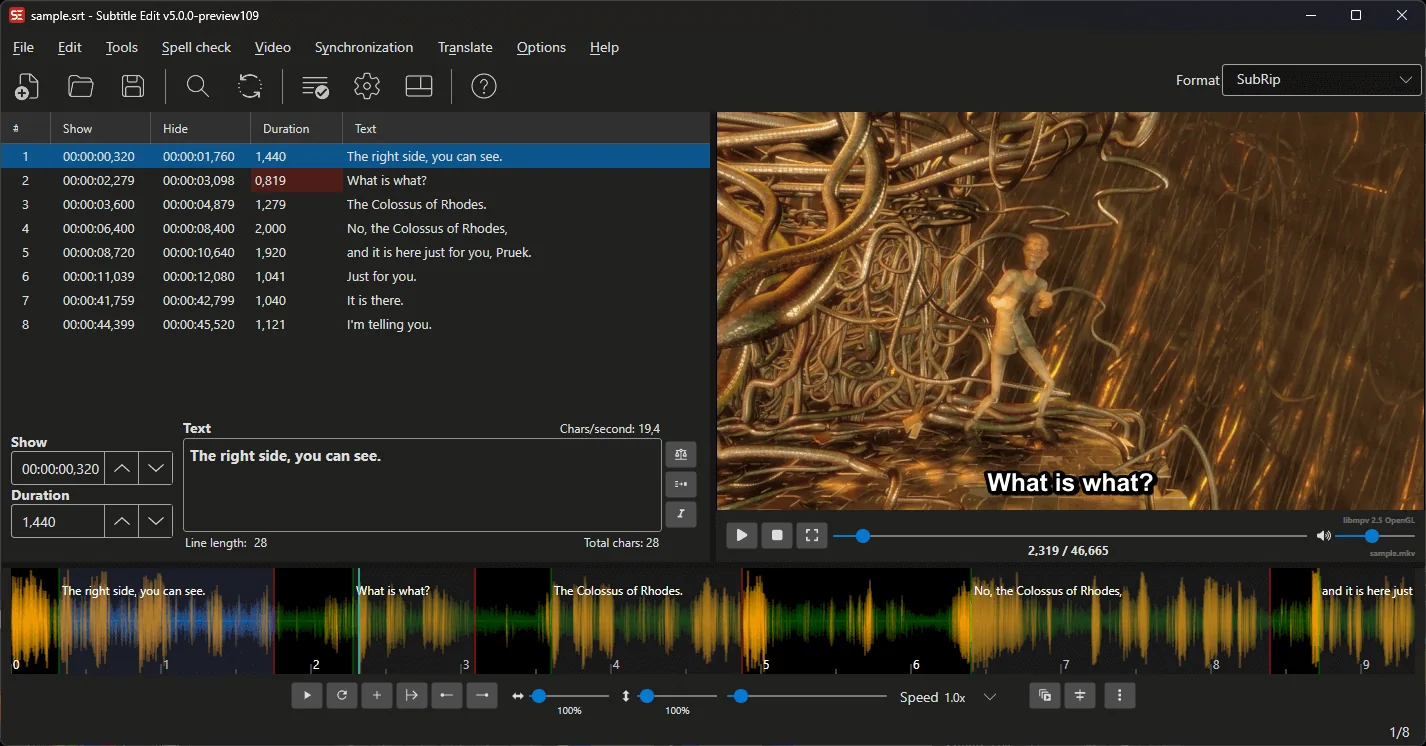
Subtitle Edit is a detailed editor for creating, correcting and converting video subtitles. Its AI features help produce or review text, while the timeline, waveform and subtitle grid support the manual decisions that make captions readable. This combination is useful when automatic transcription gets most of the words right but the finished video still needs careful timing and language work.
The current documentation covers the cross-platform Subtitle Edit 5 project. Older tutorials may describe a Windows-only interface or different engine menus. Use the current guide for the installed version, and treat an AI transcript as the beginning of the subtitle process rather than the final deliverable.
Caption a tutorial
Prepare bilingual subtitles
Repair an existing subtitle file
Improve accessible media
Official product image. Click to inspect the details.

Prepare the media
Generate a short draft
Edit text and timing together
Review the delivered file
Example prompt or task: Review these subtitle lines for spelling and punctuation while preserving names, technical commands and the speaker’s meaning. Show proposed changes separately; do not silently rewrite informal speech into a different claim.
This is an editorial starting workflow, not a measured performance result.
Subtitle Edit is distributed as MIT-licensed software, with core editing available locally without a subscription. Supported local transcription and language-model routes use the user's own compute and require the relevant model and engine files.
Optional online transcription, translation or language-model endpoints can charge according to their providers' plans. A free editor does not include unlimited cloud minutes. Compare a local sample with the intended delivery requirements before deciding whether a paid service is necessary.
Yes. It is an open-source application under the MIT license.
Yes. Supported local recognition engines are documented, with hardware and platform differences.
No. Optional online providers have their own plans and fees.
The documented workflow lets users inspect and choose proposed corrections before applying them.
No. Current project documentation includes Windows, macOS and Linux routes.
Yes. Subtitle files remain a core workflow, separate from burning captions into video.
No. Timing, reading speed and playback compatibility also need review.
Explore platforms, inputs and outputs, licensing, and access requirements.
The current project documents Windows, macOS and Linux builds, with platform-specific requirements and media dependencies. Some engine choices and acceleration options differ across platforms, so consult the current release and engine table rather than assuming every menu option is identical.
Subtitle production involves text, timing and playback behavior. A transcript can be linguistically correct while the captions are too fast to read, and a correctly timed file can still lose formatting in another player. Test the exported format in the environment where viewers will actually see it.
The project describes its core editing and playback functions as offline. Optional online services send the material needed for the selected request to their provider, so confirm the engine before processing private recordings or unpublished interviews.
Obtain the necessary permission for recordings and translations, and keep the editable source with the final export. Avoid letting automatic language correction alter a quote's meaning or remove accessibility information that a viewer relies on.
Reviewed October 3, 2026. Product facts come from the official sources below. Suggested projects, prompts and review methods are FindGoodAI editorial guidance, not measured performance results.
Loading experiences…
Saved tools are private. Approved comments are public; edits return to moderation. Comment counts include approved comments and replies. Each person has one rating. New ratings are automatically approved; withdrawn, unapproved or invalid ratings do not count. Share real experiences and avoid spam, private information or personal attacks.
For moderation appeals or data requests: support@findgoodai.com
Bring a real task and see how it fits the way you work.
User experiences