Murf
Audio & musicCreate voiceovers from scripts and refine delivery with voice, pronunciation and pacing controls. Murf Studio serves content production, while Murf’s API, dubbing and conversational-agent offerings address different workflows.
A free local audio separation application for extracting vocals, instrumentals and model-dependent stems, with several processing methods and export choices.
Ultimate Vocal Remover, often called UVR, applies source-separation models to an existing audio mix. A common task is producing a vocal track and an instrumental counterpart; supported model families can offer other stem arrangements. It is an audio-processing workspace rather than a song generator, transcription service or automatic music-rights clearance tool.
Separation estimates which sounds belong together. Reverb, distorted instruments, overlapping frequencies and dense arrangements can leave traces in the wrong stem. The useful question is whether an output works for your intended task, such as practice or editing, not whether the interface reports that processing finished successfully.
Create a practice accompaniment
Study a bass or drum part
Prepare a remix draft
Compare separation models
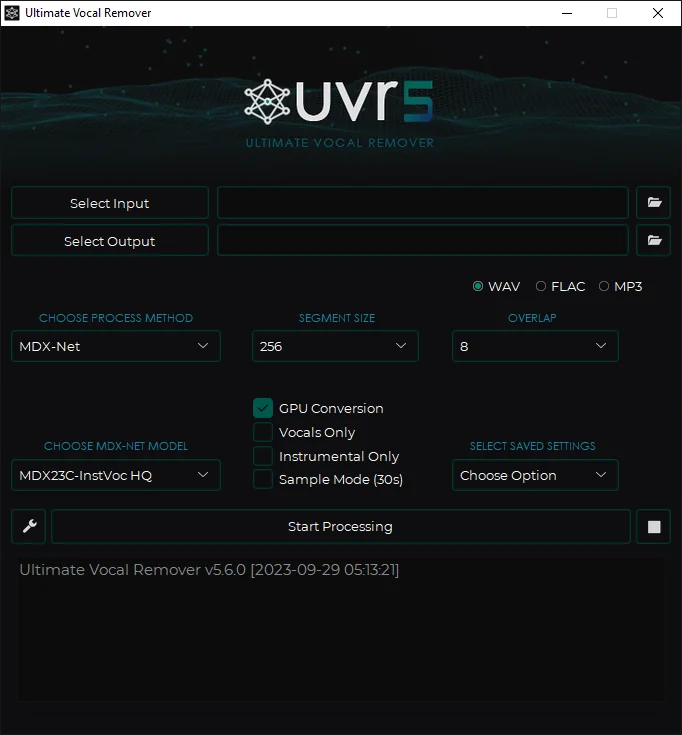
Official product image. Click to inspect the details.

Install from the official project
Select a representative input
Choose the method and model
Listen and export deliberately
Example prompt or task: Separate a short licensed music excerpt into vocals and accompaniment. Compare the vocal endings and drum hits with the original, then keep the model that gives the most useful balance for rehearsal.
This is a listening task, not a text prompt entered into UVR. Different songs can favor different models, so one successful sample does not establish universal separation quality.
No required per-song credit purchase for the local application. Source recording rights are independent of software access.
The official project describes UVR as free and open source, with MIT-licensed GUI code. The local application does not require a per-song subscription or credit purchase. Compute time, electricity and storage are supplied by your own machine.
Software access and rights to the recording are separate. A separated vocal or instrumental does not become unrestricted simply because the processing tool is free. Optional hosted services using similar models may charge independently and should not be confused with the official local application.
The official local project is free and describes its GUI code as MIT-licensed. Your hardware and any optional hosted service costs are separate.
No. Some voice, reverb or instrument leakage may remain, and aggressive separation can remove useful musical detail.
No. It estimates sources from a mixed recording. The outputs are not guaranteed to match the original recording-session tracks.
Supported multi-stem models such as Demucs four-stem options can do this. Choose the relevant model rather than expecting every vocal-removal mode to produce the same stems.
The project relies on FFmpeg for non-WAV audio processing. Check installation and the error log before changing models repeatedly.
The project recommends reducing segment or window sizes where applicable. Also check model requirements and other applications using the device.
The software does not grant rights to source recordings. Confirm permission for the intended use independently of the separation process.
Explore platforms, inputs and outputs, licensing, and access requirements.
Official packages and instructions cover Windows, macOS and Linux. The documented application is 64-bit; Windows guidance targets Windows 10 or newer, and the Mac bundle targets Big Sur or newer. Linux installation is more technical and uses an isolated Python environment with the required audio components.
Model processing is computationally intensive. Check the current model and platform requirements instead of applying one GPU recommendation to every backend. If memory allocation fails, the project suggests smaller segment or window settings. If a non-WAV input fails, confirm the FFmpeg dependency before assuming the audio file itself is unusable.
Local separation can keep recordings on your computer. Downloading models is a separate network step, and moving the workflow to a hosted service changes where the audio is handled.
Keep originals, label derived stems clearly and store project files consistently. When sharing troubleshooting logs, inspect local paths and filenames first. A clean folder structure also makes it easier to distinguish model attempts from audio approved for use.
Reviewed October 3, 2026. Product facts come from the official sources below. Suggested projects, prompts and review methods are FindGoodAI editorial guidance, not measured performance results.
Loading experiences…
Saved tools are private. Approved comments are public; edits return to moderation. Comment counts include approved comments and replies. Each person has one rating. New ratings are automatically approved; withdrawn, unapproved or invalid ratings do not count. Share real experiences and avoid spam, private information or personal attacks.
For moderation appeals or data requests: support@findgoodai.com
Bring a real task and see how it fits the way you work.
User experiences