InVideo
Video creationCreate and revise videos with AI agents while retaining an editable multitrack timeline. InVideo’s current editor combines footage search, storyboard planning, generated assets and real-time collaboration.
A free local video-enhancement application for AI upscaling and frame interpolation, with a Windows task-queue interface and Linux deployment options.
Video2X brings video super-resolution and frame interpolation into a local processing workflow. Upscaling changes spatial resolution; interpolation creates intermediate frames to change motion cadence. These are different operations, and a clip may need only one. The application is useful when you want to experiment with enhancement without uploading every video to a metered cloud service.
More pixels or frames do not guarantee a better image. A model may invent texture, smooth away intentional grain or create motion artifacts around cuts and fast-moving objects. Preserve the original and judge the result at the intended viewing size. The goal is a useful presentation copy, not a claim that missing visual evidence has been recovered.
Improve an animation presentation copy
Prepare an old personal video
Compare motion treatment
Process a consistent collection
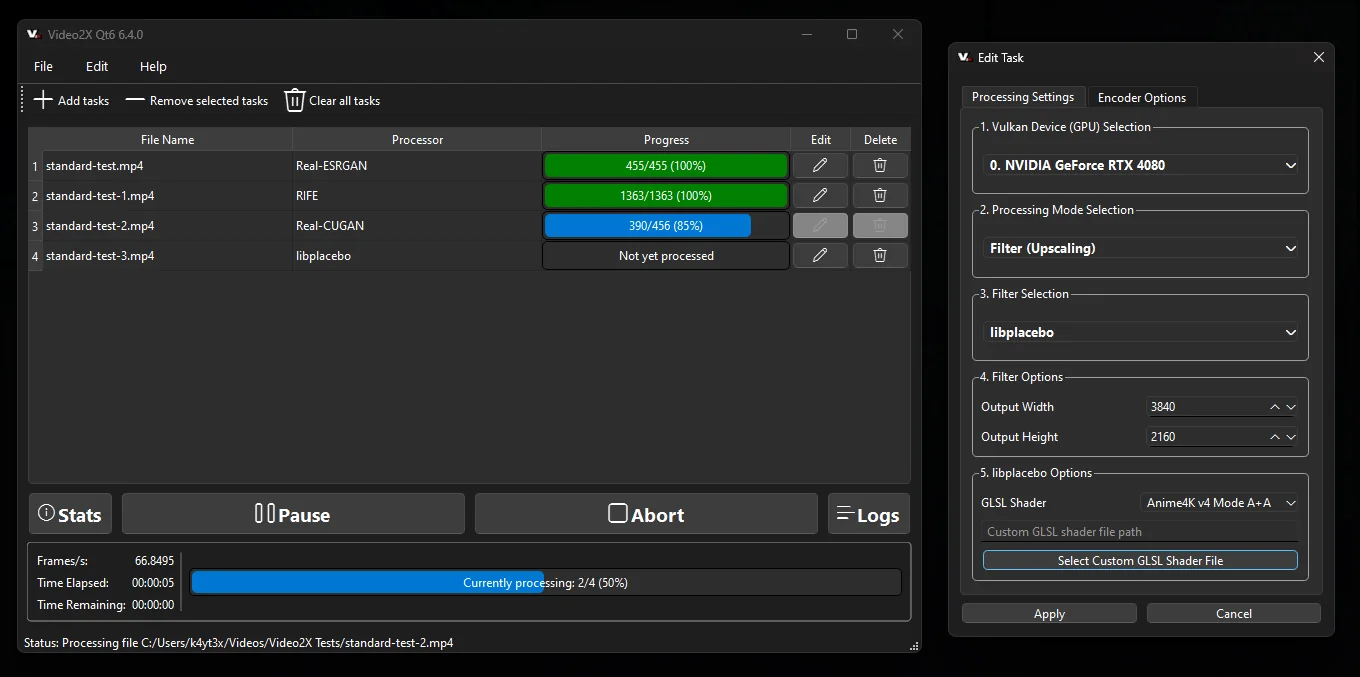
Official product image. Click to inspect the details.

Check hardware and install
Choose one short representative clip
Select the required operation
Inspect the complete short result
Example prompt or task: Process a ten-second clip containing a camera move and a scene change. Compare the source and result at normal playback speed, then inspect edges, faces and the cut frame by frame before converting the full video.
This is an editorial evaluation procedure rather than a text-to-video prompt. The screenshot’s example processing speed is not a benchmark for your computer.
There is no required local per-minute subscription. Hardware time, storage and optional cloud compute are separate.
Video2X is distributed under AGPLv3 and provides a free local software route. It does not require a cloud minute allowance for local processing, but consumes GPU time, storage and electricity. A long clip at a larger output resolution can be a substantial job.
Optional remote or notebook-based compute is a separate resource and may require payment. The local free route should not be confused with guaranteed free access to a capable cloud GPU. Dependencies and model components also have their own notices in the repository.
The AGPLv3 local application is free to obtain and use under its license. Hardware, electricity, storage and optional cloud services are separate.
Not automatically. Spatial upscaling and temporal interpolation are separate modes with different purposes; choose the operation the clip needs.
It predicts plausible detail. A sharper-looking frame is not proof that small text, faces or textures match the original scene.
No. The documentation lists AVX2 CPU and Vulkan GPU requirements. Check the actual device and driver rather than relying on operating-system compatibility alone.
No. Added frames can change its intended timing and introduce artifacts. Compare moving scenes and cuts before choosing the result.
No. The official illustration demonstrates the interface. Actual speed depends on hardware, processing mode, input and output settings.
It reveals artifacts, encoding issues and resource demand before a lengthy conversion. A successful start is not the same as an acceptable final video.
Explore platforms, inputs and outputs, licensing, and access requirements.
The documented precompiled route requires an AVX2-capable processor and Vulkan-compatible graphics hardware. Current project materials describe Windows and Linux support; do not assume an official native macOS build merely because some underlying libraries are cross-platform.
A video includes more than its visible resolution. Before delivery, confirm playback, duration, frame cadence and the audio track in the output. Keep source media and use separate filenames for alternatives so an enhancement experiment remains reversible.
The local workflow processes media on your own machine. Moving the job to a remote server or cloud notebook changes where the video is handled, so choose that route deliberately.
Keep rights to the source video and the software license separate. Preserve an original copy and label materially enhanced output when the distinction matters; generated detail should not be presented as newly recovered evidence.
Reviewed October 3, 2026. Product facts come from the official sources below. Suggested projects, prompts and review methods are FindGoodAI editorial guidance, not measured performance results.
Loading experiences…
Saved tools are private. Approved comments are public; edits return to moderation. Comment counts include approved comments and replies. Each person has one rating. New ratings are automatically approved; withdrawn, unapproved or invalid ratings do not count. Share real experiences and avoid spam, private information or personal attacks.
For moderation appeals or data requests: support@findgoodai.com
Bring a real task and see how it fits the way you work.
User experiences