
Sources & references
Kuaishou: Kling 3.0 capabilities ↗
Kuaishou: Kling O1 generation and editing ↗
Kuaishou: audiovisual generation ↗
Create and revise video shots from prompts and references, with image, storyboard and audiovisual modes in a hosted workspace.
Kling AI is Kuaishou’s hosted creative service for generating and editing visual material. It is useful for testing a shot, animating an image or exploring a product-video concept. Treat the generated clip as production material to inspect and edit. A convincing preview does not by itself establish that a sequence is ready for a client or publication.
Prototype an advertising shot
Animate a reference image
Explore a storyboard concept
Official product image. Click to inspect the details.
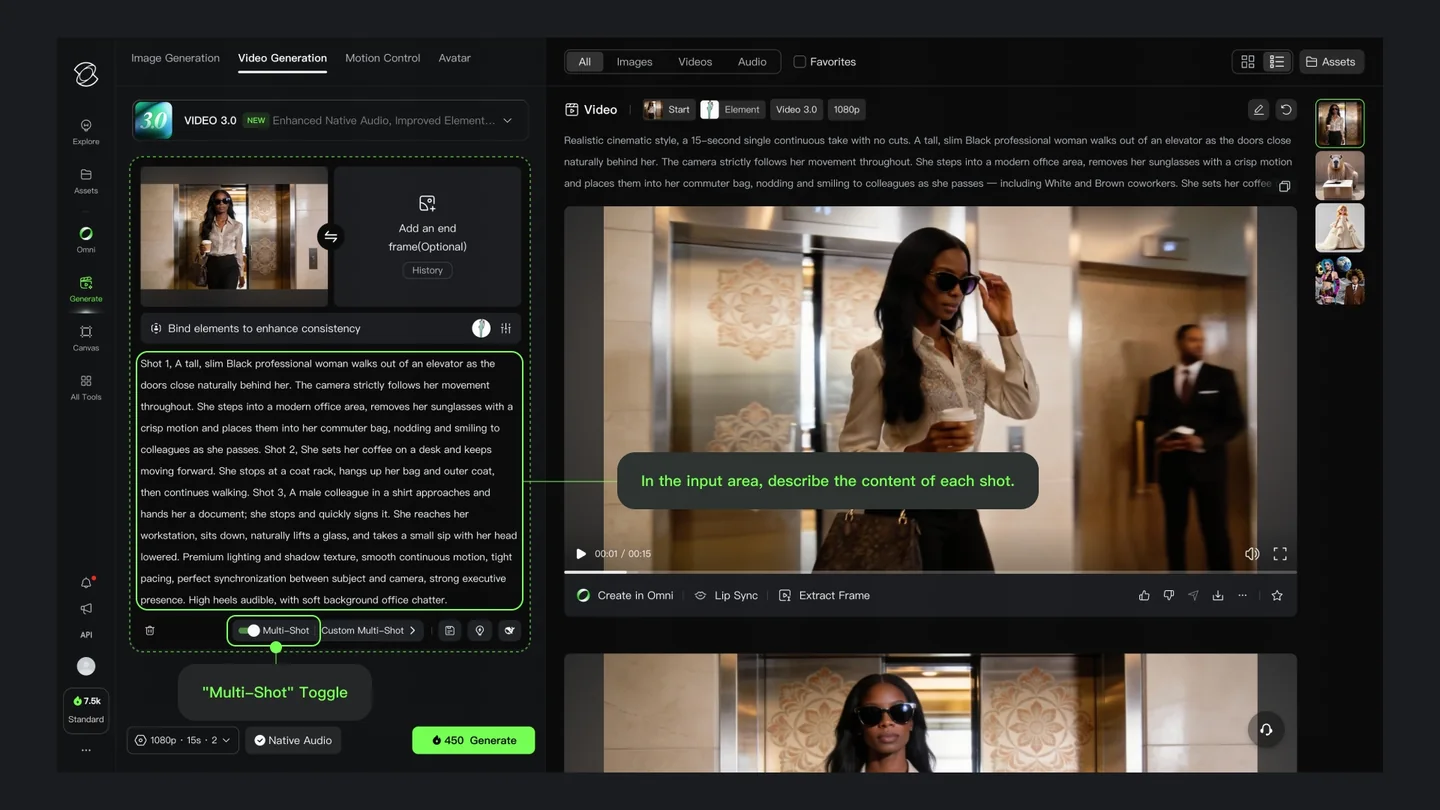
Write one shot card
Choose an available mode and check its cost
Review the full clip before editing or sharing
The official iOS listing is free to download and offers subscriptions and credit purchases. This does not guarantee free unlimited generation. Check your account’s membership and creation screens for current allowances, expiry, watermark rules and charges for the chosen mode. App-store, web and regional offers may differ; this listing does not present one universal price.
The privacy policy describes account-based access and says some browsing may be available without registration. Expect to sign in to use the creative workspace and inspect your own balance before submitting generation tasks.
Plan individual shots and assemble them. A model’s advertised clip duration is not a promise of a finished film with consistent storytelling. Use a short test to verify the behavior of the mode available in your account.
No such guarantee is assumed here. Inspect facial details, clothing, labels and proportions through the entire output, especially when movement or camera angle changes. Save the reference and compare the result side by side.
Use the help entry inside the official service; the developer’s app listing also provides support@klingai.com. Retain the task identifier, generation settings and purchase receipt when reporting an issue. Do not send unnecessary private source material.
Explore platforms, inputs and outputs, licensing, and access requirements.
Use the browser service or an officially linked mobile app; generation is associated with an account. Depending on the selected model, inputs can include prompts, pictures, reference subjects and video. Output may be an image, a video or an audiovisual clip. Duration, resolution and editing controls are mode-dependent. This entry describes the hosted product, not a downloadable open-source model.
Kling’s privacy policy says uploaded and generated user content is stored and processed. Check the version applicable to your service and region before supplying confidential footage. Use images, voices and recordings you are entitled to use, review sharing settings and keep a local copy of original assets. A generated result does not remove the need to consider third-party rights.
Checked on October 3, 2026.
Kuaishou: Kling 3.0 capabilities ↗
Kuaishou: Kling O1 generation and editing ↗
Kuaishou: audiovisual generation ↗
Loading experiences…
Saved tools are private. Approved comments are public; edits return to moderation. Comment counts include approved comments and replies. Each person has one rating. New ratings are automatically approved; withdrawn, unapproved or invalid ratings do not count. Share real experiences and avoid spam, private information or personal attacks.
For moderation appeals or data requests: support@findgoodai.com
Bring a real task and see how it fits the way you work.
User experiences